Join our iPhone, iPod touch, iPad and Apple TV community today! Register Here | Login

App Store Bugs: App Updates Downloading Over and Over and Over Again

By , Sunday, Dec 13, 2009 at 9:39 am
118

App Store repeat download bug

There appears to be a bug on Apple's iTunes App Store that's causing apps to show up as having updates available even after they've been downloaded over and over again. We've gotten quiet a few readers writing in about it now, and there's the usual huge thread up on Apple's discussion boards.

Here's what it looks like -- the App Store on your iPhone, iPod touch, or iTunes on your PC tells you you have an update for an app. You tap or click to update, enter your iTunes password, and the app downloads -- but it still shows the app in the update list. You tap or click update again, it downloads again, but again still shows the app in the update list. Or worse (as happened to me a few weeks ago), iTunes pops up a Checking for Available Downloads dialog then proceeds to try, over and over again, for days, to download 1.3GB of turn-by-turn navigation app update.

Of course, the problem seems intermittent and random -- different users experiencing the it with different apps at different times. It's also unclear if everyone is having the same problem. For some, Apple's iTunes app servers may not be properly providing the updated app file and so the new version is not successfully getting installed on the device. For others, the file might be getting installed but iTunes doesn't recognize or register it so keeps offering the same update.

Possible solutions include rebooting your iPhone or restarting iTunes on your PC, or just waiting and trying again in a day or so. On rare occasions it looks like it takes a few days to sort itself out, which for small apps isn't a show-stopper for those 1GB apps (or large games), it can be untenable, especially for people in countries with tight data caps on their home internet.

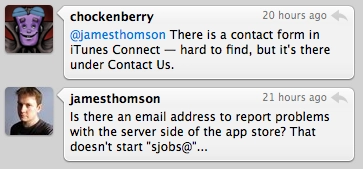
Some developers are hearing enough feedback on this that they're contacting Apple in hopes of some server-side fixing (see image of Twitter conversation above). We're hoping for some as well.

If you're having this problem, let us know in the comments, and let us know what (if anything) is fixing it for you.


Rene Ritchie

Editor-in-Chief of iMore, Executive Producer at Mobile Nations, co-host of Iterate and ZEN and TECH, cook, grappler, photon wrangler.

More Posts - Website

 TwitterFacebookGoogle Plus

← Previously

So in 2007 if Apple Slapped a Logo on an HTC Excalibur, Would That Have Been "the iPhone"?

Next up →

Quick App: ESPN ScoreCenter with Push Notifications for iPhone
  1. Georgie de curioso says:

    Happens to me at least once a week.

  2. I've had this problem with a couple of apps for some time now (several weeks). I have tried rebooting the phone, restarting iTunes, deleting the app from both the phone and the computer, but all to no avail.

    In iTunes on the Mac, the apps do not show up as having pending updates.

  3. Blackfish says:

    I've been complaining about this for weeks. It comes and goes. I find updating apps individually sometimes clears it (rather than 'update all'). Glad it's not just me :)

  4. digitalrio says:

    Same thing here with several apparently. In the ending gave upland deleted some. At times it fixes itself if I use iTunes for the updates.

  5. Danny Rodri says:

    Definitely happening to me a lot lately.

  6. Michael says:

    This is happening laty with BillMinder (with Push). Everytime I go to download it, it updates, but then shows an update is available.

  7. Mike says:

    Seems to fix itself after a few days. Sometimes a few hours. I update the app then wait a day and update it again. So far that seems to be working for me. Glad I'm not the only one having this problem. It's annoying. I'm one of those guys that doesn't like to have unresolved icon badges on my screen. Drives me nuts for some reason.

  8. fastlane says:

    Umm... this has been going on since early summer... :roll:

  9. Drake says:

    This has been happening to me a lot lately. Glad I am not the only one.

  10. pierluigi says:

    Happened a couple of weeks ago, I tried login/logout several times unsuccesfully. Then it fixed itself.

  11. Tyler says:

    Since last week, I haven't been able to update ANY of my apps. I've tried everything from reinstalling iTunes, restarting/restoring my iPod, deleting/reinstalling and reinstalling the apps. It's a huge problem for me!

  12. Bill says:

    I had this issue with my pc I rebooted my computer and iPhone then allowed the updates again and it cleared up.

  13. Dave says:

    Yes with I'm

  14. Brit says:

    Initially I thought my Jailbroken iPhone was playing ticks on me, I restored and the same prob kept happening!!! I think it's a matter if patience and wait few hours or day(s). Another solution that has worked especially when couple of updates come along together, is updating one by one (your most important needed Apps I'll suggest first).

    Hope a solution happens soon!

  15. RJ says:

    I just found this problem on my 3GS a few minutes ago. Does it affect user who have jailbroken devices & stock devices also?

  16. Jeffrey Hagedon says:

    I've experienced this often in recent days. "Time" is a culprit in particular.

  17. Zak Saber says:

    This is happening to me all the time. I did log out of iTunes on my mac and iPhone and the problem went away but when a had a new update psh it came back. and I'm not going to keep on signing out every damn time. I did fight the updates though I kept on updating and updating and finally I had no new updates.

  18. Sting7k says:

    I currently have 21 updates, they dl but it gets the old version or doesn't actually downlaod at all and just looks like it does. Another issue, iTunes refuses to remember my password for the past 2 months at least. So much for just works....

  19. Loner says:

    Happens every time an app comes up to update. I have rest both my iPhone and Mac and still nothing.

  20. USMC says:

    Reboot after installing the update. That's the fix. Happens to me all the time.

  21. Sting7k says:

    Oh yea nothing fixes it, I even restored my iPhone as new last week. This problem has been going on for weeks now.

  22. chele7259 says:

    I thought it was me! it's been happening for a while and turning off the ipone doesn't help. Neither does shutting down iTunes. It goes away when it wants to.

  23. Freiteez says:

    Started happening to me recently. If you wait a day or two and update again it works perfectly fine.

  24. HungWell says:

    This isn't anything new for me. Been going on for many weeks/months.

  25. anon says:

    Sure bet AT&T loves all the data being used.

  26. Yobad says:

    It's happened to me alot over the last few weeks. It seems to be different apps on different days. The other day I had updates for eBay, quick mark, and stick wars and all of them downloaded and installed. However, stick wars kept saying I had an update over and over untill the next day.

  27. D Kay says:

    I have that! But now my iPhone won't connect to iTunes store!!! It hasn't fir over 2 weeks. I have tried everything: rebooted, reset network settings, changed password, etc, etc! I don't know what to do now! I have 12 apps needing an update...

  28. Scott says:

    This happens to me every couple if months or so... A bit more recently. It is not a jailbreak thing as I am not and will not jailbreak. Typically it clears itself up in a couple of days. It helps occassionally (not always) to delete the offending app.

    Scott

  29. Pinny says:

    I've had this for months. It always goes away on it's own after 3 or 4 days.

  30. Elric says:

    Mine seems to have been fixed, hasn't happened in over a week now

  31. Me says:

    Why, WHY is Apple always the last to know these things????

  32. Mobster says:

    Same problem download over and over and over

  33. Ridlaw says:

    I've been getting this for a while on and off.. it wasn't a big deal until Navigon kept coming up!

  34. Wesley says:

    Happened to me only once with Tweetie. I had to upgrade at least 3 times to remove the upgrade from the App Store icon.

  35. sting7k says:

    Off topic, @rene (or anyone who knows); what twitter client is that in the caption pic?

  36. Lance says:

    I'm having that exact problem and Apple told me nothing helpful in trying to fix it.

  37. Wil says:

    Waiting is he only thing that has worked for me. One thing I did notice two days ago and yesterday, was that all the apps that wouldn't load were dated in the future. My local date was December 11th and the app update said December 12th. So I waited till they matched, then the updates worked.

  38. st3ph3n says:

    I don't update apps unless they've been in my list for at least 12 hours now. That way there's a good chance I get the nee version and not the old.

  39. iGuido85 says:

    I have this problem when I download my updates on my iPhone. Since yesterday the same problems on my mac.

  40. MFox says:

    It comes and goes. Absolutely NOTHING I try (rebooting, re-authorizing, you name it) seems to make one bit of a difference, so basically I've given up and don't check for updates on the Mac anymore. If there are updates of the applications I use, I download them directly from the iPhone. Sucks.

  41. Tony says:

    I'm having the exact same problem. It looks like the updates are taking some extra time to get on Apple's servers. This may possibly be due to more activity on the App store. If you try downloading your updates a day after they show up, you'll have no problems.

    Best, Tony

  42. dean says:

    I never had this problem until a few days ago. When I download app updates I only get the prior version, nit the new one. RInse and repeat. It seems to get sorted out after a day or so. hope this isn't an issue when the Navigon 1.4 update is released.

  43. Bill Taroli says:

    I had a situation where I had 2 of 3 updates -- which I applied all at once from the phone -- repeatedly want to install (and appeared to work but didn't). Thinking that it might be my use of a five-column springboard tgat might be causing tge issue I moved both apps to a different page, at the very beginning, and then both updates applied successfully.

  44. Neurobit says:

    This never happened to me before. I just experienced this with Calengoo.

    Just tried again and did what USMC (hoorah brother) said, and it finally updated.

  45. Swiftman says:

    I've had this same problem. It is starting to make me really mad.

  46. Tanner says:

    Only happen once so far. Knock on wood. I downloaded it several times and nothing worked. And eventaully it went a way within about a week

  47. lvondy says:

    Mine just started yesterday with the new Calengoo update. I too did what USMC suggested and it worked!

  48. Cope says:

    Happens a lot. I pay enough that apple should remedy.

  49. pixada says:

    Same problem here on iPhone and Mac iTunes. Some are updating some gets updating again and again.

    my solution is to wait one day and try again

  50. Ivoryplum says:

    Happens to me as well.

  51. BobPenn says:

    Happened to me at least three times in the last two weeks on the phone but not in iTunes. Very annoying.

  52. MaxxFlash says:

    Yep, same here. Had to do them several times. The quirkiest is MOVIE GENIE; they finally updated their cheesy icon and it keep taunting me by not installing. Ugh. Oh wait, look IMDB finally launched their own; joy.

  53. Roger Aak says:

    Have the same problem here in Norway when I download updates direct to iPhone. But when I download udates to iTunes først and then syncronize the iPhone, the problem disappear, until next update. It seams to be something that came with the 3.1 firmware. I'v had it since.

  54. Dionte says:

    It is quite irritating, I don't like having numbers next to my apps

  55. Willa says:

    It has happened constantly to me over the last few weeks. It doesn't seem to matter whether I'm trying to download on the iPhone or on my laptop. Right now I supposedly have 30 updates to download; the computer downloaded them, but there are still 30 available ... With small apps it isn't a big deal (except for the aggravation), but I've been trying to update Sims3 for a couple of weeks now and it never takes.

  56. robmar says:

    The problem is caused by an application servers cache.

    The application is served separately from the information about the update. The information about the update must come first, of course.

    The problem is, however, that the new app replaces the old one with significant delay.

    When you obtain this 'update available' again and again, you are downloading the old version, because the new file is not yet available.

  57. trock4u says:

    Same Problem here!

  58. T4ll1f3r says:

    Had a similar problem downloading an update for co-pilot uk. The update wouldn't complete then cancelled and removed the icon. I had to update in iTunes resync remove the shortcut in iTunes resync. Replace the shortcut in iTunes and resync again. Co-pilot uk now works fine

  59. aimz says:

    I had that problem last week with my State Farm app. But it eventually fixed itself. Was annoying though.

  60. AdmDms says:

    I've had this issue for maybe a few weeks. It doesn't seem to discriminate, a wide array of apps have had the issue. Even after downloading and the update area is clear, my iPhone app store asks for my password the moment I open it. Bizarre. Is this.

  61. Jason says:

    I have been having this problems for months. I am glad I am not the only one.

  62. Rene Ritchie says:

    @Sting7k

    Tweetie for Mac

  63. Glenn_Va says:

    Apple? Nah..must be operator error. Apple doesn't have these kinds of problems. They're perfect. oh....%4&#% I'm having the same problem loading stuff on my ipod touch and iphone. :)

  64. Adrian says:

    I've been having problems with this on my iPhone 3GS and iPod Touch 2G since last year but it comes and goes. An yes i know iPhone 3GS didnt exist, so im refering to my iPod Touch. The only I've really done to fix is wait and update again.

  65. Raffi says:

    What readers are syinf is right, I HAVE NEVER HAD THIS PROBLEM BEFORE on any of my 3 iphones 2 days ago my Appstore told me there's 3 updates and u guessed it i ended up updating those 3 over and over again until the next day it dissapeared but this time another app started having the same problem until 2 days ;later it dissapeared

    So i am guessing that in the past 2-3 days Apsstore did indeed have a problem on their servers

  66. benjitek says:

    I should've checked to see if this was an issue before trying to fix it myself. I uninstalled one of the apps doing this, from both the iPhone and iTunes, synced, and redownloaded -- that worked. I tried it with the other 2 that were doing it, it didn't work. Then I discovered the MobileApps folder where all the install files get stored and tried moving all those files elsewhere, and then sync'd. Big mistake. Then I moved them back and sync'd again. Bigger mistake. I should've just left them as is and waited it out, now I need to wipe the iPhone and start over :(

  67. Anders says:

    I'm also having another strange issue. Itunes is popping up all the time (even when i´m not in the app store) asking for my Itunes password??

  68. Josel says:

    This problem would come and go. It'll bug me for updates over and over, in both desktop and iphone appstore. Then will appear as though the bug has been fixed when all updates were downloaded only once. Then persist again.

  69. Mark says:

    I have been having the same issue for some weeks now. It seems to have started about the same time as my password wouldn't save in iTunes. Which was when I got the latest version. It also seems to add version number after version number (.1.1.1.1) to the files.

  70. jamie says:

    continually and very annoying, hope its fixed soon!

  71. Darrin says:

    I've been experiencing this issue randomly over the past few weeks.

  72. SpiceRak2 says:

    I've had this issue since the 3.1 update. I'm confident that this is not a hardware issue with my 3Gs as I have the same issue with my original 2G iPhone. I have the same confidence that my account has no issue as some apps update successfully.

    This looks like Apple's App Store Servers.

    What is irking me: The length of time of this issue. This is a poor turnaround time from Apple. Not cool. When the Pre had direct access to iTunes, Apple responded IMMEDIATELY and REPEATEDLY. Where's the urgency now?

  73. Krister says:

    I'm having this problem with Nimbuzz daily and a few other apps occasionally. Reboots does not help. Very annoying.

  74. Andrea says:

    Very annoying. It's not really fixed yet either. I have one app (ProCamera) that supposedly had an upgrade with a video feature. Downloaded app update multiple times, still said that it needed to be downloaded, and while my app list indicates that this app has been upgraded, on my phone it is still the old app. What's going on?

  75. Maniacfive says:

    Fabulous! i thought this was just me! Seems to me, that whatever App is misbehaving in this manner, it's fixed as soon as another App is updated and appears in the list, however, one or more of the new apps may then take its place in the update list.

  76. Justin says:

    This has been driving me batty. It'll also say numbers and I'll be like ok it's 6 now not 5 a real one and then it goes back to 5 it takes days for them to go away

  77. Justin says:

    It's like 3 a day they stay for days as I get new ones till eventualy after hitting update all like the 50th time it'll go away

  78. Justin says:

    But even though it says to upgrade it's already upgraded not like it's not doing it

  79. Justin says:

    And no robmar it's not downloading the old version I have midomi I know

  80. jcody says:

    @D Kay. Same here i restore it like new, fix it for a few days 'cause it happen again :(

  81. xfrosch says:

    Happens to me with a couple of apps - CoPilot Live has done it to me twice now, and I had this problem with a radio app update the other day. I was able to get the update to take on the nav app by DLing it directly to the phone via wifi, and the radio app update cleared itself up somehow. Hadn't thought of rebooting; that makes sense. I'll try it if it comes up again.

  82. Dman says:

    I've been having this for weeks. I just downloaded Measures 2.0.2 for the second time today. When I run the app it still says 2.0.1 and an update is available. I also had this happen on Newsstand, ESPN ScoreCenter, And a few others…

  83. endovert says:

    Actually, in my case, those apps updated in this way, ends up with crashing when it starts. :( Are there anybody having similar problems?

  84. David says:

    I was sure it's got to do with JB stuff. Glad to know it's not!

  85. The Droid Dude says:

    Man, do you proofread your posts?

  86. Erik says:

    I've had this happen probably a total of 4 times. It happened this week with an update for the app IOU UOI. I tried rebooting the iphone, respring, nothing helped. I ended up just waiting until the next morning and tried again and it worked. Annoying especially when the update adds some exciting new features :) I was able to in the past just delete the whole app and then redownload it through appstore on my iphone. But this isnt practicle if there is a lot of data stored in the app. I look forward to a fix from apple.

  87. James says:

    Same problem here...tried EVERYTHING. Two apps that wont go away...stachelastic and rock band. Finally after trying a few things on both the computer and iphone, it went away on itunes on the computer, but still shows up as updates available on iphone in app store... I checked the apps, and it seems the updates the apps were supposed to get were updated. Hmmmm, still driving me nuts though.

  88. Dalekkiller says:

    I thought it was just me having this problem, I'm glad I'm not the only one but annoyed that it's happening. Sometimes it can take up to 10 times for an app to update correctly, the other night I was trying for over an hour to download Emerald Chronometer and had the same problem with Xewton Music Studio. Along with the problem I had with the recent iArcher update that trashed all my data, this really pulls Apple down in my estimation as they seem to be putting money before customer service.

  89. GoodGuesser says:

    Yeah. Big problem. Apple needs to fix this fast. Ties up their servers as we try (in vain) to actually get the updated apps to update, and wastes our time, frustrating frequent buyers. Not good for business, Apple. This is prime purchasing season. You're going to lose a lot of sales/customers over this.

  90. RazzMann001 says:

    Enigmo and Picture Safe... the two apps that have been driving me nuts... I must have downloaded the update almost about 20 times using app store on my iphone 3GS but to no use... I've done the same with the ITunes on my Mac which is running the latest 9.0.2 (25) iTunes but no solution there either.. I download the update but the Applications Tab still shows 2 applications to update over and over again...

    Tried uninstalling and reinstalling iTunes... didnt work... Tried restarting the phone but didnt work.. Last tried resetting the iphone and restoring it but no joy... the damn updates keep appearing over and over even after downloading and installing them...

    i've deleted the apps both from the mac and the iphone and tried using a totally different account (which i created just for this purpose) but after downloading and paying for the download under the new user id... it still keeps coming with the update over and over again even on the new apple ID...

    i have no clue what to do now so i give up and im gonna go and sleep on it and hope that Apple does some fixing for this very soon and or hope this problem vanishes on its own by the time i wake up...

  91. DeInit says:

    Checked the actual app files. The problem here is that the part of the server-side appstore that checks what version you own against the latest available has up-to-date info and will show, for example, that Canabalt has updated to 1.2 and you have 1.1. However, at that point it will tell your client to connect to a server where to get the app, and it'll fail to send you to one that has the latest version, so you'll instead download the same one you already have. This will apply to both iTunes on your computer and the appstore app on the iphone. Eventually, the server will manage to direct you correctly (Canabalt finally updated properly 12 hours later, in my particular example) and it'll be alright, but because this is a server issue, no updated app is safe from this behavior. Tye flurry of offers and promotions during the Christmas season is probably more than the infrastructure can handle.

  92. jungar says:

    yep, i got this bug aswell! :( im using an iphone from o2 and everything was working fine untill about a month ago.

    The damn apps keep downloading repetitively, it's a nuisance.

  93. Twan says:

    I've been having this problem for a while now. really annoying.

  94. Dave says:

    Same problem here it's anoying when ya get 4 or 5 updates showing all the time think I will leave alone for a week or so as can't keep checking and getting same update.

  95. Mymindapps says:

    We just released the first update to our app for depression and I had this problem as well. As someone mentioned earlier I believe it is caused by Apple setting the release date ahead of the current date. I had the problem on the 11th at 10pm. The release date was set on the 12th. At midnight PST the app dowloaded the update successfully. As a user, the best thing to do is look at the release date before downloading updates. We as well as many have submitted the problem to Apple.

  96. Ramzy says:

    The issue has been happening to me, too. I see a number of app updates, I click "update all". My iPhone downloads and installs each update. When I go back into the app store, the same apps are there, informing me that there are updates to download.

    The issue has happened with pretty much every app that I've tried updating in the last couple weeks... Free and paid. The only fix is to wait a few days and try again... Which is extremely annoying when there's an important update that fixes a major crash bug or error.

  97. Iamddub says:

    Well !!! i never post anything anywhere !!! but now that i have the best phone on the market and being to update some appss i get angry !!!!

    Today i have 4 apps to upgrade and none will install !!!

    It happended to me before but now 4 of them !!!! grrrrr

  98. Biff says:

    Happens all the time. Reboots don't do anything.

  99. Craig M says:

    Same problem here.

  100. Magnus says:

    I have the same problem too. I get notifications on new versions, but after installing the updates I still have the old version installed - without any error messages. I think Apples servers are out of sync or something. Maybe the new version-notifications are ahead of the actual applications. It could take a couple of hours - a day until all apps has been distributed to all servers, while the notifications are pushed out right away.

Leave a Reply

Note: Comments must be civil, respectful, and on-topic. If a comment does not add to the conversation, if it contains spam advertising, or inappropriate language or content, it will be removed. Insulting the topic, author, staff, site, network, or other commenters will result in the comment being marked as spam and potential prevent future comments from appearing on the site. Do not post as a business or your comment will likely be confused with spam. Comments containing links may be held for moderation. Relax, enjoy, and share in the discussion.