Join our iPhone, iPod touch, iPad and Apple TV community today! Register Here | Login

How to use SBSettings for iPhone [Jailbreak]

By , Monday, Dec 20, 2010 at 12:13 pm
18

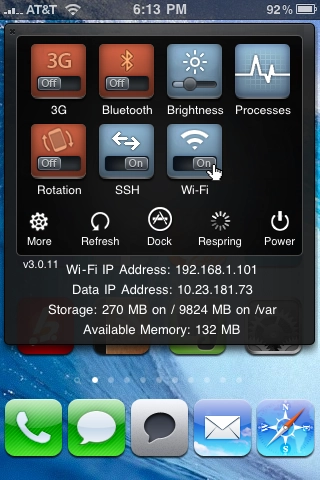
For a quick tutorial on how to use SBSettings, watch the video above. SBSettings is a free utility for Jailbroken iPhones and iPod touchs that allows you to quickly toggle things like Wi-Fi, Bluetooth, 3G, brightness, and airplane mode. It'll also allow you to hide icons you don't want or use. (This is especially useful for hiding Apple apps like Stocks and Weather that you can't uninstall.)

You'll can also more closely keep tabs on your memory and running processes. This was extremely useful before multitasking. It's still useful today for freeing up memory and seeing what may be eating through battery or slowing your phone down.

There are also several plug-ins and themes you can download for SBSettings as well.

For more, check out our Jailbreak Starters Guide. If you have any questions, leave them in the comments below or for extra help in getting SBSettings up and running check out our Jailbreak Apps Forum. If you already use SBSettings, let us know your ninja tips!


Allyson Kazmucha

Jailbreak, Mod, and DIY editor at iMore, Founder of PXLFIX, Potter pundit, the ninja in your iOS.

More Posts - Website

 TwitterFacebookLinkedInPinterestGoogle PlusYelp

← Previously

Namco, Gameloft games join holiday App Store price war

Next up →

Motorola teases new tablet, says iPad is "just a big iPhone"
  1. BLiNK says:

    definitely a "must have" when you're jailbroken

  2. stephen says:

    ^ that's what google is for. use it.

  3. BLiNK says:

    i was referring to sbsettings itself, not how to use it. ugh, when will the dbags ever stop posting here..

  4. Rene Ritchie says:

    Google should bring you here :p that's what TiPb is for.

  5. West says:

    It's for iPad's, too.

    @Blink: thumbs up

  6. stephen says:

    oh sorry blink, I read your comment wrong :) .

  7. JNGold says:

    Ally,

    Do I recall correctly hearing that there was an SBSettings plug-in to toggle on/off the back flash (ie. Flashlight)?

  8. Pete says:

    Hey huge thanks guys for this type of info being put out there. So many new people in the scene needing such easy to understand instructions.  Merry Christmas cheers! Pete: miApples

  9. Geo Coldz says:

    You need a guide for this?

  10. Snobs Suck says:

    ^^ You know Geo, some n00bs news to the jailbreak scene might appreciate something like this.

  11. stephen says:

    geo, stfu.

  12. JS says:

    @ JNGold: Yes, look for Spring Flash.

  13. swapngreen says:

    The reception at T-Mobile is pretty bad and from what I have been hearing so is the reception at AT&T, to be honest I can’t wait for verizon to get the iphone that would be so much better, well anyhow we buy old iphones at swapngreen.com

  14. Iphone4 is such a complicated iphone

  15. Silentsoul says:

    SBSettings isn't working correctly on 4.2.1 because of mobile substrate right? I'm untethered JB on 4.2.1 and was having issues with SBSet, especially BiteSMS. Had to uninstall.

  16. Piper says:

    @ Silentsoul: we'll soon see a tethered JB for 4.2.1. At current time there is no need to upgrade to 4.2.1 on iPhone, i think.

  17. Silentsoul says:

    @piper There has already been tethered JB out for all devices for a while on 4.2.1. Untethered is preferred and I was able to do that because I have a 3Gs with old bootrom. ....and yes I was running 3.2.1 before I upgraded so yeah, I almost needed to upgrade.

  18. Bman says:

    Very informative guide young fella!

Leave a Reply

Note: Comments must be civil, respectful, and on-topic. If a comment does not add to the conversation, if it contains spam advertising, or inappropriate language or content, it will be removed. Insulting the topic, author, staff, site, network, or other commenters will result in the comment being marked as spam and potential prevent future comments from appearing on the site. Do not post as a business or your comment will likely be confused with spam. Comments containing links may be held for moderation. Relax, enjoy, and share in the discussion.