Join our iPhone, iPod touch, iPad and Apple TV community today! Register Here | Login

NumberKey: Turn Your iPhone Into a Numeric Keypad for Your Macbook

By , Tuesday, Nov 18, 2008
4

You work with numbers all day long, your Macbook lacks the numeric keypad… Frustrated much? I’m sure that can be very inconvenient, that is until now.

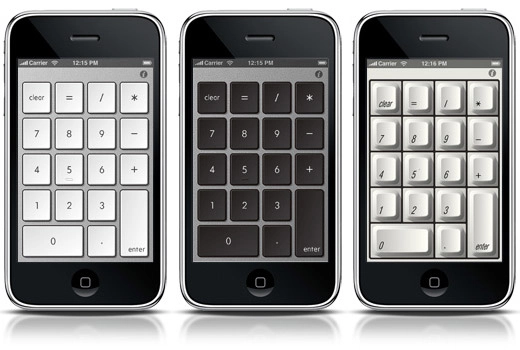
Balmuda has just released their solution to your dilemma, Numberkey. [iTunes Link] The price to this solution is a small price to pay, coming in at $1.99. For that you get your ever so priceless numeric keypad. And for all of your who have OCD like myself, it will match your style of keyboard on your Mac. Whether it’s white, black, or silver – Numberkey has you are covered.

To get set up you first need to download and install Balmuda’s Mac software. Then head to the App Store and download Numberkey, turn on WiFi on both your Macbook and iPhone, and you are good to go.

It is also important to note, this is for Macs only, sorry Windows faithful!

Enjoy!

[Via Technabob.com]

← Previously

Forum Review: SushiTime for the iPhone

Next up →

Updated! Google Mobile App Now Includes Voice Search
  1. MrBricole says:

    very useful app!

  2. Glenn says:

    tis indeed a very useful app

  3. Steve says:

    What am I, a bookkeeper? Should I wear a visor and light up a cigar too?

    By the time I launch this app, I could sooner enter my numbers with the top row of keys on my laptop.

    (Pretty cool I guess for those who need it :-)

  4. Gene says:

    I can’t get it to work.. help!! it types s and h only… no matter what you type … is the network envinont matter I am using the Hog method..

Leave a Reply

Note: Comments must be civil, respectful, and on-topic. If a comment does not add to the conversation, if it contains spam advertising, or inappropriate language or content, it will be removed. Comments containing links may be held for moderation. Relax, enjoy, and share in the discussion.

