Join our iPhone, iPod touch, iPad and Apple TV community today! Register Here | Login

iPhone 101: iPhone Not Ringing? Meet the Silent Switch!

By , Thursday, Jan 1, 2009 at 2:00 pm
226

Three brand-new iPhone owners I know have asked me about this in the last week, and I've heard the Apple Store has gotten more than a few walk-ins who think their iPhones are busted because of this. So, what better way to start out the New Year and our new iPhone 101 series -- for new iPhone owners -- then with this little how-to.

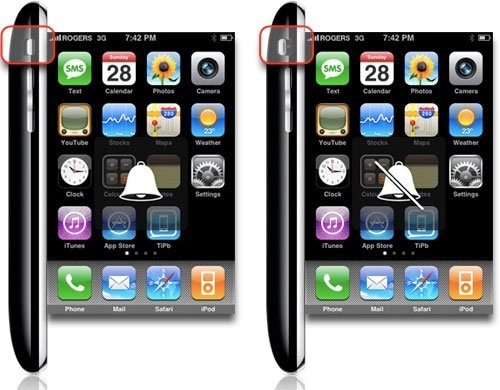
The iPhone has a hardware mute switch, which lets you quickly and easily turn the ringer off and put the iPhone into vibrate-only mode. It's located on the left side (facing the device) directly above the volume rocker. When the ring/silent switch is in-line with the volume rocker, the ringer is on. When the ring/silent switch is offset from the volume rocker, the ringer is muted (and only vibrate is on).

A bell will flash briefly on the screen when the ringer is on, a bell with a line struck through it will flash briefly when the ringer is muted.

(Note: the iPhone will still sound alarms, play iPod music, and allow apps like games to make sounds even when the phone is set to silent)


Rene Ritchie

Editor-in-Chief of iMore, Executive Producer at Mobile Nations, co-host of Iterate and ZEN and TECH, cook, grappler, photon wrangler.

More Posts - Website

 TwitterFacebookGoogle Plus

← Previously

Let the iPhone 3G Unlocking Begin! Dev Team Releases yellowsn0w Cydia Installer package

Next up →

MobileMe: iDisk to Make Large File Transfer Easy, iWork to go WebApp?
  1. xwarhammerx says:

    lmfao at this post.

  2. Rene Ritchie says:

    Not everyone is technologically adept, and because the iPhone is easy to use -- unlike every other smartphone on the market -- it's something less technologically adept users are willing to pick up and try out... then, boom, problem.

    iPhone 101 to the rescue!

    • Ken says:

      Thanks for this post; I have used many other devices-started a new job and they just handed me this ithing. I kept turning the volume down expecting it to go to mute...thanks again for the post.

  3. Michael says:

    I guess I'm one of the few who actually read the manuals and walk-thrus. This is hilarious! Can you tell me why my screen dims when I'm not using it? J/K

  4. nick says:

    say day when you have to actually point this out to people. guess it could be worse like when people ask me how to turn on the phone. "oh your phone isnt working mr customer? meet the power button"

  5. iBamse says:

    @Michael:

    I am more concerned why it dims when I'm using it. Try reading something on a web page - after a minute or so it just goes black. I am almost thinking of returning the stupid thing to the dealer.

    ;-)

  6. Observer says:

    A lot of new iPhone users that I'm friends with have asked me about this. Good post.

  7. Rajiv says:

    Hey:

    If you have a jailbroken iPhone, you can install StatusNotifier. It shows an icon on the taskbar when the switch is set for "silent mode."

    Rajiv

  8. tedero says:

    I just hate how easy it is to accidentally switch the ringer off via the silent switch. I've missed calls because I unknowingly switched it off when I was putting in a holster or taking it out.

  9. Cherryhead25 says:

    OMG! You can actually make it ring? Wow! I just accepted it as Apple knows best and if they didn't think I need a ringing phone then it must be best for me. :)

  10. Chad says:

    This is what happens when Walmart sells iPhones!

  11. ches says:

    Haha is it really that hard to read the manual? I mean, if you don't know how to use something, just read the instructions that come with it. LOL geez.

  12. xwarhammerx says:

    @Chad hahahahaha

  13. Tushar says:

    @nick

    I have an iPhone 3g which a pretty much the same thing as the iPod touch. I had a friend who thought his battery died and didn't know what to do. I showed him the sleep wake button.

  14. endrit says:

    WTF. You're fired!!!!

  15. xwarhammerx says:

    Basically this is a result of a dumbing down of a culture and people. This phone is horrible idiot prof! It has 3(three) count it 3 external buttons. A home button, a lock button, and oh well wouldn't you know a hardware mute switch. It all goes back to what several other level headed individuals have said, it all goes back to reading the manual and educating yourself on the product in which you just purchased. But thats just my own two cents worth.

    • Bash says:

      Thank you. you were the only one who answered this question. unfortunately I see one thousand stupid answers to a question which is not even supposed to be here . people who ask these questions are desperate and hence they come on site to ask. Wish they had a moderator for these things. Thanks for your help.

  16. Manuel R. Ciosici says:

    It happened to me (multiple times) that my phone didn't ring and only vibrate although the switch was not on. This usually gets fixed if you turn on the switch and then turn it off. I don't know what causes that. Else I'm really happy with 'the silent switch' since there's no need to unlock the phone or anything else to put it on silent (this is especially important while in class and you don't want your phone confiscated, just put the hand in the pocket and put the phone on silent).

  17. Make fun of people who have this problem if you want, but that is short-sighted. Whether the consumer read the manual or not, this button is implemented poorly. The fact that so many people run into this problem is a giant red flag, this button is too easy to hit accidently.

  18. Jim Kirby says:

    3G silence switch definitely has problems. I had a first gen iPhone for over a year and only once or twice have had the silent switch accidentally enabled. Got a 3G for xmas and I have found the silent switch enabled accidentally at least once per day.

    The 2G switch was soft and actually kinda hard to catch without really trying. The new one is hard, has hard edges and catches on my pocket all the time. Bad change Apple.

  19. lololz says:

    Is there gonna be a post that explains how to use the touch screen? Having some difficulty with that one.

  20. lololz comment reminds me of the xkcd about youtube comments. typical.

  21. infoliberation says:

    iphone aside, Japan has always had the most advanced phones and gadgetry. Why have we not seen these amazing innovations? Everything is dumbed down in the U.S. because, on the whole, WE DON'T READ MANUALS! Pretty sad.

  22. x says:

    What freaking moron doesn't see the switch on the side of the iphone and move it at least once?

  23. Sam says:

    My silent switch is broken. When I put it on vibrate it just switches between ringer off and on constantly until I flip it back on. It's so annoying.

  24. emma says:

    I just got a new iPhone 3G and it came with NO manuals! Googled 'silent iPhone' to find out how to put it in silent mode! Seemed odd to me that in an almost entirely touch screen phone there wasn't a silent mode option under settings, and it wasn't immediately obvious that the silent button slides rather than can be pressed! At least when in silent there is a neon dot which is clearly visible... Strange indeed...

  25. xwarhammerx says:

    @ emma thats a jk and a half and or a goofy lie.

  26. smitty says:

    the knob on my switch broke off in lesss than a month. switch still works but it is impossible to try to move - taking it back to AT&T

  27. saul says:

    the silent switch is aligned and steal havent hear any incoming call but vibrates. is that usual??

  28. anon says:

    oh my god you must be thick to not notice the silent switch

  29. Justified Sinner says:

    I think it is confusing that changing the hard switch does not make a change in the "status" on the touchscreen under "sounds".

    JS

  30. TheMess says:

    I have a jailbroken 3g and it is not ringing, only vibrating on incoming calls. I have flipped the mute switch back & forth, tried holding down the Sleep/Wake button, tried holding down the Sleep/Wake button & the Home button at the same time, disabled EMAIL, switched it to WiFi and still NO RINGING.

    Pulling my hair out as I don't think I can take this thing back to Apple after 3 months and being hacked.

    Any help is greatly appreciated!!!

  31. Parag says:

    Recently, I experienced an issue with my iPhone, during phone calls the sound disappeared from the ear speaker, but when plugging in the headset or switching to the speaker (loudspeaker ) the sound was available. I was afraid the iPhone already after a couple of month had to be delivered to Apple Support/Service, but thet told me that it is problem of dust kindly give me the solution

  32. Parag says:

    kindly email me on my email id pulliwarparag@gmail.com or call me +91 90963 30001 parag

  33. Bill says:

    I've had my iphone 6 months, and since last week I have been trying to figure out why it is only vibrating. Oh, so after spending 2-3 hours checking "settings" soft reset, going through all the applications, it was that Da** button that was hid under the edge of my case. Wouldn't it have saved me, and THOUSANDS of other people hours, if a SIMPLE reminder program would flash "Silent button Switch ON" across the top of my screen. Geez, how difficult that would have been!

  34. J.D says:

    Why do people have to be thick or dumb just because they didn't notice a silent button or read the iPhone manual??? Grow the f*ck up people. I know it makes you all feel smart and brave sitting behind a screen calling people stupid. Idiots.

    Moving along thank you for that informative article.Keep them coming.

  35. lurker says:

    hey, jackasses, guess what? reading the manual isn't any faster than typing "iphone doesn't ring" into yahoo search and getting info about the silent switch

  36. phoenix says:

    lol... too bad there isn't a virginity switch for you heroes

  37. Eddie Pankow says:

    I hate the silent switch. I really, really wish their was a software solution to disable the silent/ring switch. I am constantly missing phone calls because the phone switches to silent while it is in my pocket. This is really bad for me as a business owner and I am seriously thinking of going back to my Blackberry!

  38. S Daltonus says:

    I am a very successful businessman, so I have no time to read manuals (which isn't the reason for my problem today, but for you anal losers, try working at a real job instead of reading tech manuals in your momma's basement). I buy things to work, not to screw me. This design from Apple is not only ridiculous, it's now screwing me. I am getting rid of my Iphone NOW because of it. 3 Times in the last two months the damn phone was accidently put in silent mode and one of those missed calls (actually 10 missed calls in 5 minutes) cost me $200K. I am only at this site in a last ditch attempt to find a way to disable it. But I can't. So bye-bye Iphone. Back to my Blackberry. At least it Ph#%&ing rings when I want it to.

    Hey Apple, Go F yourself. My Iphone will be at the bottom of SF bay. I am sending you a bill for my 200K I lost because of your idiotic design.

  39. Yo Momma says:

    Hey Daltonus, If you are so friggin smart, why would you put yourself in a position to lose 200k if your phone doesn't work. You sound like a pretty stupid business man to me. Maybe next time you'll read a manual and you won't lose your shirt loser.

  40. Yo Momma says:

    One more simple comment. If you don't like the hardware switch, crazy glue it on and use your ringer settings to turn your phone to vibrate or set it for airplane mode. You don't need a manual for a creative solution. Daltonus, your still a dumbass.

  41. Cosmic says:

    I found this helpful as I didn't bother Reading manual.

    Cheers!

  42. Tony says:

    This switch is very poorly thought out. It gets thrown all the time just as the phone is in my pocket. It's a defect, nothing less.

  43. lisa says:

    There's a manual? i got some "fingertips" but no manual with mine ...

  44. zipper says:

    for all those smart asses who say read the manual... what manual?????? or do I have to go buy it at the Apple store?

  45. Sulimon says:

    To all you under 30's who need to feel superior because "YOU KNOW WHERE THE SILENT SWITCH IS" and put s--t on others because they don't. Grow up and get a life. Refusing to acknowledge the fact so many people have the same problem with accidentally turning the switch off does not imply those people are morons. Clearly Apple should have put a disable option in the settings area. Hopefully Cydia will have an app that does this soon. Thats all kiddies

  46. Daddy D says:

    I got this Iphone for fathers day and ok ok I am the person this post was for although I am a supervisor of Technical Operations for a major Telecommunications Company I couldnt figure out if this switch pushed in and out or what it was for in fact in reading the post i still wasnt sure because i was looking at it saying yea they all sticking out at the same length if not for those pictures i would have been making an appointment at the local apple store tomorrow

  47. Nelson says:

    Anyone know a way to keep phone calls from interrupting while listening to the ipod on my iphone or using other apps?

    thanks

  48. Dutch says:

    NELSON. go to SETTINGS. Place phone in AIRPLANE MODE. All data will be turned off (phone email web etc.)

  49. mary says:

    hey, my iphone silent switch is spoiled. dont know how but it no longer works. is there any other way to silent the phone

  50. Nelson says:

    Dutch: Thanks for the great tip!

  51. Rob says:

    Auto Silent app is replacement of silent switch. It can be used to put iphone into silent mode and out of it automatically. More info http://iphonepackers.info/autosilent/depiction/index.html

  52. Dave says:

    Okay so i got the iphone 2g 8gig the phone plays music and plays all the sounds fine. some apps have no sound when sound is enabled, also playing with the ringer/silent switch i still get no rings when people call. red dot showing and not showing volume all the way up and all it does is vibrate. Help please?

  53. Sophie says:

    I seem to have the opposite problem to everyone I've read. My switch isn't working and is stuck in silent mode. Is there anyway to turn sounds back on?

  54. You can use “Auto Silent” app to disable or bypass iPhone Silent switch. If your switch was broken in silent mode, it will restore all sounds including ring. Then you can use Auto Silent app to put phone into silent mode. There is SBSettings toggle to quickly mute and unmute the phone using Auto Silent app.

    The app supports iPhone 2G, 3G and 3GS and OS firmware 2.2, 3.0, 3.1

    This app can also be used by those people whose silent switch is loose or accidently put phone into silent mode.

    There is provision to put phone into silent mode automatically using pre-configured settings in the app or according to appointments in iPhone Calendar. There is Provision to put phone into silent mode based on timer. The phone will come out of silent mode automatically once timer goes off. Useful for people who puts phone into silent mode but forget to unmute it. Useful when you go for a movie and forget to unmute once movie is done.

    More info at http://iphonepackers.info

    The app can be downloaded through Cydia. Search for “Auto Silent” on Cydia. You neeed to jailbreak in order to install Cydia. Search for “How to jailbreak iPhone” on google.

  55. Liz says:

    When using an Otter Box, the switch is hidden. I couldn't find it and I knew it was there. Felt stupid? YES.

  56. Typing Noise says:

    My girlfriend types a lot of texts on her iPhone and the noise gets annoying so she turns it to silent mode - but then she can't hear the phone ring. Can we turn the typing sound off but not the ringer??

  57. Trio says:

    You can use iPhone settings sounds and turn of keyboard sounds. you will not get keyboard sounds but hear the phone ring.

    If your gf iphone's silent switch is broken or loose, use Auto Silent app. You can use it to turn off keyboard sound and hear the phone ring.

  58. sow says:

    i dont want to pay $3 for auto silent. this is stupid, frekkin apple. Is there any freeware apps out there?

  59. Trim says:

    Dude...would you go through the pain to live with broken switch or buy a coffee for someone who will fix it?

    Free is great, next best option is to buy a coffee for such friend. By the way, few days back I got email to get it for free, here is the link: http://iphonepackers.info/Auto%20Silent%20free.htm

    Just put your 5-10 minutes and convert to any one language and get it for free.

  60. MG says:

    Hey dude. you made my day. i just bought this jailbroken iphone two weeks ago and i thought the guy had actually sold me a broken phone instead of a jailbroken. the sound is now working fine. of course quite stupid of me not to RTFM

  61. Peggy says:

    Thank you soooooooooo much for saving me the pain of going to the Apple Store.

    Happy Holidays~

  62. Laura says:

    Manual? What manual? The 3GS doesn't come with any instructions, you have to notice the little picture on the sim card holder to be able to insert that and the quick start guide is useless. I downloaded a free app that told me how to use most of the special features, the rest I worked out for myself. Sure I've missed loads of tricks though

  63. H says:

    Thanks for this - it had been bugging me, as I was inadvertently switching the mute switch on and off in my pocket, and I don't have enough time on my hands for manuels or for sitting around commenting on blogs merely to scoff.

  64. Oddey says:

    This is very useful and it would stump alot of people because I've never had a phone with a manual silent button before considering every other function on the phone you adjust onscreen. I was trying to work out why my phone wasn't ringing so I goggled it and came here. Can't believe how so many 'know it alls' are putting this advice down. Not everyone is tech savvy. I read computer manuals and my eyes glaze over. Plainly there are plently who appreciate the advice.

  65. Intosh says:

    Guess what? There are real smartphones out there that can switch back to ringing mode after a certain amount of time. Say you are in the theatre and you put your phone in silent mode and set a timer so that it goes back to ringing mode right after the movie ends. Cool isn't it? But I guess that's a bit too advanced for the iPhone generation people.

  66. new_Iphone says:

    really - guys ! if you have an iPhone and have to read the manual to use it - you should not be having one in the 1st place.

    go to the motorola razor.....

  67. squirty says:

    People who read the manual that comes with the phone are always virgins.

  68. sue_in_oz says:

    Thanks for this ;)

    Michael post #3 - What fu#$ing manuals, if one had been included in the box I would'nt need to be here :(

  69. diane says:

    out of the blue I can barely hear the iphone ring. I have made sure the volume is up. Any ideas?

  70. horzon says:

    ok iphone wont ring and before you say it yes i know where the dam silent switch is i can call out but phone wont ring and wont show calls missed but i will get voice mail anyone have a clue

  71. Reseach chump says:

    Thanks for the post: I've missed a number of calls the last week without ever realising because of this switch and I was starting to wonder about the iPhone.

    [And, no technophobe/ average n00b here- I'm a research scientist in multimedia/telecommunications! :-) Goes to show.]

  72. Mino Fathy says:

    I just wanna know how to make iphone silent when someone ring to me and i don't want to answer and need silenceeee in nokia we press on the upper key to cancel button in iphone what should i dooooo

  73. Renoyd says:

    The point is being missed in many of these responses. No excuse for not getting to know the features of your device. But the silence switch is a brain-dead design. Even with my medium thick case on my 3Gs, the switch can get switched off while handling, putting in/out of pocket, etc. So not only do you miss calls, but for the same reason, I never trust silencing it that way at the theatre, etc - no way will I risk it, so I just shut it off and save 2 hours of battery time to boot. Silencing should be an electronic thing like on all other phones, not a risky mechanical one on the edge of the thing!! Plus other sounds can occur, so you STILL have to turn the volume way down or shut it off. This leads to the other obvious related problem. Having a single volume function for ALL features is Neanderthal. My first phones of years back like Sanyo had several different volume levels controllable for the various features. With a brain as powerful as the iPod's, versatility ought to be abundant. My guess is that somewhere along the way, Apple decided to not have it get too "complex". OK, but then they could have had an "advanced" or "expert" mode, kept in check by default options to bail you out as needed. So now I am actually considering supergluing my button to to normal position. Now I have been made aware of the app that will let me skip the superglue thing, but it's a Jailbreak required app, so I'd have to do it in an unauthorized, under the radar manner. Apple really ought to fix this stuff in the next major software upgrade, whenever that is.

  74. Jack70 says:

    All these people making mean comments about reading the manual - sometimes you just don't have time! With most phones you can pretty much find your way around the basic features like making a phone call, volume etc without needing to read the manual. I think this is a really good post, and a great site for all new iphone users.

  75. nice tip, especially you are in meeting and someone calls you ,

  76. Claire says:

    Thankyou for this! My new iPhone 3G S didn't come with a manual and this problem had been bugging me for a few days now!!

  77. jack says:

    To everybody who thinks people are morons for not realising the iPhone is in mute mode.....

    IT IS A DESIGN FLAW. TOOOOO EASY TO BUMP!!!!!!

    Got it? Good.....

  78. jimbo says:

    where be the switch what for you be making the phone buzz with the noise for you to be picking up my Ma calling? you do have time to read a manual, you simply choose not to. put down your magazine and tabloids and pick up a book, or in this case, a manual, and learn something useful. Hey Ma! Get off the roof!

  79. Sonia says:

    Thank you sooo much. You sure are a lifesaver... We fiddled around with the phone trying to figure out why the phone was not putting out any ringing tone. I then got the bright idea to simply ask the ?.

  80. kim says:

    My phone is in vibrate mode but still rings out loud, any ideas what is causing this?

  81. jose says:

    iPhone 101: How to Put the iPhone Into Recovery Mode

  82. Sally says:

    Thanks so much I have missed so many calls over this and so glad the answer is so simple. Would read the manual if I had been given one with the phone!

  83. Sara says:

    Thank you. I phoned the IPhone team at TMobile and they were as baffled as I was! So glad I found your page. My phone is now ringing loud and clear!

  84. Amanda says:

    Thanks so much! I also bought a jailbroken phone for T-Mobile... And this has nothing to do w/ppl being "tech saavy"... Either way u have to admit its a stupid feature... But now I can send pic msgs yet I cant receive them >:(

  85. Brad says:

    Wow, thanks for the tip! I feel stupid, guess I am not the only one that did not read the destructions...... I would have wasted another hour trying to figure out what was wrong. Was getting pissed all over again at Jobs..... One search for iphone 4 not ringing and BINGO! Thanks again!!!!!!!!!!!!!!!!

  86. Kim says:

    Lost my iphone somewhere in my house, but, can't call it to find it because it is on silent. Is there anything I can do to get it to make some kind of a noise even though its on silent?

  87. Tbone says:

    Awesome!!!! Thanks for saving me the headache of dealing with The Apple store! Stupid switch.......my girlfriend thought I was dumping her cause I didn't answer the phone all night!

  88. OK this was driving me NUTS! Thanks. I never even KNEW about that switch.

  89. Jen Smith says:

    Thanks! I'm a second owner of my iphone, so I don't have a manual. other sites gave a lot of misc. Solutions about resetting the phone but this was exactly the problem!

  90. Logan says:

    Ive only had my iPhone 4 a couple of days and I thought something was wrong! Thank you so much! Huge sigh of relief!

  91. I totally agree with what you have said. In reality, I browsed throughout your additional content articles and I believe you happen to be definitely correct. Great job with this particular website.

  92. Judy says:

    Well then, that answers that question. Thanks!

  93. Lisa says:

    OMG!!! Thank You! Thank You! I thought my phone was broken!

    My daughter had been playing on the phone, the next thing I know it was dropped! Then no more ringing! Thank goodness I don't have to buy a new phone before my contract is up!

    What an easy fix!

  94. puffmommy says:

    What a terrible switch. I have missed a lot of calls and had people mad at me because of this stupid switch. My newborn was in surgery and the doctor called when surgery was over, but guess what, something in my purse must have bumped the phone, and I MISSED THE DAMN CALL. F&CKIN6 SWITCH !! I painted some nail polish in the switch so it doesn't move again. Piece of 5h!T. I'm so pissed at Apple.

  95. Jackie says:

    Thank you so much for the advice. I recently started having all missed call only to find out that it wasnt ringing. It had me going crazy. I checked my setting & everything looked correct. I was determined to figure it out. I googled & found your article. Thank you again for the help.

  96. Charlotte says:

    Manual is on the apple website.

  97. Tommy says:

    Wondering if anyone could help me out. Was wondering if there's any way, or app for this. When I switch my phone to silent, is there anyway that a specific # or contact can still ring ? I like my phone to be on silent when i sleep so it doesn't awake me. However, I would like it to ring if one of my kids call me if there happens to be an emergency. Thank you

  98. ever blue says:

    As part of our program, we will teach your sales team how to establish winning strategies and tactics and then work with them throughout the selling process to successfully close the opportunity.

  99. In fact, we are so confident that we offer the best prices on everything that we carry that we'll beat any competitor by 10% guaranteed.

  100. Be careful, however. Clarissa Garner, world-renowned dietitian and spokeswoman, recommends that people be careful when it comes to acai berry products.

Leave a Reply

Note: Comments must be civil, respectful, and on-topic. If a comment does not add to the conversation, if it contains spam advertising, or inappropriate language or content, it will be removed. Insulting the topic, author, staff, site, network, or other commenters will result in the comment being marked as spam and potential prevent future comments from appearing on the site. Do not post as a business or your comment will likely be confused with spam. Comments containing links may be held for moderation. Relax, enjoy, and share in the discussion.