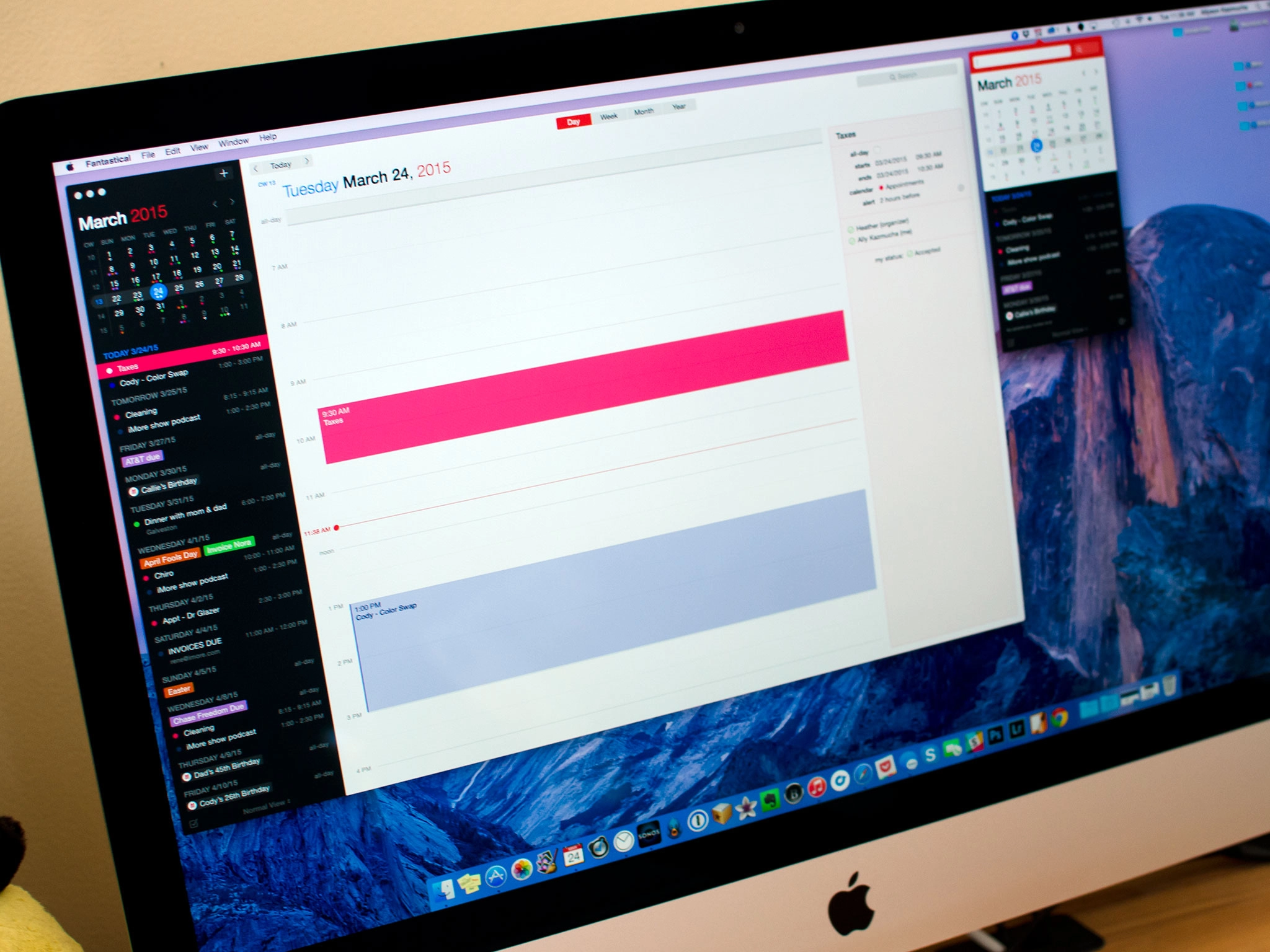
Fantastical 2 by Flexibits is a full screen calendar replacement for Mac with an all new design for OS X Yosemite and all new features that you won't find anywhere else.

A Notification Center widget, faster and more reliable sync, full time zone support, and "calendar sets" round out the highlights. Taken together, they make Fantastical 2 far more than a menu bar companion to OS X's built in Calendar app — they make it a full-on calendar app in its own right.
The good
- Simple and clean design that fits well with OS X Yosemite
- Calendar sets make sorting and viewing calendars a breeze
- Best natural language support of any Mac calendar app
- Lots of ways to view and interact with your calendar in full screen mode
- Light and dark themes for both full screen and menu bar versions
The bad
- Currently no alerts for event invites
- Reminders lists can't be sorted by category
Designing for Yosemite and bringing Fantastical full screen

"Yosemite helped us do what we tend to do best," Fantastical developer Michael Simmons of Flexibits told me in a recent interview. "Which is to create apps that are simple and clean."
If you're already using Fantastical 2 on your iPhone or iPad, you'll immediately feel at home with Fantastical for Mac. Off to the left is a mini month preview similar to what Fantastical 2 for iOS offers. Underneath that is a running list of all the events, reminders, and tasks you have coming up. Everything is color coded so you can easily see which calendars or reminders list they belong to.
Just like the iPhone and iPad version, there are two themes — light and dark — and you can switch between them in preferences. The menu bar version and full screen version will both switch to reflect whichever one you choose. reflect any theme change you make. Basic interface elements such as font size in the list view can be customized in the Preferences panel too.

The original version of Fantastical was fine if all you wanted to do was quickly add entries or view upcoming events. The menu bar made it easy. That functionality hasn't changed with Fantastical 2. You can still use it the same way you've always been using it. It just looks better now. The interface has been flattened. It's sharper and cleaner.
Also still there is the great natural language support. It's what's always made Fantastical incredibly fast for entering appointments. If you have a meeting at noon tomorrow and you would like it added to your work calendar, just type in the event entry field something like "Meeting tomorrow at noon" and Fantastical will automatically add it to your calendar.

Natural language support covers all kinds of things such as adding alarms, designating an event as repeating, and much more. You can also quickly switch between calendars by typing a "/" and then the first few letters of the calendar name at the end of your entry. If you want to toggle between reminders, just type reminder at the beginning. Think of it as a personal assistant like Siri, only one that you type to instead of talk to.
What has changed in Fantastical 2 is the addition of a new full calendar mode. It offers the same views as the built-in OS X Calendar app but makes better use of the space off the the left with the list view, which always remains static no matter what view you choose. If you're in day view you also get a side panel to the right that will show detailed info on a selected event, very similar to what the stock Calendar app shows. It means, if you're already using Fantastical, there's no reason to switch back to the built-in Calendar app anymore. You can get both views right in Fantastical.
That's the great thing about Fantastical 2 for Mac — you can use it based on what you need to get done. If you're just entering an event, the menu bar version of Fantastical does what it's always done best. Assign a universal keyboard shortcut — the default is ctrl + option + space — and you can access the menu bar window from anywhere. Once you're done entering events or viewing your calendar, just hit escape and continue what you were doing.
"I built Fantastical for myself," Simmons said. "It was a way to fix the frustrations I had with iCal. We started with a better and faster way not only to enter events, but to view them. That was the original purpose of Fantastical — it was meant to fix iCal. Fantastical 2 is meant to fix Fantastical."
Simple setup

Adding accounts to Fantastical remains simple. It can pull your data right from the internet accounts section of OS X and filter in local calendars. Fantastical 2 for Mac supports 2-step verification for Google accounts but if you have it enabled for iCloud, you'll need to generate an app specific password.
You can set defaults for calendars, reminder lists, and notifications. Every aspect of how you receive notifications and when you get them is customizable. You can also change what the list view in Fantastical 2 shows. For example, it can be a running list with no end, or you can set it to only show the current day if you'd prefer. If you use priority options regularly, Fantastical 2 can take that into account too and show those reminders first.
It's worth noting that to receive notifications for Fantastical, you'll have to leave it running in the background. If you quit the app, you will stop receiving calendar and reminder notifications. This is a restriction of OS X, not Fantastical itself.
Calendar sets: You won't be able to live without them

"Calendar Sets is the feature we are most proud of," Simmons told me, and it's easy to see why. Anyone who has lots of calendars and reminders lists to manage will quickly wonder how they ever lived without them.
The idea behind calendar sets is that you can view select groups of calendars and reminders lists quickly. For example, I can have one set that only shows my personal calendars and reminders lists. I can add a second set that only shows my work calendars, and so on. You can quickly create and manage calendar sets in the Preferences panel under Calendars.
Accessing and toggling between calendar sets couldn't be any easier. You can either click on the calendar toggle in the bottom of the list view or you can use keyboard shortcuts to switch between views even faster. The menu bar version of Fantastical also lets you toggle between calendar sets.
And it gets even better. Location aware calendar sets can automagically switch to a group of calendars depending on your physical location. For example, if you want Fantastical to show your personal calendars by default when you're at home, just turn on location options and use your home location. If you want your work set to be the default when you're at the office, enable the location option for your work set under your work address. Fantastical will automatically show relevant calendars.
Calendar sets are one of those features I never knew I needed, until I had it.
The bottom line
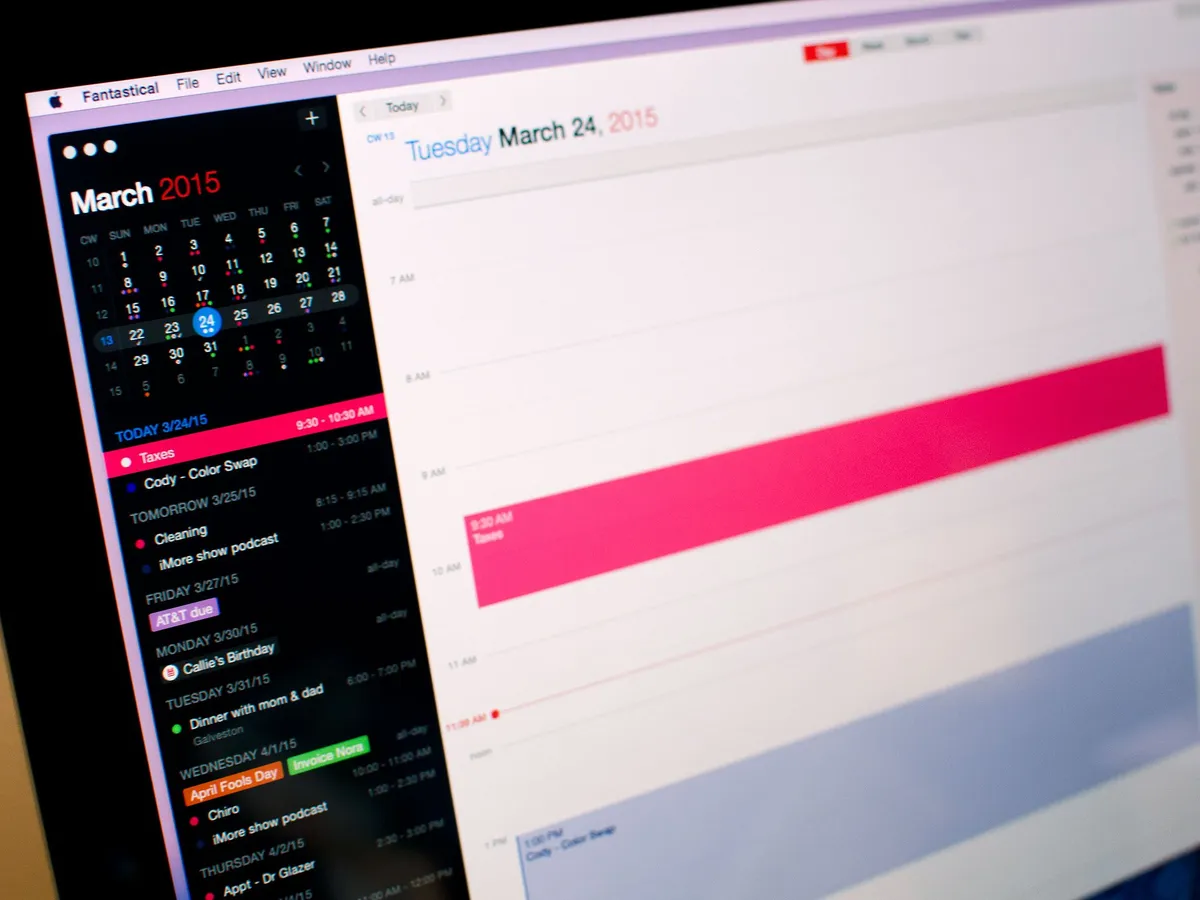
I've never been able to find a calendar replacement for Mac that strikes a happy balance between features and usability. Fantastical 2 takes everything great about Apple's Calendar app, strips out everything that's not, and adds features that are truly useful. Fantastical 2 for Mac is the calendar app I've been waiting for.
Note: Fantastical 2 is a new app on the Mac App Store, as it contains significant new features. Since Apple still doesn't provide a way for developers to offer upgrade pricing, Flexibits is giving everyone 25% Fantastical 2 for a limited time.
$49.99- $39.99 on sale - Download Now
Reader comments
Fantastical 2 for Mac review: The calendar app you've been waiting for
Compared Fantastical 1, this verson is big jump forward. Using it every day on iPhone and iPad, now try for Mac. AppFromTop knows what to advice)
Well, so I contacted the company hoping for some sort of explanation and guess what? No reply. Yet another reason why I will be staying away from this company. Well done gentlemen! You lost a good customer because of your greed and ignorance! Keep up the good work and I really hope you will be out of the market soon.
Ok so I bought this on my IPad and it was pretty cool, so of course, I can download on my IPhone, wait its MORE money (never seen an app do that one). Now more for the Mac Version. OK guys we are getting more than a bit greedy and this app is way overpriced.
The price is ... Insane! I have bough fantastical for my iOS devices and Mac. And now, I have to pay another $40 to upgrade? Guys, get real! This is too expensive and a total disrespect to your loyal customers. I think I'm on the market for a new app.
Being able to check availability is a showstopper for me as well. Unfortunately I just assumed that such an expensive calendar app had this functionality - it does not. While I know I should have checked this out on my own, I still feel cheated given the high price.
I think the pricing is bang on and flexibits is not alone in this price category and strategy. It is a great first step for their new 2.0. I am giving the trial a go and I like many aspects of what they have done. Sure, it is still buggy, but that will improve. I'm an existing 1.0 user and that is a great extension to my use of Apple calendar for work. Unfortunately, I am unable to switch because it is missing work collaborative features like Attendee Availability and its not currently on their radar. If I can't check when invitee's are available for a meeting, that's just a non-starter for a work environment. Too bad :(
Wow, the people have spoke. I hope the company is listening.
Sent from the iMore App
The developer should charge whatever they feel is an appropriate price. That doesn't mean I have to buy it. I have Fantastical on my iPhone & iPad, and the first version on my Mac. I honestly don't use the Mac version enough to justify what I paid for the first version, so the 2nd version being priced the way it is will probably save me money since it is well above my "oh what the heck" threshold for purchasing Mac apps. That said, I think $40/50 for any calendar replacement app is a bit steep, but I probably am not the target audience as my calendaring needs are sufficiently served by the default app (or the various iOS apps I have since I spend more of my time there).
At $50, I might as well get BusyCal or Omni Focus. There are more and better features for pro users.
Does anyone know how to change an existing calendar entry from one calendar to another? I have Fantastical (1 and 2) set up to access my one Exchange calendar and two iCloud calendars. If I want to have one of my Exchange calendar entries switched to an iCloud calendar, I can't do it, there is no selection for it. I can change calendars between my two iCloud calendars but not between iCloud calendars and Exchange calendars. Strange, because you CAN switch calendars in the iOS app.
Right. There's no such thing as a free ride.
But if you pay $100k for a Ford Fiesta you are a fool.
As a loyal customer, this is somewhat disrespectful. I grabbed the original one way back 3 years ago for around $20 and I currently own both the iPhone and iPad versions as well, use them on a daily basis - but this kind of pricing is insane. I can see myself shelling $20 or $25 for that matter, but $40 or even $50? No chance.
I value good written software that functions perfectly, but there is a limit as to what I am willing to spend for a calendar app.
This argument that Apple doesn't offer upgrade pricing is understandable but there are ways to work around that. Sending discount coupons for %50 off to customers is a good start. This way everyone wins and loyal users won't feel like they were left out.
Unless the pricing changes, DRASTICALLY, I won't be using Fantastical 2 anytime soon.
If the upgrade price were $20 then I might consider upgrading, but not at $40. I would suggest they reconsider their pricing as I'm sure they are getting slammed.
If the price was $20 some people would still say it's expensive. I don't blame the developer fir setting the price high & with a great app creating the desire. When the price drops to say $20 to $30 in a sale their will ge plenty of takers.
it's business at the end of the day...
If you look at Fantastical 2 in the iOS App Store they are saying 40% off for the Mac App for the launch sale.
Sent from the iMore App
It looks like they are having a real problem deciding what the discount should be. Conflicting statements depending where you look. Flexibits...get your act together!!!
They are getting slammed on FB. No one likes the pricing. I am sorry, but there should be some discount for loyal customers. I am all for developers making money, but make it fair. This is just greed, and makes it hard on other developers trying to charge a fair price for upgrades. Auria a well written DAW is $49, and when they release their newest pro version, existing customers will get the full upgrade for $25. That is fair. I don't know what Flixibits is thinking.
Sent from the iMore App
Was looking forward to updating to the new version but cannot justify the price. It's rather steep for a Mac app. It's a shame as I am a big fan of Fantastical. I use their first Mac app along with iPad and iPhone apps. Hope they will reconsider the price!
Sent from the iMore App
If the dev would read these comments, and comments on other sites today, they might would change their pricing. Na, on second thought, it ain't gonna happen. :)
I'll agree with many of the above, if this had been $20, here, take my money. I use the program every day on my laptop, but $40/$50, that's a non starter. This looks very nice, and very well done, I do not down there are several thousand hours tied up in developing this, but it feels like the story of the old bull and the young bull standing on the top of a hill looking at all the female cows. In this case they went with the young bull's strategy.
They were out of their minds the first time, but I still bought it when it went on 50% sale, which still was way more than it should have been. But to ask for 40$ again, also to existing customers who bought the app for iPhone, iPad AND MAC OS, is simply disrespectful and greedy.
I downloaded the 14-day trial from their website and I have to agree with the review - it is a very nice and polished app, and while it is "just" a calendar app, it has the deepest support for OS X 10.10 features I have seen yet, and it fits aesthetically as well.
Most iPhone and iPad third-party calendars are just plain ugly, or tied to some freemium models. I am a calendar nut and try almost everything (except for stuff that requires mandatory Google accounts). So far Fantastical 2 and miCal were the only calendar apps I consider serious replacements for the stock app. (I do agree with the comments about the iPad versions' usability to be a bit on the odd side though.)
Yes, compared to a major game release it is expensive, compared to OmniFocus (which is just a glorified list editor, but a top-notch tool for its purpose) it is priced OK, and compared to some "distraction free" text editors charging you extra for whitespace... it is dirt cheap.
I will use it for the 14 days the trial gives me, and if I do not run into major snags, I will buy it. I'll just get my coffee from the cafeteria instead of Starbucks for 10 days, and it is paid.
I agree with you that if you're a calendar junkie the $40 price is likely nothing. I'm just trying to balance out how I use my Calendar along with Omnifocus. Personally I don't use my calendar enough to warrant the expenditure but I don't have a problem seeing how other folks may need this power. I may wait and snag it on a discount if it ever comes.
I've never actually used a calendar app on a desktop before. It was always on my phones, even back during the feature-phone days (cumbersome, but it worked). Don't see the need, to be honest, but if they offer a trial I moght give it a try.
I have version 1 for Mac and the latest versions for IOS. Its a very good calendarapp, but i had to use Busycal on my Mac to do real planning and have a great overview of things. With this insane price for the new version of Fantastical 2 for Mac, i have now uninstalled the app and is really angry on this company. High price and not much to offer for loyal customers has made me feel this way. Its not that there is no competition for calendar apps. Having this price and making loyal customers feel out in the cold is bad business.
I have all three versions (iPhone, iPad, Mac), and before reading the price at the end of the review I was thinking "$20 would be fair price for this app". Sorry, $50 or even $40 is too much in my book for this kind of app. Not buying at this price.
$60 for a calendar app is ridiculous. I hope they're joking. The market will decide, but its a major rip-off.
BTW, I paid $20 for Fantastical 1 and see no reason 99.99% of people would need to upgrade, especially for $60 (even $40 is a joke).
50% discount minimum for me to even consider purchasing. Yea yea I get it Simmons is your buddy and software devs need to eat but I'm not paying $50 for a calendar that offers mostly redundant features
Sent from the iMore App
They should give current users a 75% discount. That would put the price at about what it is worth. $10 is fine, but $50 is ridiculous.
This is absolutely insane imo. So there is a separate price for the iPhone, iPad, and MAC apps, which I've already paid as a loyal customer, which is already a little much. But now a new version of the MAC app is released, and no free version for current users of ALL 3 products, nor is there a real discount. Just a small discount that everyone can get, and it's still $40 for that? This is possibly the most money-hungry developer that I've noticed in the AppStore.
I'm sorry but they have to be out of their minds with that price.
And this is why people now write web apps for "free" and sell your data to anyone with a quarter. Because there's no such thing as a price that people won't hate. "But whyyyyyy do I have to payyyy so muuuuuch"?
I've seen that used for apps that cost NINETY-NINE CENTS.
This is why so much software out there sucks. Because creating good software takes a lot of time, and no one will pay for it anyway. May as well create crap in that case. The payback's about the same.
You argue out of ignorance. There are better calendar apps from less greedy developers that do not sell your info.
For a simple calendar replacement $60 is ridiculous. Do you realize that a major game release costs the same amount - and requires much much more effort from many more people.
This reminds me of the $999 app that was on the store that people bought just to show they had money to burn. If you want to spend $60 for a pretty calendar, by all means throw away your money.
$50 for a calendar replacement is ridiculous. I don't mind paying for quality but I can't justify the cost in the case of Fantastical 2. It isn't paying $50K for a Benz, it's paying $50K for a Ford Focus when you already own one just like it.
Sent from the iMore App
No one minds paying for an app like this.
I, however, as someone who has purchased Fantastical on literally every other device I have, have SERIOUS problems dishing out *another* fifty dollars for an app that isn't worth it. I tried the 14 day demo - there is no aspect of this app that warrants fifty dollars.
Looks awesome but fleecing thier user base is bad form.
They should have waited until next week and released it on April 1st. The price would have been even more comical
Sent from the iMore App
I paid a lot for the first Fantastical, so why should I have to pay $40 or $50 for #2 ?
Agreed. You would think there would be some sort of benefit for being a loyal user. Fantastical is my go-to calendar app for iOS. I own it for Mac but never use it because I need something more than a widget to manage my calendar, which Fantastical 2 solves. That being said, I won't be paying $40-$50 for a replacement to calendar.app.
I have purchased and used Fantastical, Calengoo, Calendars5, Sunrise, and Pocket Informant (among others I forgot). I always go back to PI - it has the most features and is the most customizable. Although Fantastical is the most expensive, it is not the best.
Completely agree. I know Rene consistently touts pay your developers. I have gladly paid for Mac, iPad and iPhone. Use Fantastical everyday but I was hoping for a entry level cost for current users. I get that apple doesnt allow upgrade pricing but still bummed. I like the new features and would have used it more on the Mac in a full screen mode. Not spending $40.
I paid $50K for my Benz, why won't Daimler give me a new one for free?
Because at $50K, it was obviously a used Benz. :)
An excellent analogy. I'll give you another one.
I paid $20K for my used Benz (while it was on sale in the App Store). I'm having to decide whether I liked it enough to shell out $50K for the shiny new Benz or if a much cheaper Honda (or even better a public auction beater car) will get me to work and back.
I think I'll be going with the public auction...since I don't really need a Benz.
Event the shadiest of car dealers will give you something for your old benz when you buy a new one.
Car analogies are always horrible.
I must say this is some what disappointing. I've used fantastical for quite some time now and it looks like i might have to switch to apple calendar across the board, I've used other calendar apps but fantastical was my favorite, but to pay 40$ for a calendar app is to steep for my budget, don't get me wrong i fee dev should try and capitalize on their work but i feel this is was overpriced. I hope I'm wrong but they might be loosing more then they are gaining. wish them all the best. app looks great but out of my budget.
I am all for developers making money- I do think however that $50 is for me too much for a calendar app- I do have the original fantastical for Mac- I am trying to remember what I paid for it but I know it wasn't more than $20
man really!!! just download sunrise calendar! it is totally free with iPhone, ipad, and mac! does all the same things as fantastical 2 does and even more! Plus notifications as well! integrates with a lot of apps like evernote, all social sites like Facebook,etc! It is just a better choice!
OH wow!
So much this... Sunrise is awesome. I love fantastical, but not $50 worth. I beleive i got the original fantastical on sale for $20 and that's pushing my limits. But since discovering Sunrise, I've found myself gravitating to it more and more. Replaced fantastical on my Mac's dock, and my iOS home screens. I know Microsoft purchased the company, but as long as they let it be, I'm a loyal user.
Might want to read their privacy policy first.
You are scolding Microsoft for their privacy policy? Must be an Apple user....
Wow, just wow, Allyson... the app is pretty cool, but this review in terms of the fabulous text-&-screenshot compilation is quite stunning (viewing on a 46-inch HDTV screen); now I know how Darryl Hannah & Charlie Sheen felt, sitting in front of all that gorgeously presented food in 1987 movie "Wall Street" and he said to her: "Let's not eat it, let's just look at it!" :-)
Even at the "sale" price $40 for a calendar replacement is ridiculous. No thanks.
Sent from the iMore App
Ok so I purchased their iPhone version. Then I picked kind of reluctantly picked up the Mac and iPad version when I caught them on sale (over priced IMHO). And now they want $49.99 (once the sale is over) for the new and improved Mac version? Are they out of their minds? I mean Im not the cheap type obviously and I feel I've been totally had. I recently picked up Due for IOS and it has just about completely replaced the reminders portions of NotSoFantasticCal as it is full featured and offers multiple persistent alarm features so basicallyNotSoFantasticCal is just Calendar now. Not this time Mr. Simmons, not this time.
I totally agree with, this is simply disrespectful to loyal customers. I'm changing ship
I've avoided Fantastical in iOS once I discovered it wouldn't make copying events easy. Calendars 5 does this very well. Can't figure out why the native app and Fantastical don't have this simple feature--after all, it was on the old smartphones such as my old Treos! Has Fantastical added it yet? If so, I might consider switching and using this new Mac calendar of theirs, too.
No idea when exactly they have added it, but you just press and hold on any list item until the context menu comes up and choose "Duplicate". Works fine for me, and it's definitely not brand new... again, not sure when it was added.
Sounds good, but, in iOS, does that work in the regular calendar view, as well, i.e., not just in the side panel list view?
No, just in the list. Items in the regular calendar view do not have context menus (no idea why, maybe because of the support for dragging / moving).
Dang--a deal breaker for me (though it still sits in iTunes all alone). Plus, with the price of the Mac app, I'll stick with Calendars 5 which does everything the Fantastical iOS app does, as far as I can see, and the native Mac calendar seems just fine (plus, maybe Apple will do some cool stuff with it in the next OSX version).
Thanks for your help, dreyfus2! (Have you seen dreyfus1 lately?! ;-) )
Like Ally, I was on the beta. Fantastical 1 was my go to calendar for Mac for years, but I'd have to go to Calendar.app frequently anyway. Now I don't.
Tremendous software.
