Join our iPhone, iPod touch, iPad and Apple TV community today! Register Here | Login

iPhone 3.1 Software Walkthrough

By , Wednesday, Sep 9, 2009 at 6:36 pm
166

iPhone 3.1 Features

On the fence about downloading iPhone 3.1? Wondering what’s changed since iPhone 3.0? Need a handy link to send your friends who may have questions? TiPb’s got your back with our complete iPhone 3.1 Software Walkthrough.

Previously, we took you through all three beta versions, now we’ll take you through the final release.

And we’ll get started, right after the break.

What Hasn't Changed

A lot. Too much to list neatly this time around. When you finish reading this walkthrough, go back and read our iPhone 3.0 walkthrough. It's a giant compared to this.

Still, there are a few talking points...

iPhone 3.1 features

iTunes 9 Features

It's also worth noting that a couple of new features touted for iPhone 3.1, like Genius Mixes, and App Management are actually contained in the simultaneously released iTunes 9. See our iTunes 9 Software Walkthrough for more.

Bug Fixes

Big .0 releases are typically followed up swiftly with quick .1 bug fixes. While the swift part here is debatable -- though on par with last year's update -- the bug fixes aren't. Among the issues addressed:

Note, we'd heard iPhone 3.1 would also fix the Spotlight issue that displayed deleted emails, but Apple doesn't list it, and we've heard reports it isn't yet fixed. (Though it apparently was in iPhone 3.1 Beta 3. Strange.)

Home Screen

iphone_30_icon_home_screenWith the iPhone 3GS and its accessibility features, you can now enable triple-clicking of the Home Button to toggle VoiceOver, Toggle White on Black, and Ask (which then will pop up a menu offering Turn VoiceOver On, Turn Zoom On, Turn White on Black On).
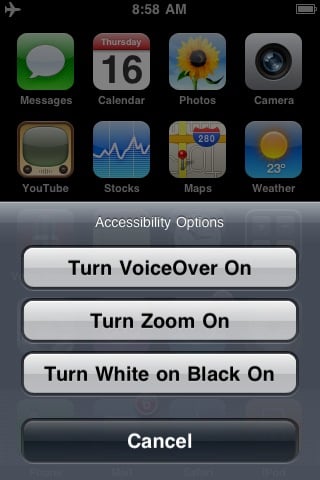
iphone 3.1 Triple Click Home for Accessibility Features

Voice Control

iphone_30_icon_voicecontrolVoice Control in iPhone 3.0, after holding down the Home button for several seconds, let you speak simple commands to place calls and control music. With iPhone 3.1, it will now also work over Bluetooth.

Just hold down the Bluetooth call button as you would the Home Button, let go, and Voice Control pops up. State your command into the BT mic, and Voice Control will "speak" the confirmation (whether it gets it right or not) through the BT earpiece.
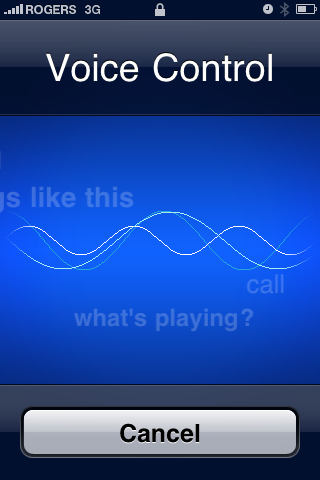
iPhone 3.0 Voice Control

MobileMe Find My iPhone Remote Passcode Lock

iphone_30_icon_find_my_iphoneExpanding on the Find My iPhone remote tracking and wiping service that came with iPhone 3.0, you can now also remotely assign a passcode lock. This is a nice half-way ground between leaving your iPhone wide open, or having to wipe it clean, if you can’t find it but aren’t sure you’ve permanently lost it.

Messages

iphone_30_icon_messagesStill no MMS for AT&T users. That's being released on September 25 (though whether it will require an iPhone 3.1.1 update, or just a new carrier file is unknown).

For those outside the US with working MMS, you can tap the action button at bottom, left to save them to the camera roll, just like you could previously do with pictures under iPhone 3.0.
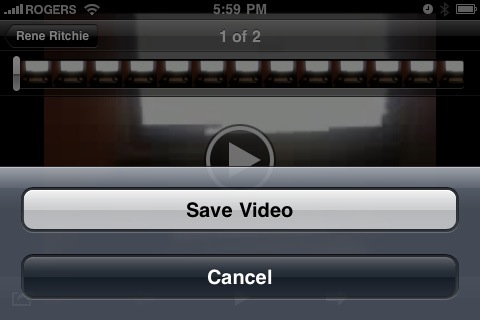
Save MMS Video

Calendar

iphone_30_icon_calendarCalendar gets a minor tweak in iPhone 3.1. Now event alerts also display the location of the event in the popup. Presumably, this is now considered important glance-able information.
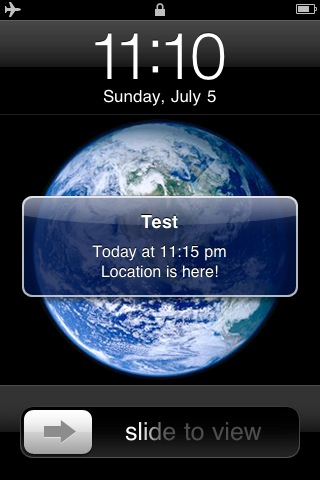
iphone_31_calendar_alert_location

Photos

iphone_30_icon_videoVideo trimming is now non-destructive. Previously, if you trimmed a video, it was automatically saved over the original, meaning you could never undo or go back to the full clip. Now, a Save As... dialog gives you the option of preserving the original and creating as many version copies as you want (an short clip to email, a longer one to share to YouTube, and the full clip to sync and bring into iMovie, for example).
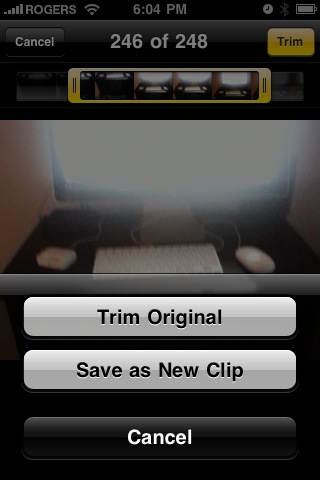
iphone 3.1 Save Trimmed Video As...

Maps

iphone_30_icon_mapsWe haven't seen this show up yet ourselves, but during Steve Jobs' iPhone 3.1 overview, the slide behind him listed Sponsored Links in Maps as a... feature. (Maybe that's why Google CEO, Eric Schmidt was there?). Not quite sure how we feel about this in a built-in app either, as opposed to a site we choose to navigate to in Safari...

Settings

iphone_30_icon_settingsSetting usually accounts for the longest list of changes in a new iPhone firmware, but this time it's fairly short.

iphone_30_icon_tetheringSettings: General: Usage now includes a separate meter for Tethering Data. Apologies again, AT&T users, but for those outside the US -- if it proves reliable! -- it could help avoid nasty overage charges if you exceed your data cap.

photo

Settings: General: Accessibility includes that aforementioned toggle for the Home Button triple-click to enable quick Accessibility switching. Options include Off, Toggle VoiceOver, Toggle White on Black, or Ask which will launch a pop-up and let you choose between the above and Turn Zoom On.
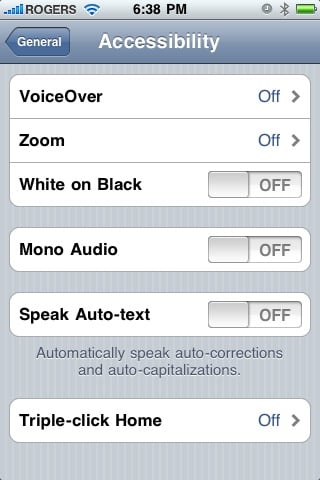
photoiPhone 3.0 triple-click options

Settings: Safari now, finally, has that toggle to enable Fraud Warnings for malicious web sites (like phishing sites, malware sites, etc.).
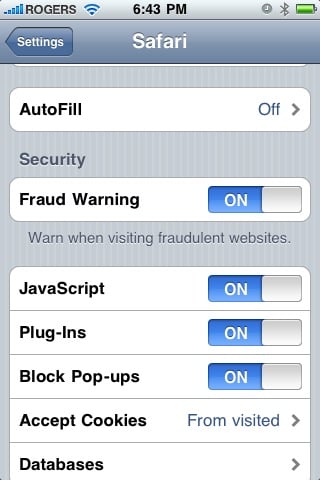
iphone 3.1: Settings: Safari: Fraud Warning

iTunes Store

iphone_30_icon_itunesiPhone 3.1 lets you display available iTunes account credit both iTunes Store, and in the App Store, and allows you to redeem gift cards and other promotional codes.
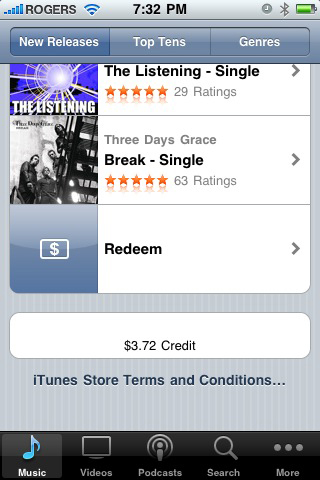
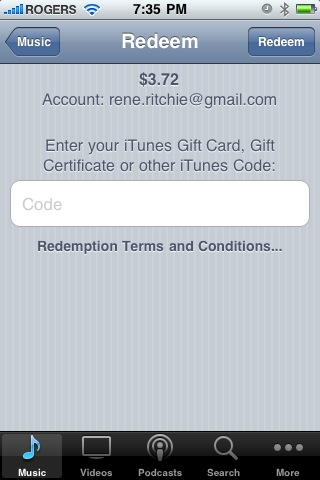
redeem1redeem2

Also, iTunes U is now "better organized".

iPhone 3.1 iTunes U

In addition, displacing Podcasts (which moves to the other side of the tracks beneath the More tab) is Ringtones, displayed like music, and available ready-made for $1.29.

iphone 3.1: iTunes: Ringtones

App Store

iphone_30_icon_appstoreSince the App Store is closer akin to a local WebView, it's fairly easy for Apple to update the App Store (or iTunes Store) without updating the firmware. Case in point, the night before iPhone 3.1 went live, the App Store was updated to feature "Top Grossing" as one of the view options. App Store Top Grossing View

Apple has extended their Genius technology to recommend apps as well in iPhone 3.1. The Genius tab appears under Featured, taking the left-most slot. Once you log in, activate, agree to the terms of service (twice!), Genius will crowd-source other iTunes App Store users with similar tastes in an effort to suggest apps you don't have but might enjoy. (The app on which the recommendation is based is listed on top of the suggested app -- nice touch).

iPhone 3.1: Genius Apps 1iPhone 3.1: Genius Apps 2iPhone 3.1: Genius Apps 3iPhone 3.1: Genius Apps 4iPhone 3.1: Genius Apps 5iPhone 3.1: Genius Apps 6

As mentioned above, you can now also see your current iTunes Store credits in the App Store, and you can now also redeem iTunes gift cards, promo codes, and certificates here as well. Feature. Parity.

itunes_account_balance

iPhone 3.1: App Store Redeem

Phone

iphone_30_icon_phoneCopy and Paste comes to the Phone Keypad. Just tap and hold and the input area will change from dark blue to light blue, and the Copy Paste menu will pop up.

iphone_30_icon_cut-copy-pasteThe iPhone Paste feature is "smart" enough to change alphanumeric phone numbers to pure numbers (i.e. 1-800-FLOWERS to 1-800-356-9377).
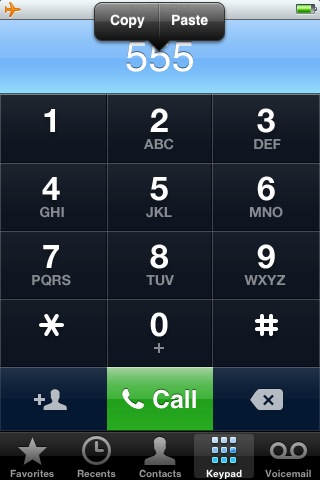
iphone_31_phone_keypad_paste

Contacts also get direct copy, so you can hold your finger down on a contact field, just like a picture in Photo, to trigger the copy pop-up menu.

contact_copy

Conclusion

Like the recently released Mac OS X 10.6 Snow Leopard, iPhone 3.1 doesn't provide a lot of fancy user-facing updates (we likely won't see those until Mac OS X 10.7 and iPhone 4.0 respectively). What it does is fix things that needed fixing, and fill in missing functionality that needed filling in. And, it throws in a couple small feature enhancements, just because.

Free for both iPhone and iPod touch 3.0 users (iPod touch 2.x users will still need to cough up $9.95 to pay the subscription accounting devil's dues), if iPhone 3.0 was a must-have for the sheer magnitude of its new functionality, 3.1 is a no-brainer update to make the must-have that much nicer-to-have as well.

[Thanks to everyone who contributed screenshots and descriptions for this walkthrough, especially Justin, Jeremy, and James. If you noticed we missed anything, drop us a note in the comments and we'll update as needed.]


Rene Ritchie

Editor-in-Chief of iMore, Executive Producer at Mobile Nations, co-host of Iterate and ZEN and TECH, cook, grappler, photon wrangler.

More Posts - Website

 TwitterFacebookGoogle Plus

← Previously

Celebrating 10 Years of Smartphone Communities

Next up →

Apple "It's only rock and roll, but we like it" Keynote Podcast Now Available on iTunes
  1. fastlane says:

    There's some good stuff here, just nothing for me. I might use the Bluetooth Voice Control once before I die... maybe... but nothing else.

  2. Dionte says:

    the price of upgrade for touch users is 4.95

    • Dhilu says:

      quoto nick (soprattutto per i filtri litapcpi alle foto, faccio la stessa cosa XD ).ragazzi, ogni tanto provo qualche gioco un po' vecchiotto ma denso di stile e ne rimango ancora piacevolemnte colpito.shadow of the colossus, non sar questo florilegio di poligoni ma ancora in grado di incantare o quando giocai al primo sient hill, graficamente meno d'mpatto rispetto alla serie di re(che si giovava di dettagliatissimi sfondi prerenderizzari), eppure la suggestione artistica di quel titolo (che trovata geniale quelle "oscillazioni" della realt ) era di gran lunga superiore.giusto per fare un ultimo esmepio, pi attinente ai giorni nostri: quando presi zelda twiligt pricess ( il primo zelda a cui abbia giocato, se non il primo che abbia mai visto), speravo solo in una buona storia dato che sulla rete avevo letto molte critiche sulla componente tecnica.ora sar io che sono abituato male, che non conosco la serie appunto, ma a me sembra bellissimo, pieno di poesia e dettagli.poi, sar che sono vecchio (e, non scherzo, credo che sia davvero una componente che incide in maniera rilevante sul mio metro di valutazione) ma davvero non mi sento di puntare esclusivamente sul realismo visivo per giudicare l'aspetto di un prodotto (lo so, sembra un ossimoro ma vi risparmio la speigazione e altre 40 righe di post). che la forza sia con voi e con lavezzi.

  3. Sting7k says:

    The 3.1 update has crashed on me 3x now doing random things. Phone just stopped responding and screen was black, had to restart.

  4. qwerty says:

    the vibration feedback for the jigglies is non-existent on my phone. ???

  5. Paul says:

    My iPhone 3G is now taking forever to back up since updating to 3.1.

  6. Bones says:

    Same here, no vibration jigglies. That is a sad state.

  7. Matt says:

    I think you have a typo under the "Voice Control" section: "Voice Control in iPhone 4.0..." should probably mean 3.0, unless you guys have super-secret Apple access.

  8. Todd says:

    Same here, no vibrations, whats the deal??

  9. Green says:

    I rather keep GV mobile.

  10. JIm says:

    I've noticed it everywhere tonight, but what's new in 3.1 is that you can save pics from emails to the roll now unlike before. You could already save pics from MMS before. I've been doing it a lot before this update. Never got a vid MMS, but I assume that would be the same? Its late for me. I'm in the UK. Thanks.

  11. Stephen says:

    "The jigglies — what Dieter lovingly calls the little dance icons do when you hold them down long enough to make them moveable and rearrangeable — now make the iPhone vibrate, if your ringer switch is set to silent, as an alternate indicator of the change of state. You can now also enable triple-clicking of the Home Button to toggle VoiceOver, Toggle White on Black, and Ask (which then will pop up a menu offering Turn VoiceOver On, Turn Zoom On, Turn White on Black On)."

    None of this is true for me. Not that it's a big deal, having the jigglies vibrate my phone, but still anyway and so on.....maybe these two things only apply to the 3GS? (for some strange and random reason - like the delicate sensors in the old 3G can't handle vibrating jigglies, perhaps).

  12. Stephen says:

    No Settings : General : Accessibility options either (on old 3G)

  13. Ezekiel06 says:

    No vibrate with the "jiggles" and i don't see the "White to Black" option.

  14. Ezekiel06 says:

    iPhone 3G by the way

  15. CG says:

    I have a 3GS and no jiggle vibration

    • Lauris says:

      I know wasn't that a great comment!It will be quite a lot of money but it does dpneed on what carrier and what time you cancel. Adding a new phone line is dirt cheap though and you could also find a buddy to use the other line or have it for emergency

  16. Pat says:

    No jiggle vibration for me either on a 3GS.

  17. Oboewan says:

    Jiggly vibration only works on silent. And the triple click is 3GS only.

  18. Marc says:

    No vibrations when editing apps for me as well? What's the deal?

  19. Justin says:

    Can anyone verify this?

    Since the 3.1 update, I no longer get the annoying message "nothing to undo" when shaking the phone at the Home screen... Is that just me?

    • Afia says:

      yea, just go to the app store on itunes and u can uaschpre or get free apps . then when you sync your iphone to itunes they will be there!hope that helps. email-if u have questions :]

  20. Todd says:

    i have a 3gs as well, the jiggles does not work, i tried on vibrate and sound, nothing. Can someone please explain??

  21. sfditty says:

    I have a 3GS, no vibrating jigglies in silent mode either.

  22. Fringgo says:

    Ya I'm mhaving the same is with the vibration. There are a lot of new features for this being a minor update.

  23. Dylan says:

    You said iPhone 4.0 a couple times, is there something I'm missing?

  24. sfditty says:

    I have the apple bluetooth headset. It doesn't respond to voice control. When I hold down the on/off button as suggested, it turns off. Does this only work with certain headsets? Does it require perhaps a 2.1 spec BT headset?

  25. Todd says:

    Im starting to wonder if the "jiggles" was happening in the beta version, but didnt make the cut in the final release. Any thoughts??

  26. Stephen says:

    Under Settings : General : Usage (on my 3GS) the display for data statistics is different. It use to just display "Statistics" which showed your 'Sent' and 'Received' data. Now there is a separate entry for 'Tethering Data.' Didn't see this mentioned elsewhere.

  27. Hakala says:

    if i would have know my troubles, i would have ran like hell! still syncing after about two hours. But thats just a personal issue. please do not take my only joking comment seriously...

  28. Carl says:

    The accessibility features are 3GS only and same with the thing that pops up when you hit the home button 3 times.

  29. Frank says:

    I've noticed that while typing a message, wether it be email or text, the keyboard is extremely quiet, almost muffled. Anyone else experiencing this? Not a big deal, just annoying....

  30. D-recka says:

    Just updated to 3.1, and I'm missing my mms settings. Is that only me or is anyone else missing theirs also?

  31. Kelly says:

    I guess I'm in the minority but I would love to see a customizable equalizer instead of using the built in presets. There is no one preset that sounds great to me. That's why I still use my Walkman mp3 player. Even if I use the Sony headphones the iPod on my iPhone doesn't compare.

    • Sejal says:

      Played around with it the whole day it is sooo adinctidg.One thing though: It would be great if the app would create a new album on the iphone instead of saving the shakeitphotos in between the standard iphone pictures. Or is that somehow restricted by apple?

  32. Mab177 says:

    Hey all yeah I just notice sense the update to 3.1 under usage I see tethering date usage for those who noticed and I'm not jailbroken

  33. Bre bre says:

    @ Frank… ive noticed that also!!! I was turning the sound up on my text messaging clicks and nothings working… believe it or not i miss the loud clicks lol

  34. iJeffro says:

    All I got from the update was the fraud setting and the battery % meter that's all nothing else I'm a lil upset I mean it was a free update but still why say it's gonna do all this new stuff then I spend the time to download it and only get to features not very happy

  35. Mab177 says:

    Can't wait for sept. 25 for MMS though I'll use it but tethering would be great to have just as a feature just incase yeah my icons don't jiggle aswell but I don't really care to much for such a small feature

  36. D-recka says:

    Ability to turn on mms in message setting is missing! Does anyone care? No?

  37. DJ Josh says:

    On 3.1 beta 3, I was not receiving new voicemail messages on my iPhone, I know that because with the official 3.1 release, I have 33 new messages going back to late July. Haha!

  38. Mab177 says:

    That's a good thing lol

  39. iSkythe says:

    No jigglies vibrating for me either. On iPhone 3G, doesn't work with it on silent either.

  40. John says:

    Maybe Im the only one here, but WOW. With my 1st gen oldschool phone 3.1 is FAST. Something has seemed "off" since 3.0. My phone has been crawling. Now its finally fast again.

    Anyone else confirm this?

  41. Clark says:

    My main problem is after the update it seems that the volume is quieter then before. Any music,movies or iphone sounds are barely audible. Youtube videos sound just fine. I haven't tried making any calls to test the level of audio. I am upset because its a big difference in level of sounds the iphone produced before the update. Also I have yet to hear any similar issues :(

  42. Bre bre says:

    @ clark… ive got the same problem but its only with the clicking sounds wen im typing my music and everything else is fine

  43. Rene Ritchie says:

    Okay, enough people aren't getting the vibe that I'm taking it out. It was certainly in the 3.1 betas, but I just did a clean install and no vibe here either. Cut at the last minute?

  44. icebike says:

    3.1 seems to have totally bricked my phone for 10 minutes.

    One minute its working, the next its totally black, and won't come on. No buttons do anything. Even plugged it in to itunes and nothing showed up on the screen.

    Plugged it into wall and it finally came up. Very weird, never saw this before. After it climbed out of what ever hole it was in, I powered down and restarted. Seems ok now.

    @John: Yes, its quite a bit faster for me too. Loading web pages on wifi seems much faster, and launching Settings, is about a third faster.

    (Launching settings on a 3G usually takes a "one thousand one, one thousand two, one thousand three" count, but now its there before I get done saying "two". Not too scientific, but works for me).

  45. Rene Ritchie says:

    Added "sponsored links in maps" (WTH?!) and direct contact copy (yes!)

  46. Stan The Man says:

    Is there anything in 3.1 for us iPhone 2G users?

  47. James R. says:

    Jigglies was indeed taken out. Should help save some battery and plus no need for it now that most will rearrange the home screens from iTunes. Also certain features only work for the 3GS. It will take a while to back up the iPhone for the first time after the update so let it take it's course or you may see problems such as data loss. MMS sliders may not show unless you have carrier "AT&T 5.0" if you still have AT&T 4.0 then you may not see anything related to MMS until AT&T releases the 5.0 for you through a iTunes update on the 25th of this month (Sept). Also less sound in certain minor applications such as text messaging (SMS) may be geared toward battery improvement. Less sound at what you do a lot of daily equals more power to cram out more texts. For some of you with a 3G do not expect to get a % meter along with the battery at the top of your screen after update. Its only on the 3GS. Hope this helps a lot of people!!!!

  48. Sean says:

    How do i rearrange apps on iTunes. I have the 3gs. It seems locked and won't let me click on that portion of the screen?

  49. Icebike says:

    Anyone notice any difference in the maps app?

    Seems like you get the blue pin point much faster and much more accurately.

  50. Benanna says:

    Clicks do seem more muffled....I am on a 3g and 3.1 is running faster than 3.0

  51. Eric says:

    Sean the rearranging of apps will only work with iTunes 9 and 3.1 installed respectively.

  52. Scott says:

    yes! 3.1 makes my Vmode Vibe Duo remote work again with my 3GS! voice control and remote functions never worked since i had it. so glad its back.

  53. GSF says:

    Not sure if anyone else encountered this but after downloading 3.1 I lost my ability to tether my iPhone 3GS (no, it's not a jail-broken phone). Anyone have a remedy or work-around for this?

  54. Chris says:

    @James R I have AT&T Carrier 5.0 Still no MMS stuff.

  55. Misframed says:

    My iphone automatically turned on fetch for my email... had to go and turn that thing off or my battery would be dead before noon...

  56. MAB177 says:

    YEAH I HAVE AT&T CARRIER 5.0 BUT NO MMS STUFF OR SLIDER PROBABLY WILL BE FIXED ON THE SEPT. 25

  57. Clark says:

    @ Icebike

    After reading your comment I tried it out on mine. It was way off. almost by half a mile. ROFL

    Glad its more accurate for you but not for me after I read your comment. haha

  58. Larr says:

    My phone keeps shutting off after sucessful 3.1 upload. Anyone else have this problem???

  59. Paul Christensen says:

    My 3.1 upgrade went extremely smoothly on my 3GS - and much faster than the 3.0.1 update.

    Several notes not mentioned: - Playlist sorting now finally matches my iTunes and iPod Classic (I use ">>" to bring several playlists to the top, which now sorts properly - If you use MobileMe to remote lock, the passcode becomes your new phone unlock code replacing the old code (if you had one)

    Not sure if others are noticing this, but Bluetooth voice control doesn't seem to recognize well. I have a high-end Plantronics earpiece that is excellent on call quality.

  60. OL says:

    Apparently allowing an app to automatically launch a phone call was disabled in 3.0 and rumors were that it'd be turned back on for 3.1. Anyone know if this is the case? It's useful for the "baby monitor" apps.

  61. Andy Fowler says:

    Alarms can now enable/disable snooze. No playlist alarms, still.

  62. Ectomort says:

    Another new MobileMe feature in 3.1 is: subscribed calendars are now synced wirelessly via MobileMe.

  63. William Hacker says:

    It looks like the iPod listing by Composer now respects Sort Composer settings. I may be wrong, but I could swear it didn't use to respect these.

  64. giromide says:

    Has anyone had any luck being able to save videos sent to them via email or syncing videos back to iTunes?

  65. Beto says:

    Where is the "Bluetooth Call Button"?????

  66. icebike says:

    Quote Story:

    Settings: Safari now, finally, has that toggle to enable Fraud Warnings for malicious web sites (like phishing sites, malware sites, etc.).

    Turns out this is far less than expected as well: http://research.zscaler.com/2009/09/watered-down-phishing-protection-in.html

    Quoting:

    The phishing protection on the iPhone is ineffective. I've tested a variety of online/validated phishing sites from PhishTank. They were generally blocked by Safari, but none were blocked by Safari Mobile. In fact, I have yet to identify a single phishing page blocked on the iPhone.

  67. icebike says:

    @LARR

    My phone keeps shutting off after sucessful 3.1 upload. Anyone else have this problem???

    This happened to me once. See #44 above.

    Haven't seen it again.

  68. Panamajack says:

    The update was free for me and my 1g iPod touch. Was the $4.95 price for people who hadn't already upgraded to 3.0? It's so patently easy to avoid the software upgrade charge regardless ... I really believe Apple does this mostly for auditing purposes, can't understand why they'd leave it so easier to circumvent.

  69. Burgi says:

    When I have new gmail via the Mail app it will appear in the Inbox for 1 second then diappear. I have to manually fetch email again. This started after my 3.1 upgrade.

  70. MAB177 says:

    SO DOES ANYONE HABE THE ICON FOR MMS IN THERE TEXTING KEYBOARD AFTER UP DATE OR DO U THINK WE WILL HAVE TO DO ANOTHER CARRIER UPDATE ON SEPT. 25???

  71. Sparky says:

    When you make this upgrade, does it clear the content from your phone? I want to upgrade but I'm currently without my machine and therefore back up and I don't want to lose what I have until I return home... Thanks

  72. y3k says:

    they removed the "vibrating while moving icons" thing like 2 betas back guys, FYI.

  73. I have the plantronics Voyager pro and Voice control on my 3.1 3GS does not recognize it. The "Call" Button is what you use to answer a phone call.

  74. I still have jiggling icons while moving them. Interesting that its missing on some phones.

  75. OK found a link that suggested I turn the headset off then on and try again. Voice Control now works on my 3GS with Voyager Pro.

  76. Raffi says:

    Same here Click sound veryyyyyy low

  77. Not sure whther this is new to 3.1 but the volume control disappears when the sound is going out via line out (as when going through the dock). The volume control did nothing in those cases so it makes sense for the control to disappear at such times.

  78. Deanna says:

    Does this fix the camera causing the PC to blue screen problem?

  79. Notice the speed increase as well. Definitely was running clunkily since 3. Going from desktop sheet to sheet is actually now faster than it seems physically possible. No jiggy vibration. First backup was molasses. Prefer the muffled keyboard (now I can turn it on). iTunes 9 is best ever version. Love finally being able to rearrange apps in the desktop.

  80. Stormchild says:

    One thing you may want to add to the list:

    If you have an original iPod touch, you no longer have persistent access to the volume control. Double-clicking the home button ONLY brings up the playback/volume controls if a song from the iPod library is playing. Otherwise it takes you to the first home screen, the search screen, or the iPod app, depending on your setting.

    Now I have NO VOLUME CONTROL at all when playing games or using music apps. This completely SUCKS. Whoever decided this was a good idea needs to be kicked in the nads.

    I've already complained about it here, and I suggest all other 1st gen iPod touch owners do the same:

    http://www.apple.com/feedback/ipodtouch.html

    • Jeff says:

      Wow! Thanks for ShakeItPhoto. Fantastic, fantastic app!! I'm so glad that you added rlieastic photo color and exposure manipulation as well as the border and sound effects. Suggested future features would be the ability to manipulate the image like Lucas Samaras and others used to do by simulating pressing, scraping and even applying heat to the image as it is processing. Anyway, thanks again!

  81. joseph says:

    I UPDATED MY IPHONE 3GS 3.1 UPDATE AND THE MMS ICON DOESN'T SHOW WHY..TWITTER ME WITH ANSWERS @yojoseph

  82. 3.1 Kills Tethering on AT&T even if you are running 5.0 or 5.1 carrier files and you have the ability to edit APNs (via .ipcc file updates).

    I just myself reverted back to the 4.0 carrier file since Tethering an MMS weren't working (so I saw no need to have a "hacked" carrier file).

    I know that some have MMS working but I couldn't care less about MMS personally since I have full e-mail support.

  83. Pete says:

    Only thing I've noticed is the very low 'click' sounds on the keyboard, whic is a bit annoying as I like a good 'click'! Does anyone know of a fix or can this be altered??

  84. Check Point says:

    iPhone OS 3.1 resolves L2TP VPN issues (malformed packet errors) with Check Point firewall products running R65 with HFA 50 installed. If you still have issues, request hotfix 786 from customer support.

  85. rocketcuse says:

    Is the VoiceOver in 3.1 still only for iPhone 3G(S)? Truly sucks if so. Besides the MMS, not having a voice command to dial from BT or to control the phone has been my biggest disappoint with the iPhone. Really, a $20 cell phone can do both of these basic functions, but not the iPhone?????

  86. rocketcuse says:

    I mean Voice Control

  87. Amol says:

    i'm not able 2 update os 3.1 from itunes..network error is showing..my internet speed is also 2 mbps..wht 2 do?

  88. Jake says:

    I have a 3Gs and my battery life now sucks because of the new 3.1os update. Don't they check this stuff before release. Geez. It takes long enough to get it in the first place. I thought they were testing it.

  89. grammarian says:

    A small point, but you make this error several times in your otherwise excellent post:

    it's = it is its = belongs to it

    Just remember, if the apostrophe follows "it," it means "it is," not "belongs to 'it'."

  90. Conor says:

    to bad 3.0 broke my wifi.

    • Unggul says:

      In the video, Nick uses the Email Photo button when vineiwg the photo on the iPhone. This generates a new email with a 800-pixel-wide photo attached.I stumbled upon a method to attach photos with much higher resolution (1040 pixels wide). Assuming you're on iPhone OS 3.0, from the thumbnail view in an album or the camera roll, tap the icon in the lower left corner, select your photos, then tap Copy . Start a new blank mail message, then paste the photos into the body. It may be an extra step or two, but the payoff is higher-resolution attachments.

  91. TigerBoi says:

    @icebike I had the same issue. Twice!

    Two days after the upgrade, my phone (3G) was non-responsive, tried plugging in to the wall and itunes, hitting buttons, no reaction, black screen and unresponsive. Even tried calling it, the phone never rang and went to voicemail. 10-15 minutes later, hit the sleep/wake button, got a bright white screen that faded into my home screen. Got the runaround with support, and was told to bring to the apple store today.

    Did it again on the way to the apple store this morning, however, it was responsive again by the time I got there, and they couldn't replicate the issue, so no replacement phone yet:-(

    Never had this behavior on 3.0.1, but it now sounds like I'm not alone, so this may be a 3.1 bug?

  92. Miles says:

    @grammarian Please get a life.

  93. Justin says:

    Rene, the vibrate when going into move apps mode was removed in 3.1 beta 3, not sure why they removed it...also not sure why the added in the first place.

  94. Ralph says:

    I had a sent message get caught in limbo. Kept trying to send but would not. I reset the phone but didn't fix. I removed my other two email accounts and it sent. Also, the phone has gone dead several times. Battery was fully charged. Had to hit the top power button to turn back on. Weird!! Never had these issues on 3.0

  95. James R. says:

    I still have the MMS features on mine after the update with AT&T Carrier 5, just can not send the message out. Get the red !. I still have tethering without a hickup. just curious as to why everyone elses does not work. Mine is not jailbroken either. The only thing I have done to it was change the carrier file. As a matter of fact see if you can change your setting under GENERAL>NETWORK>CELLULAR DATA. Mine is as follows:

    MMS APN: wap.cingular Username: Password: MMSC: 66.209.11.32 MMS Max Message Size: MMS UA Prof URL:

    might be some better settings available to get it to send but i'm still searching for them. restart your phone after the changes.

  96. Tyler says:

    Would be nice if the phone app new how to handle extensions, that would be the one and only thing I miss from my old bberry...

  97. James R. says:

    everyone with 5.0 crrier file add the following. I got MMS to send now and recieved a small update in the text field. It now has a subject line

    APN: wap.cingular Username: wap@cingulargprs.com Password: CINGULAR1 MMSC: mmsc.cingular.com MMS Proxy: 66.209.11.32:80 MMS Max Message Size: 614400 MMS UA Prof URL: [leave blank]

  98. James says:

    Since upgrading to OS 3.1 my phone will just shut off if I'm not using it for an hour. battery is fine but i have to reboot phone, never had this issue over the last year of ownership. I'm definitely blaming this on 0S 3.1 and I'm pissed. how can i go back to OS 3.0?

  99. Daniel says:

    Yay 100th comment.

    Safari has completely disappeared after the 3.1.1 update. My iTouch was jailbreaked before update but I dont see why that would do anything to the Safari.app. If anyone knows what to do please reply on this post.

Leave a Reply

Note: Comments must be civil, respectful, and on-topic. If a comment does not add to the conversation, if it contains spam advertising, or inappropriate language or content, it will be removed. Insulting the topic, author, staff, site, network, or other commenters will result in the comment being marked as spam and potential prevent future comments from appearing on the site. Do not post as a business or your comment will likely be confused with spam. Comments containing links may be held for moderation. Relax, enjoy, and share in the discussion.