Join our iPhone, iPod touch, iPad and Apple TV community today! Register Here | Login

Daily tip: How to text message multiple photos at once

By , Friday, Jan 13, 2012 at 12:08 am
11

Ever wondered whether or not you can text message multiple photos at once? The answer is yes. Sending them individually is annoying and time consuming. And why when your iPhone easily allows you to send multiple photos at once? This will not only work for text messaging but for e-mailing photos as well.

Although you can send multiple images at once there is still a few caveats that we've found. The first being that you can only send a certain number at once. In most instances, this seems to be five. It also may depend on the size of the photos you're trying to send. You can also only send one video message at a time (for now anyways).

To text multiple images at once, follow these easy steps -

  1. Open your Photos app and hit the arrow in the upper right hand corner.
  2. Now you should see a few new options along the bottom - Share, Copy, Add To (only in iOS 5), and Delete
  3. Tap on the photos you would like to SMS and then click Share. If you're tapping on too many, the Share option will be greyed out.
  4. Once you've tapped Share you'll be presented with a few options. Tap Message to send them via text.
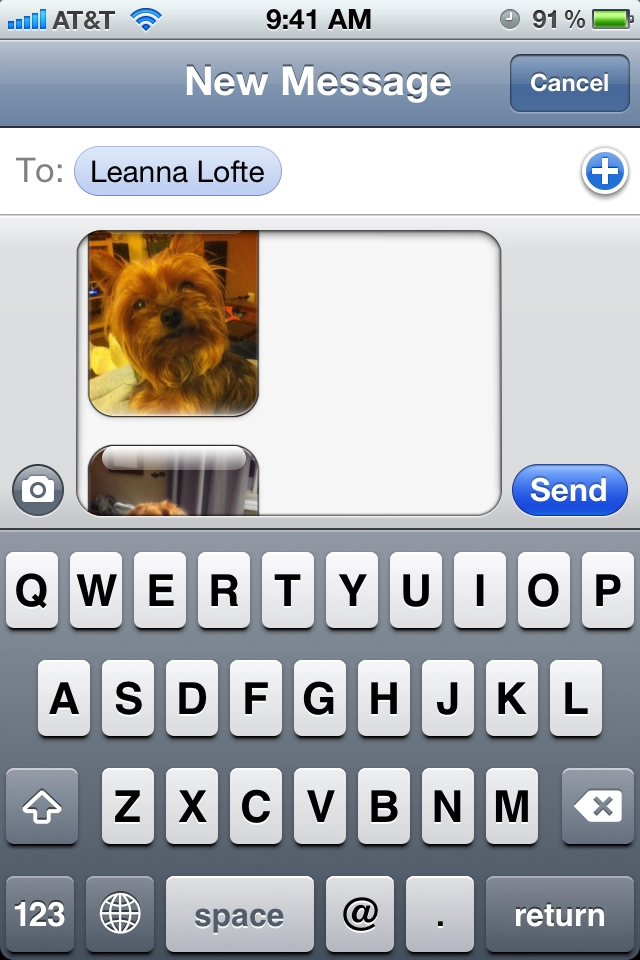
  5. Your message app will automatically open. Just type in the name of the person you want to send them to and click Send.

    That's it! All your photos will be sent to the recipient. They will receive them as separate messages but this method seems to be a lot easier than tapping each photo individually.

    Daily Tips range from beginner-level 101 to advanced-level ninjary. If you already know this tip, keep the link handy as a quick way to help a friend. If you have a tip of your own you’d like to suggest, add them to the comments or send them in to dailytips@tipb.com. (If it’s especially awesome and previously unknown to us, we’ll even give ya a reward…)

    Allyson Kazmucha

    Jailbreak, Mod, and DIY editor at iMore, Founder of PXLFIX, Potter pundit, the ninja in your iOS.

    More Posts - Website

     TwitterFacebookLinkedInPinterestGoogle PlusYelp

    ← Previously

    Access pediatrician-approved baby health and wellness info with WebMD Baby for iPhone

    Next up →

    Top 10 best alarm tones to make sure you wake up in the morning
    1. Dude says:

      You must be kidding

    2. Nand says:

      Yes, it works, but I ran into one problem, the point where we click share and the options open up, strangely I get only email, print & cancel. I don't see message (for an SMS ) why is that, any clue?

    3. Jeff Bamberger says:

      Bottom left corner for the arrow for me. Did it change with iOS 5?

    4. Patrick says:

      There's a limit of two photos. At least here.

    5. Sean says:

      So simple, yet I never knew how to do

    6. Dude says:

      It depends on the size of the picture. if u select small size pic u will have all the optins which is Email. Print, Message, and even Tweet. The biger the size the less options u will have. So if u select 2 small pics u will see e Email, Message and Print. . However, if u select 2 big size pics then u will not see Message but u can Email or print And if u select more pics which means more size then u wouldn't see ether Email or Message

    7. DonnyLong says:

      Jesus. Can you teach me how to put on a condom too?

    8. Jensen Thompson says:

      Go to hell Donny

    9. This might not be the best place to inquire about this, but I'm trying to find a pest control company in the pittsburgh area and have no way to find out who is the most effective. I uncovered this company that is definitely close to me and wished to see if anyone has any critiques on them. Spectrum Pest Control, 3058 West Liberty Avenue, Dormont, PA 15216 - (412) 446-2802

    Leave a Reply

    Note: Comments must be civil, respectful, and on-topic. If a comment does not add to the conversation, if it contains spam advertising, or inappropriate language or content, it will be removed. Insulting the topic, author, staff, site, network, or other commenters will result in the comment being marked as spam and potential prevent future comments from appearing on the site. Do not post as a business or your comment will likely be confused with spam. Comments containing links may be held for moderation. Relax, enjoy, and share in the discussion.
