Join our iPhone, iPod touch, iPad and Apple TV community today! Register Here | Login

Mac OS X Lion is here!

By , Wednesday, Jul 20, 2011 at 8:31 am
57

Mac OS X Lion arrives today

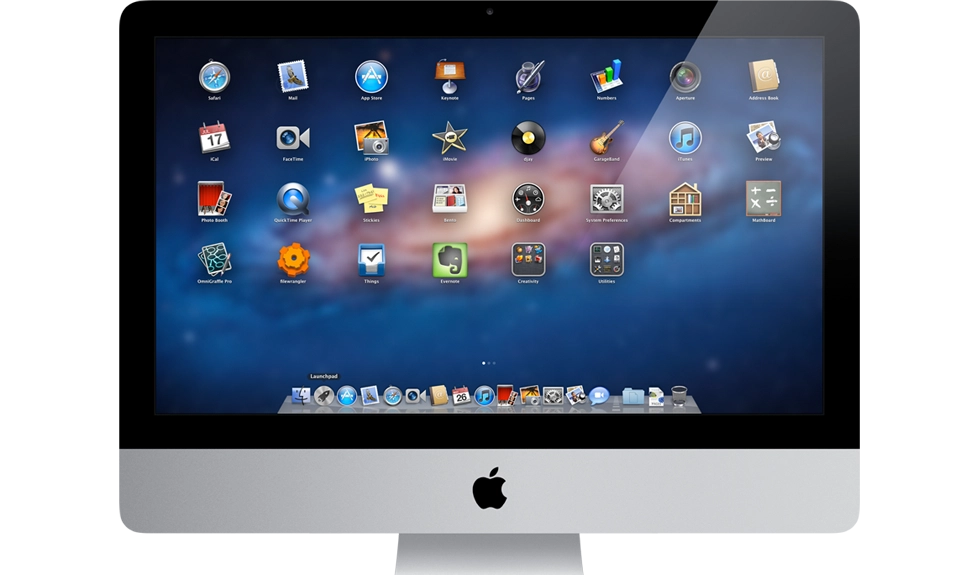
Mac OS X 10.7 Lion is here. OS X, the desktop counterpart to Apple's mobile iOS, has taken iPad innovation "Back to the Mac" with this release, including the iPad home screen-like LaunchPad for app management, automatic save and resume, etc.

“Lion is the best version of OS X yet, and we’re thrilled that users around the world can download it starting today,” said Philip Schiller, Apple’s senior vice president of Worldwide Product Marketing. “Lion makes upgrading a Mac easier than ever before; just launch the Mac App Store, buy Lion with your iTunes account, and the download and install process will begin automatically.”

It's also the first time a major Mac OS X version will be distributed online, through the Mac App Store. Gigabytes of download will be an interesting challenge for those with multiple machines, but especially for those with slower internet connections or restricted bandwidth. (Never mind what the launch day rush might do to the internet in general -- Apple servers have gone down during iOS releases in the early days.)

UPDATE: Apple has announced that Lion will be available "later this August" on a USB thumb drive for $69.

All that aside, we welcome our Mac OS X cousins to the goodness we've been enjoying for a while now in iOS. Who's getting it?

[Apple PR, $29 - Mac App Store]

Rene Ritchie

Editor-in-Chief of iMore, Executive Producer at Mobile Nations, co-host of Iterate and ZEN and TECH, cook, grappler, photon wrangler.

More Posts - Website

 TwitterFacebookGoogle Plus

← Previously

Chinese counterfeit phones are nothing new, counterfeit Apple Stores, now that’s something new!

Next up →

Apple introduces new MacBook Airs, other stuff
  1. Anonymous says:

    Yay! I can't wait. I wish they gave us a time it was going to be released. I want to get it and mess around with it before i go to work later today.

  2. Adam Dutson says:

    I've been using the GM seed and I have to say that it is really nice. The upgrade process is about as simple as it gets. Download from the Mac App Store, launch, accept the license, type in your password and go. Everything else is taken care of.

  3. Eduardo Malheiros says:

    Bought it! Downloading it right now!

  4. Caballera says:

    I plan to get it but going to wait a few days to see how it goes for everyone else. I use OSX on my for work laptop so I need it in working order, just in case something goes wrong. I've been a user of Windows for a long long time and a new user of OSX so I'm cautious.

    I would be interested if there are instructions on how to do a 'clean' install of Lion, do you just download it from the Mac App Store and are giving the option to do a 'clean' install vs. a upgrade?

  5. kch50428 says:

    Just started download. Who knows how long it's going to take... :)

  6. Dionte Love says:

    Downloading it now, should be finished by the time I get home from work. Love logmein

  7. kch50428 says:

    AppStore downloads screen shows it's "Only" a 3.47GB Download. :)

  8. Ron says:

    Just bought it, I had my ISP here this morning waiting with me. They connected a T8 Line straight to my laptop thunderbolt port and it downloaded in 5 secs. I already got it installed and I must say that I am pulling your leg. J/K... Downloading now! Prob be done in ummm by the time I get off work at 5pm hopefully!

  9. Cmoore976 says:

    Downloading on all 3 of my machines now. Once downloaded takes about 40 minutes to install...

  10. Isaac65 says:

    Downloading it now also. I don't know what you guys are talking about... Mine is only going to take 25 minutes. :D

  11. Joseph says:

    $69 Bucks! They clearly want to push the download until their servers go down... then, they will push the USB drive for $49

  12. For those with multiple machines: Download once, then copy the Lion install app from your /Applications folder to your other machines (to avoid having to download it once per machine).

  13. Can I Yo? says:

    Might get it for my Girlfriends Macbook Air so I can live vicariously through her.. I currently have the 2007 black macbook.. don't know how much fun lion would be on it without multitouch..

  14. bryant says:

    does anyone know if the black macbooks can run lion without multi touch?

  15. Dionte Love says:

    It was going slow at first but finished in less than 45 minutes, now all I can do is look at the install screen, synology released dsm 3.2 beta with support for lion too if you need it.

  16. Lgorrin18 says:

    Is taking long on a 25mbps connection :( is been downloading for like 30min and is not even 1/4 of the download :(

  17. Anonymous says:

    I paid $32.67 for a XBOX 360 and my mom got a 17 inch Toshiba laptop for $94.83 being delivered to our house tomorrow by FedEX. I will never again pay expensive retail prices at stores. I even sold a 46 inch HDTV to my boss for $650 and it only cost me $52.78 to get. Here is the website we using to get all this stuff, GrabPenny.com

  18. WAMadden4 says:

    Downloading it now :) For only $30 who would pass this up?????

  19. Ron says:

    Just finished D/L. I copied it to another folder on my Hard drive and am now making a Bootable DVD from the InstallESD.dmg disk image located in the package contents. I hope I can take that DVD to my daughters MBPro and do a Clean Install, we'll see?

  20. Jim says:

    Says you have to have Leopard to upgrade to lion. What if I'm running the previous incarnation? 10.5.8? I don't want to have to go out, buy Leopard first to then access the app store to then download Lion!!

    • captain_kid says:

      Wait for the USB thumb drive, it'll cost you a little more, but not nearly as much as buying two operating systems. The only reason you need snow leopard is because you need the bundled app store (which I think is BS)

      It's just like when Snow Leopard came out Apple said you needed to have Leopard installed first. It wasn't true. I'm gonna go out on a limb and say that this isn't true either.

      • Pat says:

        I'm pretty sure you need Snow Leopard installed to upgrade to Lion. Not only will you need to get a Snow Leopard DVD, once you have installed it you will need to run Software Update (possibly a few times) to get the last version of Snow Leopard. For instance they only put the Lion installer in Software Update last night.

        Anyway you should keep your OS up to date all the time!

  21. fastlane says:

    Waiting for feedback from CS5 users. Forums have offered no help so far. Other than that, I'm ready to buy.

    Rene, you're a CS5 user. What's the word?

    • Going to install on old MBP and see first then will try unibody. If I hit any CS5.5 issues I'll ping here.

      • captain_kid says:

        Any news... i read on adobe that there are issues with saving in Illustrator, but only when saving to the desktop. Other than that the cs3 and above issues seem minimal.

        WARNING: CS2 and below WILL NOT WORK with Lion. These applications require a now discontinued feature called rosetta which made PPC (PowerPC, apple's processor prior to Intel) compatible applications compatible with Intel based macs. If you make your living with adobe CS2 or below DON'T UPGRADE until you are able to upgrade your software.

        **A note to those who use photoshop's droplet feature. The code for for droplet was written for PPC and requires either a PPC based machine or Rosetta. If that's a feature that you rely on you may also want to rethink upgrading until this issue is resolved.

  22. Bsangs says:

    Smooth as silk download here on FIOS. Less than 20 minutes. The install however has 29 minutes remaining.

  23. Danieleon says:

    Bought it. Downloading it right now.

  24. WOOT! $30 is insane. MSFT seriously needs to reconsider their pricing. This is practically free!

  25. Mervb says:

    I have had no troubles with lion for the past 2 weeks except for coda that they just released a fix for. Rock solid performance on my air.

  26. Trankins24 says:

    Download on my MacBook 5,2 took only 3 minutes. Install took 20 minutes. Make sure you guys do a Time Machine backup first, if not it will ask to do a fresh install which wipes everything

    • Anonymous says:

      I plan on purchasing/downloading when I get home, but I'm curious about the install options -- based on what you wrote it seems that you can choose to do a hard drive wipe/clean install as part of the Lion install (which is what I want to do) but you are the only one who has said this. So for those of you who have started or installed Lion -- do you get the option to upgrade or clean install?

  27. Jungleland4383 says:

    Painless process. Downloading onto 3 machines. Just log into app store with same ID and click purchases and then click download/install next to lion. Dowloading is quick and easy. Don't know why people are saying it's a slow download. Maybe they should get a faster connection? Lol

    • Analog Spirit says:

      Well, not everyone needs a really fast connection; mine is fast enough for my needs. The download itself was 33 min., then a few more minutes after that to complete the installation (about 40 min. total). That's not too long, as I was busy with other stuff while waiting for it.

  28. Kaarloss says:

    Will i lose my files if i upgrade?

    • Analog Spirit says:

      No, you shouldn't lose any files; I downloaded it today and have had no issues. But it's always a good idea to back up your hard drive, just in case.

  29. Nowdeconstructed says:

    Did it up and running is less than an hour. No problems..all apps seems to be running without issue. some minor setting to be reset otherwise from all appearances the transition was...... seamless.

  30. Anonymous says:

    Awesome. I think I'll wait to see what others think before getting this, but I'm definitely looking forward to the new OS. Just got my first Mac a few months ago and love the gestures, so having even more is going to be nice.

  31. WAMadden4 says:

    Just got it installed... it works great and quick! Very smooth... All files intact... GREAT JOB APPLE!!!! :)

  32. kch50428 says:

    Scrolling with my Logitech mouse is going to take some getting used to...

    Edit: I went into the system preferences and turned off the new "natural" scrolling because for me, it's anything but natural. :)

  33. Taylor says:

    Unfortunately, installing Lion has caused my Hard Drive to practically crash. I've been on the phone with Apple Care for the past 3 hours trying to get the issue resolved. It's pretty frustrating.

  34. Alex N says:

    I am at my local Apple Store trying out the Macs and Mac OS X Lion. So sweet!!

  35. Analog Spirit says:

    I just bought and downloaded 10.7 Lion from the Mac App Store this morning. It took a while (about 40 minutes), but once it was finished, it ran just fine. My old 24" iMac runs a bit faster now, and feels like a new machine! It's been taking a little getting used to Lion, but so far I've had no issues at all, and am really impressed with it.

  36. Anonymous says:

    Really liking Lion so far. If you just install it and change nothing, it's very similar to Snow Leopard. But as you start to try out the new features, you'll eventually see that it's quite different in many ways.

    For example, I really missed the 4-finger swipe app-switching gesture. Completely gone. But the combination of Mission Control and full-screen apps more than makes up for it. I "get it" now, and it all seems inevitable and natural. The logical evolution beyond Snow Leopard.

  37. Anonymous says:

    Bringing iOS-like features to OS X results in a simplification of the GUI and the user experience. This is something that Microsoft simply can't do with Windows. Microsoft relentlessly adds features. They think more checkboxes on a product info sheet means that the product is better. It's part of their culture. Gates is a geek. Microsoft was made in his image.

    There are a huge number of training courses for corporate IT employees and end users that are designed to invest them in all that Windows complexity. People who have taken those courses are locked in. They've spent so much time learning Windows and Office that they can't or won't switch. Microsoft is perfectly happy to keep them locked in. The idiotic "Start" button with its multi-level menus will remain there forever.

  38. Wordpress backlink builder plugin says:

    Great blog right here! Additionally your web site quite a bit up very fast! What host are you the use of? Can I get your associate hyperlink in your host? I desire my site loaded up as fast as yours lol

Leave a Reply

Note: Comments must be civil, respectful, and on-topic. If a comment does not add to the conversation, if it contains spam advertising, or inappropriate language or content, it will be removed. Insulting the topic, author, staff, site, network, or other commenters will result in the comment being marked as spam and potential prevent future comments from appearing on the site. Do not post as a business or your comment will likely be confused with spam. Comments containing links may be held for moderation. Relax, enjoy, and share in the discussion.
