iOS 4.2 for iPhone, iPod touch, iPad, Apple TV now available!
As previously announced, iOS 4.2 for iPhone, iPod touch, iPad, and Apple TV is now available for download via iTunes (or directly on Apple TV). Expect the servers to be crushed, but let us know when you get it, when you've got it, and how it's working for you.
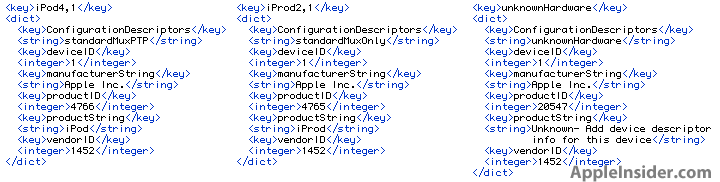
And while you're waiting for the download to finish, here once again are our handy references:


There are 130 comments. Add yours.
yeah!
Damn! Its 624 megs for iPhone 4
im on it
is working here in Miami FL
Downloading for iPad now. Servers are not crushed yet, I'm getting it fast!
Hell Yeah..it's working!!! Can't wait to play with my iPad, it will be a whole new toy again :-)
Downloading in Canada right now. Bit of a hiccup on the get go. Said it was available, but errored immediately when trying to download. Then for about 1 minute 4.1 was current. Then 4.2 was available again and seems to be coming down fine.
Downloading 4.2 for iPad in Ft Lauderdale now.
Wonder how long it'll take for a jailbreak? Hopefully today lol.
Available in UK. Downloading now
:-)
Its downloading, albeit slowly from England. (Although, it did read, 4.2.1 - hmmm, interesting, question mark).
Downloading now for iPhone4. A little slow, says it's going to take 40 minutes to download.
I just downloaded iOS4.2 for the iPad. It took a couple of times for the system to indicate an upgrade was available. Once it indicated an upgrade was available, the download was quick. Loading on the iPad now and will check out the cool updates.
can i download this without itunes. like an offline link or somthing. the ipsw file wouldbe good
4.2 for iPhone on Verizon Fios = 45 minutes....fail.
Downloading now. A little slow, so you may want to listen to some of my music while waiting in vain.
One Love.
Getting mine right now in NY
@Stephen millions of people all over the globe are downloading it right now haha. Give it some time and all will be good.
downloading here in florida
is not that slow
Still getting "server could not be contacted" in Texas.
i got a message your iphone is restarting
Downloading now for my 3GS, then will follow with my iPad.
backing up
syncing
and is alive
Got it and completed in SoCal...
..... Installing .....
Since there were a couple 4.2 GM's this time, I was able to downgrade to the first 4.2 and have iTunes recognize 4.2.1 as new this time. I know, I know, 4.2.1 GM is the same as today's release but I have O.C.D. ;-)
Can somebody please provide the build number so we know if it's the same as the 4.2.1 GM?
http://superfr8d.blogspot.com/2010/11/ios-421-8c148-available-today-impo...
find me is working fine
40 minutes remaining.. -.- LoL
just updated my 3GS, I don't see any new text tones...
Took me about 15 minutes to download. Installing on the iPad now.
80 minutes remaining...
just updated a 3GS to 4.2.1. And I still only have the regular Text Message tones. I thought there were supposed to be more?
Took me 1 minute to install on Verizon Fios for iPhone 4!
Downloading it here on Blink Fiber (Toronto/Canada). 6 minutes ETA :-)
HP Officejet J4680 All in one not working with airprint
How many times do you guys need to run the same story on TIPB? I mean really! 3+ on FindMe?
Downloading in Seattle
MY IPAD IS UPDATING!
MY IPAD IS UPDATING!!!!!!!!!!!!!!!!!!!!!!!!!!!!!
Downloaded for me first time got error. secod time it was done in about 15 min. I had already backed up previously.
All good, all cool. "Find my iPhone" works like a charm!
I'm connected to my work network, with probably 10 different variations of HP networked printers, All in one, laser, color laser, inkjet including the latest HP Officejet Pro 8500A and non of them appear when I try to use airprint.
JoeMcG: The Build Version that I just installed via iTunes (for iPad) is 8C148
Installed about half an hour ago. One problem I had was after the update the iPod app said I had no content even though iTunes was showing 3.5GB of music on my phone. Another sync corrected that though.
One semi-interesting thing I had found is the Airplay controls are now also used to control whether audio goes to a connected Bluetooth headset or the iPhone speakers. Works great with my Sony Ericsson MW600 headset. Sadly it still only seems to support AVRCP 1.0 so while play/pause, next, prev, and volume work fine the song information is not displayed on the headset display (unlike with iTunes on the Mac strangely). iPhone needs AVRCP 1.3 or higher please...
4.2.1 for iP4 starts to DL then about 1/2 way through, I get a 9006 error.... happened three times so far.
Got mine downloaded pretty quick. Have been backing up my iPad now for over an hour now and it's not even 1/2 done the backup. Man this is killer! And I don't even have much installed on it either.
Anyone know why the iPad takes so long to perform a full backup?
Before Apple released iOS 4.2.1 I already had when they released it for developers. Now today, I get the update message and the iOS 4.2.1 downloads but it gives me and error after it has completed to download. When I check the build in User/Library/iTunes/iPhone Software Updates folder the build is 8C148a that just downloaded from Apples server. I'm confused?
using the 3GS, no extra text tones and where is the option to set up the airprint???
Am I the only one that doesn't have airplay or AirPrint?
where are the new text tones for the 3gs?
Just updated to 4.2.1 successfully; I was expecting it to take a while, but it only took about 10 minutes for me over AT&T in CA.
@Bob Marley: +10! Respect...
@Rene & Tipb staff: Thank you for walking me thru the steps and for all your helpful input on this.
PEACE
Just finished the update. so far so good. Took about 10-15 minutes. So happy to get this update before my Thanksgiving trip to Toronto on Wednesday. Perfect timing!
Yea it's finally here...
Working fine in Los Angeles CA
So what are the benefits to us 3GS users?
The update to Apple TV took only a few minutes, IPhone 4 is done and using AirPlay to stream to Apple TV while the IPad updates... Everything is working pretty good so far..
Why did Apple not give the 3GS the new text tones? So stupid.
Wow there are lots of little treats in this bad boy!
i guess i'm gettig angry about this update.
according to mother apple 3gs sucks? so say it! and then scxxx xxx!!!!
Can't wait to download when I get home from work this evening. Why oh why do we still require a hard connection to a computer to update our software? When is Apple going to allow us to do OTA updates??
@DataCentre, I know when 4.0 came out, back up took a long time on my iPod touch due to my large photo file.
I got mine. My itune keeps crashing when trying to sync after 10.1. Anybody else having this problem?
DataCentre, are you plugged into a USB hub, some downgrade your connection. I had one that took forever doing backups. Now backups just take a minute or two plugged straight into the computer.
Anyone else spending a stupid amount of time waiting for it to download? I appreciate patience but its been an hour now and still 200MB to go!
(iPad)
Text ringtones.... useless.... I'd be laughing stock. Every one of them is far too long. It'll be like a blinking orchestra playing every time I get a text. Pointless waste. As for printing... top range brand new wifi Canon and it's can't find the thing. :-/
3G people. Relax and forget the ringtones. They are rubbish!
This update bricked my iPod Touch! and it's a FORTH GEN.
iPhone 4.2 downloaded rapid. iPad is now crawling and stalling at 345mb and that's with 20mb broadband. I think thier servers are struggling. Understandable really.
also its so sucks if you wanna delete only like one incoming call or out going you should be able to delete the calls that you want it doesnt let you delete what you want either all or nothing they should do something about it
to all let me know if you think this idea is good thx all
If you choose to download and NOT install 4.2, where does itunes keep the ipsw file? (Windows)
Just updated, everything was fine. But it's unable to find any printer in my office, Epson printers, Lexmark and Canon, I think I'll stick with ePrint app, it works great, effortless, and can find any printer wherever I go.
Anyone know if 4.2 has helped with a fix for the proximity sensor? I really want to stop the face dialing :(
Never mind, found it.
I wasn't aware 3GS wasn't getting the new text tones. That's a bit upsetting even if they were a little long.
Anyone else still downloading at a crawl?????
Updated fine, but now trying to see what features I received for an iPod touch 2g 16G. I think more if a fix. No airplay. Need 32G or better. Mo AirPrint, no big deal, been printing for a year now. Not much more that I can see. Sure miss the old mic icon. Well April, and the new iPad is just around the corner.
Getting Error: Network Connection Timed Out don't know why? anybody know what to do?
Is iOS 4.2 Gm build 8C148 and 8C148a the same or different?
I downloaded and installed on my ipad, and its now a brick. Good job....
10-15 minutes mines is ipad:87 min. iphone:2hrs
Now the iPad is completely locked up, itunes won't respond even after rebooting the computer, when i hook the ipad up, its coming up on the desktop as an external USB drive- nothing is in it, and the GET INFO reveals a 32kb drive with no contents, that is not formatted for mac... WTF... I guess I'll be returning to the apple store again...
Updated to ios 4.2.1 and my visual voicemail doesnt work anymore ( t-mobile NL)
@ anotherbrian. Yes I was. I unplugged it and plugged directly into my PC and it still crashes. Everything worked fine before 10.1
Any 3G (not s) users install this yet?
Does it fix the SLOOOOOWs?
You guys are crazy. Bricking your iPod? Man, that's trippy. My iOS 4.2 update showed up fine. My iPhone 4 is partying with iOS 4.2 like they were long lost friends from summer camp. It even came with a free 12 pack of Miller High Life! Let's party guys!!!
I md5 hashed the 4.2.1 GM iPhone 4 and the 4.2.1 Public Release. They had different hashes, so i did a update(not a restore) to the Public Release just to be sure.
They were the same size though, down to the bit according to the info pane in MacOSX.
My iPhone won't sync music after iTunes 10.1.
Is there anywhere else I can download iPad 4.2 faster than via iTunes. 2 hours with 20mb broadband and still only 397mb or 551 downloaded!!
Why don't they allow text tones for 3GS users? we were able to get gamecenter, why not a few more text tones? Is that too much to ask for?
If anyone would like direct downloads for iOS 4.2.1 you can get them here: http://forum.tipb.com/jailbreak-forum/201153-ios-4-2-1-direct-downloads....
@IceBike my wife has a 3G and has this installed and it runs much better than any other 4.x build yet!
downloaded 4.2 just now, but got 4.2.1 with no airplay. guess I should have waited a day.
@anotherbrian: I reinstalled itunes 10.1 for the second time . now its working again . To bad i have to re sync all my music because i took it off thinking that might solve my problem .
I go back on what I said earlier about the rubbish too long text tones.... it's childish and will be embarrassing on the train but I now like them!!! Quite good having diff tones for diff people.
Hey thanks FARPOD that direct download is almost done!!!! in a 1000th of the time it's likely to take the iTunes version which still has a third way to go! Hey, I hope this is a legit genuine version!!!
Now what do I do with the file?
@DavidJames these links are directly from Apple Download, so yes they are genuine :) http://forum.tipb.com/jailbreak-forum/201153-ios-4-2-1-direct-downloads....
@DavidJames In iTunes, you use shift (Option on Mac) + Upgrade or Restore, which ever you prefer... Restore is a fresh install, Upgrade doesnt require you to sync settings and library.
Can't turn off out-going text sounds unless I silence the entire phone. WTF.
Thanks Farbod. Before I got this message from you I thought I'd be clever and drag the downloaded file into iTunes - iPad Software Updates folder. I restarted itunes, connected the pad and it all looked to be updating wonderfully then - error: The iPad "iPad" could not be restored. An unknown error occurred (14). Over and over again it does the same thing and now it's a brick! Maybe I can back track and do what you suggested. Sorry. Should have waited for your guidance first!
@David put your phone in recovery mode and use the shift + Restore method if nothing else works.
no AirPlay feature on iPhone 3GS?! I'm really disappointed! :-(
So when it's plugged in a message says 'its detected an iPad in recovery mode' - hold shift and press the restore button in iTunes... the extract software, then 'preparing iPad software', then 'restoring software' processes run through on iTunes... then........... the big long bar moves across the right then..... an other error window comes up saying the sale thing as last time about the iPad could not be restored. Oh dear. I think it's dead!!! Lucky I'm going near an Apple store tomorrow!!
3.2.2. is latest for my iPad.
There is no 4.2.1. in my iTunes.
@David, delete all the firmware files, and restart computer. Then try restore...
Ok. So then I suppose I re-download the 4.2 file and start again. I'll do that now.
is today 4.2.1 US only????
FARBOD. Bing, Thanks! It ended-up re-downloading from within iTunes. this time in 3 minutes instead of 3 hours and all is 4.2. Now for a play!!!
Update started...NOW! More as it happens.
Update on iPad and iPhone 4 went fine. What pisses me off is this.....bought a new 27' iMac two months ago and purchased a new HP wireless printer from Apple. I tried AirPrint and guess what, it does not recognize my printer. WTF?
That is crap. Guess the $10 I spent on Print Central app is the way to go. Still sucks huge!
Just finished installing the 4.2.1 update and it works great, no issues at the moment and the Mobile Me app works perfectly.
Quick question.. Is it not possible to view video you’ve recorded from your iPhone (4) on your Apple TV? I can view pictures but no option for airplay on video.. Is this correct or am I missing something?
@Yanni - With the new update you should be able to view you pictures/videos off your Iphone on your Apple TV.
Does the 3GS not receive the Text tones update? Still have the same old boring ones....
i have a 2month old hp printer and airprint doesnt work. lame
**** make airprint work on your network. I did it with my 3Gs, Brother printer, Windows 7 and Itunes 10.1 !!!!!!! It works !!!!!
http://forums.macrumors.com/showthread.php?t=1047779
I keep getting down to about a half hour on the ipad download and it tells me my network connection failed and to check my settings. My network is fine. I've tried to download the ipad update like 5 times now. I already synched my 3G. I am wondering is this is just Apple trying to further mess with 3G owners.
I got the ipad needs to be restored error when I tried the update. I had applecare so I called them and ended up having to delete iTunes, restart my mac in a new account, reinstall iTunes and only then could I restore my iPad. It took hours, but it looks okay now. Scary though. I had a bricked iPad for hours........ and wasted an entire morning.
Well all is good so far 1 iPad and 1 iPhone 4 and 1 iPod touch 4G down and 3 more to go.Till tomorrow.
Hey guys, if you get and error when update 3000-3999 ---->>> here's a fix for it:
Error 3004: If the steps listed in Error 3000-3999 do not resolve, you may be able to resolve an error 3004 by quitting iTunes and using the following command at the command line: dscacheutil -flushcache
For people who had iOS 4.2.1 before apple had released it to the public and only to developers the verison 4.2.1 build you guys have is different then the public release. The public release build is 8C148a and the build you devs have is 8C148. It's different but you guys can update it the 8C148a. Don't know the diffrence but the builds are different
Don't know if anyone mentioned it but it looks like this update is basically worthless for Ipod Touch 2G owners. Why? Because none of the new features work on it except the different fonts in the notepad app. Even the word search in Safari doesn't work on the Ipod 2G.
I'm not seeing AirPrint anywhere on this iPhone 4,where is it located?
Thanks
DO NOT UPGRADE - WIFI IS VERY SLOW - DOWNGRADING BACK TO 3.2.2 NOW :-(
i had a problem, when i upgraded my phone 3g it doesn't work and locked to itunes and the phone is not working..what shall i do?can u pls help me?tnx...