<?xml version="1.0" encoding="UTF-8"?><rss version="2.0"
	xmlns:content="http://purl.org/rss/1.0/modules/content/"
	xmlns:dc="http://purl.org/dc/elements/1.1/"
	xmlns:atom="http://www.w3.org/2005/Atom"
	xmlns:sy="http://purl.org/rss/1.0/modules/syndication/"
		>
<channel>
	<title>Comments on: App Review: Remote for iTunes + Apple TV</title>
	<atom:link href="http://www.imore.com/2008/07/12/app-review-controller-for-itunes-apple-tv/feed/" rel="self" type="application/rss+xml" />
	<link>http://www.imore.com/2008/07/12/app-review-controller-for-itunes-apple-tv/</link>
	<description>More of everything iPhone and iPad</description>
	<lastBuildDate>Fri, 10 Feb 2012 18:03:18 +0000</lastBuildDate>
	<sy:updatePeriod>hourly</sy:updatePeriod>
	<sy:updateFrequency>1</sy:updateFrequency>
	<generator>http://wordpress.org/?v=3.3.1</generator>
	<item>
		<title>By: codevolunt</title>
		<link>http://www.imore.com/2008/07/12/app-review-controller-for-itunes-apple-tv/comment-page-1/#comment-135835</link>
		<dc:creator>codevolunt</dc:creator>
		<pubDate>Wed, 31 Mar 2010 11:02:24 +0000</pubDate>
		<guid isPermaLink="false">http://www.theiphoneblog.com/?p=3234#comment-135835</guid>
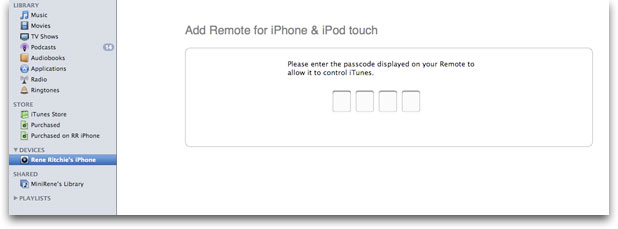
		<description>&lt;p&gt;I have been having problems connecting the Remote app on Vista 64-bit, and just investigated the references to the Bonjour service by trying to find it in the exception list for the basic Windows Firewall settings (i.e. not the other Windows Firewall with Advanced Security settings). Could not find anything called &quot;Bonjour&quot; so used the Browse... button (after clicking the &quot;Add Program...&quot; button at the bottom) to navigate to the Bonjour folder in Program Files (x86). In the Bonjour folder was an executable called mDNSResponder.exe, so I clicked on that to add it as an exception, and clicked &quot;Open&quot; and &quot;OK&quot; to add it to the list of Exceptions. After that, when launching the Remote app on the iPhone and choosing to add a library, the silver/blue/black icon appeared in iTunes under &quot;Devices&quot;, and when I clicked that, a page appeared on the right asking for the 4 digit code displayed on the Remote, did so and connected to the library ok.&lt;/p&gt;

&lt;p&gt;Only a basic test, but will report if further tests bring up any reliability issues.&lt;/p&gt;
</description>
		<content:encoded><![CDATA[<p>I have been having problems connecting the Remote app on Vista 64-bit, and just investigated the references to the Bonjour service by trying to find it in the exception list for the basic Windows Firewall settings (i.e. not the other Windows Firewall with Advanced Security settings). Could not find anything called &#8220;Bonjour&#8221; so used the Browse&#8230; button (after clicking the &#8220;Add Program&#8230;&#8221; button at the bottom) to navigate to the Bonjour folder in Program Files (x86). In the Bonjour folder was an executable called mDNSResponder.exe, so I clicked on that to add it as an exception, and clicked &#8220;Open&#8221; and &#8220;OK&#8221; to add it to the list of Exceptions. After that, when launching the Remote app on the iPhone and choosing to add a library, the silver/blue/black icon appeared in iTunes under &#8220;Devices&#8221;, and when I clicked that, a page appeared on the right asking for the 4 digit code displayed on the Remote, did so and connected to the library ok.</p>

<p>Only a basic test, but will report if further tests bring up any reliability issues.</p>]]></content:encoded>
	</item>
	<item>
		<title>By: HP</title>
		<link>http://www.imore.com/2008/07/12/app-review-controller-for-itunes-apple-tv/comment-page-1/#comment-96953</link>
		<dc:creator>HP</dc:creator>
		<pubDate>Sat, 28 Nov 2009 17:05:51 +0000</pubDate>
		<guid isPermaLink="false">http://www.theiphoneblog.com/?p=3234#comment-96953</guid>
		<description>&lt;p&gt;Hello,&lt;/p&gt;

&lt;p&gt;I am using the Remote software on my 3gs and have iTunes 9.0.  For some reason, only 10% of my songs are showing up on the iPhone Remote software.  How can I get all my music to show up?&lt;/p&gt;

&lt;p&gt;thanks&lt;/p&gt;
</description>
		<content:encoded><![CDATA[<p>Hello,</p>

<p>I am using the Remote software on my 3gs and have iTunes 9.0.  For some reason, only 10% of my songs are showing up on the iPhone Remote software.  How can I get all my music to show up?</p>

<p>thanks</p>]]></content:encoded>
	</item>
	<item>
		<title>By: Ringostarr</title>
		<link>http://www.imore.com/2008/07/12/app-review-controller-for-itunes-apple-tv/comment-page-1/#comment-96756</link>
		<dc:creator>Ringostarr</dc:creator>
		<pubDate>Fri, 27 Nov 2009 19:06:29 +0000</pubDate>
		<guid isPermaLink="false">http://www.theiphoneblog.com/?p=3234#comment-96756</guid>
		<description>&lt;p&gt;I have a problem.
My Laptop (running vista 64) is not on the same router IP as my Ipod Touch. My ipod is recognized by itunes but when i insert the code, it says connecting and then it just stops and does not connect.
i am on a college campus and am using the college wifi network. Shouldn&#039;t my laptop and ipod thus have the same router ip. what can i do to solve this ?&lt;/p&gt;
</description>
		<content:encoded><![CDATA[<p>I have a problem.
My Laptop (running vista 64) is not on the same router IP as my Ipod Touch. My ipod is recognized by itunes but when i insert the code, it says connecting and then it just stops and does not connect.
i am on a college campus and am using the college wifi network. Shouldn&#8217;t my laptop and ipod thus have the same router ip. what can i do to solve this ?</p>]]></content:encoded>
	</item>
	<item>
		<title>By: Jamie</title>
		<link>http://www.imore.com/2008/07/12/app-review-controller-for-itunes-apple-tv/comment-page-1/#comment-88968</link>
		<dc:creator>Jamie</dc:creator>
		<pubDate>Sun, 25 Oct 2009 20:59:35 +0000</pubDate>
		<guid isPermaLink="false">http://www.theiphoneblog.com/?p=3234#comment-88968</guid>
		<description>&lt;p&gt;I&#039;ve no idea why but I&#039;ve had this problem on and off since the iphone first came out - have read all the &quot;fixes&quot; - and tried them all since day dot too - none of them ever worked - but after trying noobproof on basic settings, everything works fine - thankyou noobproof - this is recommended&lt;/p&gt;
</description>
		<content:encoded><![CDATA[<p>I&#8217;ve no idea why but I&#8217;ve had this problem on and off since the iphone first came out &#8211; have read all the &#8220;fixes&#8221; &#8211; and tried them all since day dot too &#8211; none of them ever worked &#8211; but after trying noobproof on basic settings, everything works fine &#8211; thankyou noobproof &#8211; this is recommended</p>]]></content:encoded>
	</item>
	<item>
		<title>By: Mike</title>
		<link>http://www.imore.com/2008/07/12/app-review-controller-for-itunes-apple-tv/comment-page-1/#comment-84851</link>
		<dc:creator>Mike</dc:creator>
		<pubDate>Mon, 12 Oct 2009 03:26:22 +0000</pubDate>
		<guid isPermaLink="false">http://www.theiphoneblog.com/?p=3234#comment-84851</guid>
		<description>&lt;p&gt;I installed NoobProof for mac and this worked using the basic settings wizard. Hope this helps some people.&lt;/p&gt;
</description>
		<content:encoded><![CDATA[<p>I installed NoobProof for mac and this worked using the basic settings wizard. Hope this helps some people.</p>]]></content:encoded>
	</item>
	<item>
		<title>By: chris</title>
		<link>http://www.imore.com/2008/07/12/app-review-controller-for-itunes-apple-tv/comment-page-1/#comment-75818</link>
		<dc:creator>chris</dc:creator>
		<pubDate>Mon, 14 Sep 2009 23:54:01 +0000</pubDate>
		<guid isPermaLink="false">http://www.theiphoneblog.com/?p=3234#comment-75818</guid>
		<description>&lt;p&gt;Thanks Gonzo, restarting the router solved this problem for me&lt;/p&gt;
</description>
		<content:encoded><![CDATA[<p>Thanks Gonzo, restarting the router solved this problem for me</p>]]></content:encoded>
	</item>
	<item>
		<title>By: St0ut15</title>
		<link>http://www.imore.com/2008/07/12/app-review-controller-for-itunes-apple-tv/comment-page-1/#comment-68209</link>
		<dc:creator>St0ut15</dc:creator>
		<pubDate>Wed, 12 Aug 2009 20:33:21 +0000</pubDate>
		<guid isPermaLink="false">http://www.theiphoneblog.com/?p=3234#comment-68209</guid>
		<description>&lt;p&gt;Big Thanks to Casey.  Setting up port forwarding on TCP 3689 and UDP 5353 correct my problem.  I just entered in these ports to forward to my phone and PC and Boom! it worked like a charm!  I also noticed Bonjour disable in macafee... Double check all of these firewall settings.&lt;/p&gt;
</description>
		<content:encoded><![CDATA[<p>Big Thanks to Casey.  Setting up port forwarding on TCP 3689 and UDP 5353 correct my problem.  I just entered in these ports to forward to my phone and PC and Boom! it worked like a charm!  I also noticed Bonjour disable in macafee&#8230; Double check all of these firewall settings.</p>]]></content:encoded>
	</item>
	<item>
		<title>By: Jim</title>
		<link>http://www.imore.com/2008/07/12/app-review-controller-for-itunes-apple-tv/comment-page-1/#comment-64693</link>
		<dc:creator>Jim</dc:creator>
		<pubDate>Sun, 26 Jul 2009 12:01:14 +0000</pubDate>
		<guid isPermaLink="false">http://www.theiphoneblog.com/?p=3234#comment-64693</guid>
		<description>&lt;p&gt;I am having the same sort of problems as everyone else. I am running Windows with an iphone 3G S. After re-installing bonjour I managed to get to the point where my iphone appears in iTunes and I can enter the 4 digit PIN. However the iphone keeps saying &quot;Could not find Library&quot;. I have tried enabling file sharing and disabling all firewalls but no joy.&lt;/p&gt;

&lt;p&gt;Any suggestions? Thanks.&lt;/p&gt;
</description>
		<content:encoded><![CDATA[<p>I am having the same sort of problems as everyone else. I am running Windows with an iphone 3G S. After re-installing bonjour I managed to get to the point where my iphone appears in iTunes and I can enter the 4 digit PIN. However the iphone keeps saying &#8220;Could not find Library&#8221;. I have tried enabling file sharing and disabling all firewalls but no joy.</p>

<p>Any suggestions? Thanks.</p>]]></content:encoded>
	</item>
	<item>
		<title>By: Joe</title>
		<link>http://www.imore.com/2008/07/12/app-review-controller-for-itunes-apple-tv/comment-page-1/#comment-63422</link>
		<dc:creator>Joe</dc:creator>
		<pubDate>Sun, 19 Jul 2009 17:31:06 +0000</pubDate>
		<guid isPermaLink="false">http://www.theiphoneblog.com/?p=3234#comment-63422</guid>
		<description>&lt;p&gt;Eddie - I have exactly the same problem.&lt;/p&gt;

&lt;p&gt;Iphone shows up in ITunes, I enter the 4 digit access code but no joy.&lt;/p&gt;

&lt;p&gt;Dont get any error message to give me a clue as to what is happening&lt;/p&gt;

&lt;p&gt;I&#039;ve tried with both router and software firewalls disabled, ports forwarded.  Have the same prob on a Vista machine and XP Pro connected to the same network.&lt;/p&gt;

&lt;p&gt;Have also reinsalled Bonjour app but makes no diff&lt;/p&gt;

&lt;p&gt;Would be very grateful for any replies&lt;/p&gt;
</description>
		<content:encoded><![CDATA[<p>Eddie &#8211; I have exactly the same problem.</p>

<p>Iphone shows up in ITunes, I enter the 4 digit access code but no joy.</p>

<p>Dont get any error message to give me a clue as to what is happening</p>

<p>I&#8217;ve tried with both router and software firewalls disabled, ports forwarded.  Have the same prob on a Vista machine and XP Pro connected to the same network.</p>

<p>Have also reinsalled Bonjour app but makes no diff</p>

<p>Would be very grateful for any replies</p>]]></content:encoded>
	</item>
	<item>
		<title>By: Tosh</title>
		<link>http://www.imore.com/2008/07/12/app-review-controller-for-itunes-apple-tv/comment-page-1/#comment-60629</link>
		<dc:creator>Tosh</dc:creator>
		<pubDate>Sat, 04 Jul 2009 15:48:42 +0000</pubDate>
		<guid isPermaLink="false">http://www.theiphoneblog.com/?p=3234#comment-60629</guid>
		<description>&lt;p&gt;Had a the firewall problem until i read Ludo&#039;s post
Ludo Says:
July 12th, 2008 at 7:56 pm&lt;/p&gt;

&lt;p&gt;thanks for that - all works fine!!&lt;/p&gt;
</description>
		<content:encoded><![CDATA[<p>Had a the firewall problem until i read Ludo&#8217;s post
Ludo Says:
July 12th, 2008 at 7:56 pm</p>

<p>thanks for that &#8211; all works fine!!</p>]]></content:encoded>
	</item>
	<item>
		<title>By: Eddie</title>
		<link>http://www.imore.com/2008/07/12/app-review-controller-for-itunes-apple-tv/comment-page-1/#comment-43121</link>
		<dc:creator>Eddie</dc:creator>
		<pubDate>Wed, 29 Apr 2009 13:26:24 +0000</pubDate>
		<guid isPermaLink="false">http://www.theiphoneblog.com/?p=3234#comment-43121</guid>
		<description>&lt;p&gt;I&#039;m having similar problems. My Iphone shows up in ITunes, asks for the pin in Itunes, I type the code as displayed on my phone into itunes. A message at the top in itunes flashes that says Verifying your access code and then nothing happens. I type the code in again and still, NOTHING.&lt;/p&gt;

&lt;p&gt;My wi-fi must be setup correctly otherwise I wouldn’t even see my iphone as a device in itunes.&lt;/p&gt;

&lt;p&gt;This is my last attempt at getting this to work!&lt;/p&gt;

&lt;p&gt;Please help!!&lt;/p&gt;
</description>
		<content:encoded><![CDATA[<p>I&#8217;m having similar problems. My Iphone shows up in ITunes, asks for the pin in Itunes, I type the code as displayed on my phone into itunes. A message at the top in itunes flashes that says Verifying your access code and then nothing happens. I type the code in again and still, NOTHING.</p>

<p>My wi-fi must be setup correctly otherwise I wouldn’t even see my iphone as a device in itunes.</p>

<p>This is my last attempt at getting this to work!</p>

<p>Please help!!</p>]]></content:encoded>
	</item>
	<item>
		<title>By: GONZO</title>
		<link>http://www.imore.com/2008/07/12/app-review-controller-for-itunes-apple-tv/comment-page-1/#comment-37874</link>
		<dc:creator>GONZO</dc:creator>
		<pubDate>Sat, 28 Mar 2009 03:16:18 +0000</pubDate>
		<guid isPermaLink="false">http://www.theiphoneblog.com/?p=3234#comment-37874</guid>
		<description>&lt;p&gt;The only thing that consistently works for me is to restart my router - After trying everything - sharing library in itunes, look for remotes, enabling ports 3689,5353 in my firewall, turning off firewall, restart computer , restart itunes/iphone , turning off then turning back on the wifi on iphone, reinstaling bonjour , restarting the bonjour service. NONE of these things worked but when i restart my router - there is the remote - working like a charm , but then when i restart the computer i have to restart the router so i can find my library in the app. otherwise it keeps saying can&#039;t find library.
Might have something to do with the DCHP lease time in the wireless settings on the router, if i figure it out i will repost. Hope this helps.&lt;/p&gt;
</description>
		<content:encoded><![CDATA[<p>The only thing that consistently works for me is to restart my router &#8211; After trying everything &#8211; sharing library in itunes, look for remotes, enabling ports 3689,5353 in my firewall, turning off firewall, restart computer , restart itunes/iphone , turning off then turning back on the wifi on iphone, reinstaling bonjour , restarting the bonjour service. NONE of these things worked but when i restart my router &#8211; there is the remote &#8211; working like a charm , but then when i restart the computer i have to restart the router so i can find my library in the app. otherwise it keeps saying can&#8217;t find library.
Might have something to do with the DCHP lease time in the wireless settings on the router, if i figure it out i will repost. Hope this helps.</p>]]></content:encoded>
	</item>
	<item>
		<title>By: ray</title>
		<link>http://www.imore.com/2008/07/12/app-review-controller-for-itunes-apple-tv/comment-page-1/#comment-37624</link>
		<dc:creator>ray</dc:creator>
		<pubDate>Thu, 26 Mar 2009 18:10:51 +0000</pubDate>
		<guid isPermaLink="false">http://www.theiphoneblog.com/?p=3234#comment-37624</guid>
		<description>&lt;p&gt;Finally! I finally got Remote working by disabling the network settings I&#039;d set up for Parallels.&lt;/p&gt;
</description>
		<content:encoded><![CDATA[<p>Finally! I finally got Remote working by disabling the network settings I&#8217;d set up for Parallels.</p>]]></content:encoded>
	</item>
	<item>
		<title>By: Ruud</title>
		<link>http://www.imore.com/2008/07/12/app-review-controller-for-itunes-apple-tv/comment-page-1/#comment-37221</link>
		<dc:creator>Ruud</dc:creator>
		<pubDate>Tue, 24 Mar 2009 20:55:30 +0000</pubDate>
		<guid isPermaLink="false">http://www.theiphoneblog.com/?p=3234#comment-37221</guid>
		<description>&lt;p&gt;Hi there, Remote now finally works for me but it took a long time since I also couldn&#039;t get passed the &quot;verifying&quot; code.  I tried almost everything, checking iTunes preferences, resetting my router, firewalls, etc. 
The thing that made it work in the end was in my SYSTEM Preferences &gt; Internet &amp; Network &gt; Sharing. You have to activate &quot;filesharing&quot; there. Try it!&lt;/p&gt;
</description>
		<content:encoded><![CDATA[<p>Hi there, Remote now finally works for me but it took a long time since I also couldn&#8217;t get passed the &#8220;verifying&#8221; code.  I tried almost everything, checking iTunes preferences, resetting my router, firewalls, etc. 
The thing that made it work in the end was in my SYSTEM Preferences &gt; Internet &amp; Network &gt; Sharing. You have to activate &#8220;filesharing&#8221; there. Try it!</p>]]></content:encoded>
	</item>
	<item>
		<title>By: Katie</title>
		<link>http://www.imore.com/2008/07/12/app-review-controller-for-itunes-apple-tv/comment-page-1/#comment-36962</link>
		<dc:creator>Katie</dc:creator>
		<pubDate>Tue, 24 Mar 2009 01:36:03 +0000</pubDate>
		<guid isPermaLink="false">http://www.theiphoneblog.com/?p=3234#comment-36962</guid>
		<description>&lt;p&gt;I have read thru all of these posts and changed everything accordingly... Still my iphone wouldn&#039;t show up under devices! Finally i noticed that the ip address my mac was connected to was different from the one my iphone was on. I am connected to the internet via wireless thru my college... and, my iphone says it is connected to the same router, just a different ip address... Any ideas?&lt;/p&gt;
</description>
		<content:encoded><![CDATA[<p>I have read thru all of these posts and changed everything accordingly&#8230; Still my iphone wouldn&#8217;t show up under devices! Finally i noticed that the ip address my mac was connected to was different from the one my iphone was on. I am connected to the internet via wireless thru my college&#8230; and, my iphone says it is connected to the same router, just a different ip address&#8230; Any ideas?</p>]]></content:encoded>
	</item>
	<item>
		<title>By: Sasuke</title>
		<link>http://www.imore.com/2008/07/12/app-review-controller-for-itunes-apple-tv/comment-page-1/#comment-36485</link>
		<dc:creator>Sasuke</dc:creator>
		<pubDate>Fri, 20 Mar 2009 16:07:20 +0000</pubDate>
		<guid isPermaLink="false">http://www.theiphoneblog.com/?p=3234#comment-36485</guid>
		<description>&lt;p&gt;This app is not as impressive or flawless as people keep making out. Trying on a work network, and couldn&#039;t get anything to happen for a while. Eventually tried making my laptop wired (instead of wireless) and suddenly up pooped my ipod in devices. Now tying in the password does nothing except make an unsatisfying beep before asking for it again, so I fully powered down my ipod and yet it still shows up in devices!!&lt;/p&gt;

&lt;p&gt;If they added more options for the firewall side of this, or instructions on what ports to open etc it might be useful!&lt;/p&gt;
</description>
		<content:encoded><![CDATA[<p>This app is not as impressive or flawless as people keep making out. Trying on a work network, and couldn&#8217;t get anything to happen for a while. Eventually tried making my laptop wired (instead of wireless) and suddenly up pooped my ipod in devices. Now tying in the password does nothing except make an unsatisfying beep before asking for it again, so I fully powered down my ipod and yet it still shows up in devices!!</p>

<p>If they added more options for the firewall side of this, or instructions on what ports to open etc it might be useful!</p>]]></content:encoded>
	</item>
	<item>
		<title>By: cheatsisazn</title>
		<link>http://www.imore.com/2008/07/12/app-review-controller-for-itunes-apple-tv/comment-page-1/#comment-34713</link>
		<dc:creator>cheatsisazn</dc:creator>
		<pubDate>Tue, 10 Mar 2009 15:13:58 +0000</pubDate>
		<guid isPermaLink="false">http://www.theiphoneblog.com/?p=3234#comment-34713</guid>
		<description>&lt;p&gt;If you&#039;re running windows vista and have this problem, then click the orb, type in firewall &gt; windows firewall. From there, just disable the firewall, then run the remote app. It should appear in your iTunes under devices. If it doesn&#039;t....well too bad. And after you have it connected, you can turn the firewall back on and you will still be connected.&lt;/p&gt;
</description>
		<content:encoded><![CDATA[<p>If you&#8217;re running windows vista and have this problem, then click the orb, type in firewall &gt; windows firewall. From there, just disable the firewall, then run the remote app. It should appear in your iTunes under devices. If it doesn&#8217;t&#8230;.well too bad. And after you have it connected, you can turn the firewall back on and you will still be connected.</p>]]></content:encoded>
	</item>
	<item>
		<title>By: doh</title>
		<link>http://www.imore.com/2008/07/12/app-review-controller-for-itunes-apple-tv/comment-page-1/#comment-34442</link>
		<dc:creator>doh</dc:creator>
		<pubDate>Sat, 07 Mar 2009 19:37:38 +0000</pubDate>
		<guid isPermaLink="false">http://www.theiphoneblog.com/?p=3234#comment-34442</guid>
		<description>&lt;p&gt;This is a cool idea, but I&#039;ll agree with first few posts.  It&#039;s not a &quot;just works&quot; product by any means.  Especially after AppleTV updates and just a variety of smaller issues that can come up in the linking process.  The most common points of failure are firewall settings on the PC/MAC running itunes; Router &quot;multicast&quot; settings not allowing multicast traffic; itunes needing to be started, apple tv needing to be restarted, or just your router/switch needing to be restarted.  If you cannot get this to connect ensure you are able to ping your apple tv.  If you cannot you&#039;ve got more than syncing problems.  Keep in mind you&#039;ll need the apple tv to pop up as a device in itunes before you can sync to it.  The only way it&#039;ll actually pop up is if you have Itunes set to &quot;look for Apple Tv&#039;s&quot; and you have to go to your Apple TV settings and click Computers and add a Shared iTunes Library - then it will appear in itunes.  This is overly complicated in my opinion, but probably only seems that way because it is an apple product and I expected a nicer experience compared to windows products.  Oh well, good luck everyone and enjoy apple TV! it is a cool product.&lt;/p&gt;
</description>
		<content:encoded><![CDATA[<p>This is a cool idea, but I&#8217;ll agree with first few posts.  It&#8217;s not a &#8220;just works&#8221; product by any means.  Especially after AppleTV updates and just a variety of smaller issues that can come up in the linking process.  The most common points of failure are firewall settings on the PC/MAC running itunes; Router &#8220;multicast&#8221; settings not allowing multicast traffic; itunes needing to be started, apple tv needing to be restarted, or just your router/switch needing to be restarted.  If you cannot get this to connect ensure you are able to ping your apple tv.  If you cannot you&#8217;ve got more than syncing problems.  Keep in mind you&#8217;ll need the apple tv to pop up as a device in itunes before you can sync to it.  The only way it&#8217;ll actually pop up is if you have Itunes set to &#8220;look for Apple Tv&#8217;s&#8221; and you have to go to your Apple TV settings and click Computers and add a Shared iTunes Library &#8211; then it will appear in itunes.  This is overly complicated in my opinion, but probably only seems that way because it is an apple product and I expected a nicer experience compared to windows products.  Oh well, good luck everyone and enjoy apple TV! it is a cool product.</p>]]></content:encoded>
	</item>
	<item>
		<title>By: Matt Benton</title>
		<link>http://www.imore.com/2008/07/12/app-review-controller-for-itunes-apple-tv/comment-page-1/#comment-33620</link>
		<dc:creator>Matt Benton</dc:creator>
		<pubDate>Sat, 28 Feb 2009 04:01:37 +0000</pubDate>
		<guid isPermaLink="false">http://www.theiphoneblog.com/?p=3234#comment-33620</guid>
		<description>&lt;p&gt;If you can&#039;t get it to work with apple tv, set it up on pc. If that works, look in bottom right hand corner of itunes for window for speaker selection. Select apple tv and it should go to work. Mine did.&lt;/p&gt;
</description>
		<content:encoded><![CDATA[<p>If you can&#8217;t get it to work with apple tv, set it up on pc. If that works, look in bottom right hand corner of itunes for window for speaker selection. Select apple tv and it should go to work. Mine did.</p>]]></content:encoded>
	</item>
	<item>
		<title>By: Me</title>
		<link>http://www.imore.com/2008/07/12/app-review-controller-for-itunes-apple-tv/comment-page-1/#comment-29143</link>
		<dc:creator>Me</dc:creator>
		<pubDate>Fri, 23 Jan 2009 21:42:25 +0000</pubDate>
		<guid isPermaLink="false">http://www.theiphoneblog.com/?p=3234#comment-29143</guid>
		<description>&lt;p&gt;Turning off my virus protection made it work for me.
So now i know whats messing it up.
I use Avast! on Windows 7.&lt;/p&gt;
</description>
		<content:encoded><![CDATA[<p>Turning off my virus protection made it work for me.
So now i know whats messing it up.
I use Avast! on Windows 7.</p>]]></content:encoded>
	</item>
	<item>
		<title>By: Tanglereid</title>
		<link>http://www.imore.com/2008/07/12/app-review-controller-for-itunes-apple-tv/comment-page-1/#comment-28233</link>
		<dc:creator>Tanglereid</dc:creator>
		<pubDate>Fri, 16 Jan 2009 12:38:06 +0000</pubDate>
		<guid isPermaLink="false">http://www.theiphoneblog.com/?p=3234#comment-28233</guid>
		<description>&lt;p&gt;@notts:&lt;/p&gt;

&lt;p&gt;Make sure your computer and remote are on the same WiFi... i went through the same headaches until i noticed that my IPhone had connected to my neighbours&#039; unsecured WiFi instead of mine (my Imac was on mine).&lt;/p&gt;
</description>
		<content:encoded><![CDATA[<p>@notts:</p>

<p>Make sure your computer and remote are on the same WiFi&#8230; i went through the same headaches until i noticed that my IPhone had connected to my neighbours&#8217; unsecured WiFi instead of mine (my Imac was on mine).</p>]]></content:encoded>
	</item>
	<item>
		<title>By: notts</title>
		<link>http://www.imore.com/2008/07/12/app-review-controller-for-itunes-apple-tv/comment-page-1/#comment-27479</link>
		<dc:creator>notts</dc:creator>
		<pubDate>Tue, 13 Jan 2009 18:23:11 +0000</pubDate>
		<guid isPermaLink="false">http://www.theiphoneblog.com/?p=3234#comment-27479</guid>
		<description>&lt;p&gt;my pc is not finding my ipod touch i have the latest version of the remote app, my ipod touch(2.2) and of itunes. when i click on the app and select &quot;add library&quot; the 4 digit code appears however the tab on my itunes does not. i was using the app fine about 5 months ago, i have then re downloaded the app  this week as and when i go to set it up, it does not work.&lt;/p&gt;

&lt;p&gt;so can someone plz help thanks&lt;/p&gt;
</description>
		<content:encoded><![CDATA[<p>my pc is not finding my ipod touch i have the latest version of the remote app, my ipod touch(2.2) and of itunes. when i click on the app and select &#8220;add library&#8221; the 4 digit code appears however the tab on my itunes does not. i was using the app fine about 5 months ago, i have then re downloaded the app  this week as and when i go to set it up, it does not work.</p>

<p>so can someone plz help thanks</p>]]></content:encoded>
	</item>
	<item>
		<title>By: Pietro</title>
		<link>http://www.imore.com/2008/07/12/app-review-controller-for-itunes-apple-tv/comment-page-1/#comment-27296</link>
		<dc:creator>Pietro</dc:creator>
		<pubDate>Tue, 13 Jan 2009 01:26:09 +0000</pubDate>
		<guid isPermaLink="false">http://www.theiphoneblog.com/?p=3234#comment-27296</guid>
		<description>&lt;p&gt;hi, i tried everything. relax firewall (allow incoming connection), shared all library, checked &quot;Look for iPhone and iPod Touch Remotes&quot; option and still nothing pop-up  when i press add library on my ipod touch (the devices are on the same network). this happens if i use the wireless interface of my MBP, if i use ethernet card everything work perfect, also vnc lite has same behaviour (works fine on etheret, nothing using wireless). can someone help me?&lt;/p&gt;
</description>
		<content:encoded><![CDATA[<p>hi, i tried everything. relax firewall (allow incoming connection), shared all library, checked &#8220;Look for iPhone and iPod Touch Remotes&#8221; option and still nothing pop-up  when i press add library on my ipod touch (the devices are on the same network). this happens if i use the wireless interface of my MBP, if i use ethernet card everything work perfect, also vnc lite has same behaviour (works fine on etheret, nothing using wireless). can someone help me?</p>]]></content:encoded>
	</item>
	<item>
		<title>By: chantel</title>
		<link>http://www.imore.com/2008/07/12/app-review-controller-for-itunes-apple-tv/comment-page-1/#comment-24090</link>
		<dc:creator>chantel</dc:creator>
		<pubDate>Thu, 18 Dec 2008 06:40:33 +0000</pubDate>
		<guid isPermaLink="false">http://www.theiphoneblog.com/?p=3234#comment-24090</guid>
		<description>&lt;p&gt;im computer illeterate and im trying to get my iphone remote to work with my toshiba can someone walk me through the steps. I have a wireless internet card thats hooked up to my computer&lt;/p&gt;
</description>
		<content:encoded><![CDATA[<p>im computer illeterate and im trying to get my iphone remote to work with my toshiba can someone walk me through the steps. I have a wireless internet card thats hooked up to my computer</p>]]></content:encoded>
	</item>
	<item>
		<title>By: Larry</title>
		<link>http://www.imore.com/2008/07/12/app-review-controller-for-itunes-apple-tv/comment-page-1/#comment-17031</link>
		<dc:creator>Larry</dc:creator>
		<pubDate>Thu, 09 Oct 2008 10:17:08 +0000</pubDate>
		<guid isPermaLink="false">http://www.theiphoneblog.com/?p=3234#comment-17031</guid>
		<description>&lt;p&gt;When remote controlling the Apple TV, cover art does initially not display. However, when skipping forward or backward within the same album, the cover art displays correctly. When skipping or playing between albums, the cover art does not display. Has anyone gotten the cover art to work from Apple TV without skipping within albums?&lt;/p&gt;
</description>
		<content:encoded><![CDATA[<p>When remote controlling the Apple TV, cover art does initially not display. However, when skipping forward or backward within the same album, the cover art displays correctly. When skipping or playing between albums, the cover art does not display. Has anyone gotten the cover art to work from Apple TV without skipping within albums?</p>]]></content:encoded>
	</item>
	<item>
		<title>By: Ken</title>
		<link>http://www.imore.com/2008/07/12/app-review-controller-for-itunes-apple-tv/comment-page-1/#comment-16135</link>
		<dc:creator>Ken</dc:creator>
		<pubDate>Mon, 29 Sep 2008 16:02:15 +0000</pubDate>
		<guid isPermaLink="false">http://www.theiphoneblog.com/?p=3234#comment-16135</guid>
		<description>&lt;p&gt;mine did not work neither. but i just noted that there is actually a setting to enable it:&lt;/p&gt;

&lt;p&gt;go to preference --&gt; &#039;device&#039; tab --&gt; check &#039;Look for iPhone and iPod Touch Remotes. &lt;/p&gt;

&lt;p&gt;It works immediately!&lt;/p&gt;
</description>
		<content:encoded><![CDATA[<p>mine did not work neither. but i just noted that there is actually a setting to enable it:</p>

<p>go to preference &#8211;&gt; &#8216;device&#8217; tab &#8211;&gt; check &#8216;Look for iPhone and iPod Touch Remotes. </p>

<p>It works immediately!</p>]]></content:encoded>
	</item>
	<item>
		<title>By: jimusik</title>
		<link>http://www.imore.com/2008/07/12/app-review-controller-for-itunes-apple-tv/comment-page-1/#comment-16017</link>
		<dc:creator>jimusik</dc:creator>
		<pubDate>Sun, 28 Sep 2008 01:24:34 +0000</pubDate>
		<guid isPermaLink="false">http://www.theiphoneblog.com/?p=3234#comment-16017</guid>
		<description>&lt;p&gt;Make sure you are sharing your entire library in iTunes or else the remote app will give you an unknown error.  I had my sharing only a few playlists and it was not working.  Switched to entire library and everything worked.&lt;/p&gt;
</description>
		<content:encoded><![CDATA[<p>Make sure you are sharing your entire library in iTunes or else the remote app will give you an unknown error.  I had my sharing only a few playlists and it was not working.  Switched to entire library and everything worked.</p>]]></content:encoded>
	</item>
	<item>
		<title>By: evan</title>
		<link>http://www.imore.com/2008/07/12/app-review-controller-for-itunes-apple-tv/comment-page-1/#comment-15694</link>
		<dc:creator>evan</dc:creator>
		<pubDate>Tue, 23 Sep 2008 19:07:42 +0000</pubDate>
		<guid isPermaLink="false">http://www.theiphoneblog.com/?p=3234#comment-15694</guid>
		<description>&lt;p&gt;Why is only some of the artwork showing?  When I stream from iTunes, all of the artwork shows. If I&#039;m listening to music from the appletv, only some artwork shows. Any suggestions? This is driving me crazy. Could it be a firewall setting?  Thanks for any and all help!&lt;/p&gt;
</description>
		<content:encoded><![CDATA[<p>Why is only some of the artwork showing?  When I stream from iTunes, all of the artwork shows. If I&#8217;m listening to music from the appletv, only some artwork shows. Any suggestions? This is driving me crazy. Could it be a firewall setting?  Thanks for any and all help!</p>]]></content:encoded>
	</item>
	<item>
		<title>By: Pat</title>
		<link>http://www.imore.com/2008/07/12/app-review-controller-for-itunes-apple-tv/comment-page-1/#comment-15141</link>
		<dc:creator>Pat</dc:creator>
		<pubDate>Wed, 17 Sep 2008 19:07:17 +0000</pubDate>
		<guid isPermaLink="false">http://www.theiphoneblog.com/?p=3234#comment-15141</guid>
		<description>&lt;p&gt;Hi! did you notice problem with the new version of remote ? I upgrade with 1.1 and cant access correctly with my library in Apple TV. Cant start the music, just browse library.&lt;/p&gt;

&lt;p&gt;All was OK with previous version.&lt;/p&gt;
</description>
		<content:encoded><![CDATA[<p>Hi! did you notice problem with the new version of remote ? I upgrade with 1.1 and cant access correctly with my library in Apple TV. Cant start the music, just browse library.</p>

<p>All was OK with previous version.</p>]]></content:encoded>
	</item>
	<item>
		<title>By: Suxondeez</title>
		<link>http://www.imore.com/2008/07/12/app-review-controller-for-itunes-apple-tv/comment-page-1/#comment-13114</link>
		<dc:creator>Suxondeez</dc:creator>
		<pubDate>Fri, 22 Aug 2008 04:54:44 +0000</pubDate>
		<guid isPermaLink="false">http://www.theiphoneblog.com/?p=3234#comment-13114</guid>
		<description>&lt;p&gt;well I just figured it out after spending hours and hours looking on form and doing it myself. Well first off for PC, Linksys Router, and Norton users. Open ports 3689 TCP and 5353 UDP for Linksys. For Norton what I did was add the ports under Program Control. Add the ports for Itunes and for Apple Computer Bonjour. Modify it go under Communitations allow TCP/UDP then ADD Individually specified ports and under Locality click Remote. Well Goodluck and enjoy&lt;/p&gt;
</description>
		<content:encoded><![CDATA[<p>well I just figured it out after spending hours and hours looking on form and doing it myself. Well first off for PC, Linksys Router, and Norton users. Open ports 3689 TCP and 5353 UDP for Linksys. For Norton what I did was add the ports under Program Control. Add the ports for Itunes and for Apple Computer Bonjour. Modify it go under Communitations allow TCP/UDP then ADD Individually specified ports and under Locality click Remote. Well Goodluck and enjoy</p>]]></content:encoded>
	</item>
	<item>
		<title>By: AFS</title>
		<link>http://www.imore.com/2008/07/12/app-review-controller-for-itunes-apple-tv/comment-page-1/#comment-12874</link>
		<dc:creator>AFS</dc:creator>
		<pubDate>Wed, 20 Aug 2008 04:10:02 +0000</pubDate>
		<guid isPermaLink="false">http://www.theiphoneblog.com/?p=3234#comment-12874</guid>
		<description>&lt;p&gt;Remote had worked when first installed but went sour.  I could pair the iphone with with itunes running on a Mac laptop but got the &quot;library could not be found&quot; error.  I tried various fixes and was about the restart the computer when I realized that I had VPN client open.  When that was closed the app worked fine again.  VPN client also interferes with printing from my Airport router so I should have guessed that could be a problem.  Hope this helps other.&lt;/p&gt;
</description>
		<content:encoded><![CDATA[<p>Remote had worked when first installed but went sour.  I could pair the iphone with with itunes running on a Mac laptop but got the &#8220;library could not be found&#8221; error.  I tried various fixes and was about the restart the computer when I realized that I had VPN client open.  When that was closed the app worked fine again.  VPN client also interferes with printing from my Airport router so I should have guessed that could be a problem.  Hope this helps other.</p>]]></content:encoded>
	</item>
	<item>
		<title>By: macG</title>
		<link>http://www.imore.com/2008/07/12/app-review-controller-for-itunes-apple-tv/comment-page-1/#comment-12870</link>
		<dc:creator>macG</dc:creator>
		<pubDate>Wed, 20 Aug 2008 02:23:44 +0000</pubDate>
		<guid isPermaLink="false">http://www.theiphoneblog.com/?p=3234#comment-12870</guid>
		<description>&lt;p&gt;solved!!!   with info from:&lt;/p&gt;

&lt;p&gt;http://support.apple.com/kb/TS1741&lt;/p&gt;

&lt;p&gt;(itunes&gt;preferences&gt;advanced&gt;look for iphone was unchecked)&lt;/p&gt;
</description>
		<content:encoded><![CDATA[<p>solved!!!   with info from:</p>

<p><a href="http://support.apple.com/kb/TS1741" rel="nofollow">http://support.apple.com/kb/TS1741</a></p>

<p>(itunes&gt;preferences&gt;advanced&gt;look for iphone was unchecked)</p>]]></content:encoded>
	</item>
	<item>
		<title>By: macG</title>
		<link>http://www.imore.com/2008/07/12/app-review-controller-for-itunes-apple-tv/comment-page-1/#comment-12869</link>
		<dc:creator>macG</dc:creator>
		<pubDate>Wed, 20 Aug 2008 02:11:40 +0000</pubDate>
		<guid isPermaLink="false">http://www.theiphoneblog.com/?p=3234#comment-12869</guid>
		<description>&lt;p&gt;I cannot get it to work either.  Nothing pops up in Itunes even though the library is &quot;shared&quot; with no password.&lt;/p&gt;

&lt;p&gt;Leopard defaults to minimum firewall security (accepting all incoming connections)... though I&#039;ve also tried specifically excepting the itunes app.&lt;/p&gt;

&lt;p&gt;I can see my iphone and various computers checked-out ip address from my router status page.  File sharing works between my pc and my mac so I know the router is allowing communication between hosts.  I do, however, have a sneaking suspicion that this problem may be router specific.&lt;/p&gt;

&lt;p&gt;EVERYONE:  PLEASE POST WHAT ROUTER MODELS YOU ARE USING.&lt;/p&gt;

&lt;p&gt;I&#039;m using Netgear WPN824v2 at the latest firmware.  (btw I hate this router... don&#039;t get one it has a firmware memory leak that netgear will not acknowledge... I have to restart it every day).&lt;/p&gt;
</description>
		<content:encoded><![CDATA[<p>I cannot get it to work either.  Nothing pops up in Itunes even though the library is &#8220;shared&#8221; with no password.</p>

<p>Leopard defaults to minimum firewall security (accepting all incoming connections)&#8230; though I&#8217;ve also tried specifically excepting the itunes app.</p>

<p>I can see my iphone and various computers checked-out ip address from my router status page.  File sharing works between my pc and my mac so I know the router is allowing communication between hosts.  I do, however, have a sneaking suspicion that this problem may be router specific.</p>

<p>EVERYONE:  PLEASE POST WHAT ROUTER MODELS YOU ARE USING.</p>

<p>I&#8217;m using Netgear WPN824v2 at the latest firmware.  (btw I hate this router&#8230; don&#8217;t get one it has a firmware memory leak that netgear will not acknowledge&#8230; I have to restart it every day).</p>]]></content:encoded>
	</item>
	<item>
		<title>By: marshall</title>
		<link>http://www.imore.com/2008/07/12/app-review-controller-for-itunes-apple-tv/comment-page-1/#comment-12295</link>
		<dc:creator>marshall</dc:creator>
		<pubDate>Tue, 12 Aug 2008 21:54:23 +0000</pubDate>
		<guid isPermaLink="false">http://www.theiphoneblog.com/?p=3234#comment-12295</guid>
		<description>&lt;p&gt;well i went through the whole ordeal as described above with firewall settings etc.  I even went back to a restore point a few days ago when this app originally worked.  No Luck.  Finally I deleted the remote app, reset the phone and reloaded it.  This worked, but i&#039;m scared to shut it down for fear of going through the same thing.  God I hate Vista, but this app is frustrating because of its inability to be manually configured.  Can&#039;t someone create a similar app.  I&#039;ll pay for it.  Surely someone out there is capable.  I know i&#039;m not.&lt;/p&gt;
</description>
		<content:encoded><![CDATA[<p>well i went through the whole ordeal as described above with firewall settings etc.  I even went back to a restore point a few days ago when this app originally worked.  No Luck.  Finally I deleted the remote app, reset the phone and reloaded it.  This worked, but i&#8217;m scared to shut it down for fear of going through the same thing.  God I hate Vista, but this app is frustrating because of its inability to be manually configured.  Can&#8217;t someone create a similar app.  I&#8217;ll pay for it.  Surely someone out there is capable.  I know i&#8217;m not.</p>]]></content:encoded>
	</item>
	<item>
		<title>By: Michel</title>
		<link>http://www.imore.com/2008/07/12/app-review-controller-for-itunes-apple-tv/comment-page-1/#comment-12179</link>
		<dc:creator>Michel</dc:creator>
		<pubDate>Mon, 11 Aug 2008 16:40:02 +0000</pubDate>
		<guid isPermaLink="false">http://www.theiphoneblog.com/?p=3234#comment-12179</guid>
		<description>&lt;p&gt;True, nobody has seen a proper answer, at least not for a Vista PC and non-Apple wireless routers. I&#039;ve got a Vista64, D-Link router and checked everything. Firewalls down, bonjour installed, iTunes 7.7.1.11, wifi working on the iPhone, numerous restarts of PC and iPhone. 
No luck, as for others the phone does not appear in iTunes. Very frustrating when one has 12 years experience as a SysAdmin.  Does anyone from apple read this forum at all?&lt;/p&gt;
</description>
		<content:encoded><![CDATA[<p>True, nobody has seen a proper answer, at least not for a Vista PC and non-Apple wireless routers. I&#8217;ve got a Vista64, D-Link router and checked everything. Firewalls down, bonjour installed, iTunes 7.7.1.11, wifi working on the iPhone, numerous restarts of PC and iPhone. 
No luck, as for others the phone does not appear in iTunes. Very frustrating when one has 12 years experience as a SysAdmin.  Does anyone from apple read this forum at all?</p>]]></content:encoded>
	</item>
	<item>
		<title>By: LOU</title>
		<link>http://www.imore.com/2008/07/12/app-review-controller-for-itunes-apple-tv/comment-page-1/#comment-12137</link>
		<dc:creator>LOU</dc:creator>
		<pubDate>Mon, 11 Aug 2008 02:19:04 +0000</pubDate>
		<guid isPermaLink="false">http://www.theiphoneblog.com/?p=3234#comment-12137</guid>
		<description>&lt;p&gt;Many people have mentioned that the application will not show up under the device list on itunes. I am having the same problem, and dont think i have seen an answer. Its not a firewall issue, itunes just wont recognize the app (even though it is on the phone and listed in apps...just not listed under device)&lt;/p&gt;
</description>
		<content:encoded><![CDATA[<p>Many people have mentioned that the application will not show up under the device list on itunes. I am having the same problem, and dont think i have seen an answer. Its not a firewall issue, itunes just wont recognize the app (even though it is on the phone and listed in apps&#8230;just not listed under device)</p>]]></content:encoded>
	</item>
	<item>
		<title>By: Ege</title>
		<link>http://www.imore.com/2008/07/12/app-review-controller-for-itunes-apple-tv/comment-page-1/#comment-12113</link>
		<dc:creator>Ege</dc:creator>
		<pubDate>Sun, 10 Aug 2008 17:36:33 +0000</pubDate>
		<guid isPermaLink="false">http://www.theiphoneblog.com/?p=3234#comment-12113</guid>
		<description>&lt;p&gt;I had the same error on pc &quot;could not find library...&quot;
The cause of mine was I deleted ituneshelper.exe from the startup applications,when I&#039;ve put it back problem resolved&lt;/p&gt;
</description>
		<content:encoded><![CDATA[<p>I had the same error on pc &#8220;could not find library&#8230;&#8221;
The cause of mine was I deleted ituneshelper.exe from the startup applications,when I&#8217;ve put it back problem resolved</p>]]></content:encoded>
	</item>
	<item>
		<title>By: Doug</title>
		<link>http://www.imore.com/2008/07/12/app-review-controller-for-itunes-apple-tv/comment-page-1/#comment-11800</link>
		<dc:creator>Doug</dc:creator>
		<pubDate>Tue, 05 Aug 2008 06:03:24 +0000</pubDate>
		<guid isPermaLink="false">http://www.theiphoneblog.com/?p=3234#comment-11800</guid>
		<description>&lt;p&gt;For those of you having trouble with the OSX Firewall Settings... see this:  http://support.apple.com/kb/HT1810.&lt;/p&gt;

&lt;p&gt;You cannot select &#039;Essential services only&#039;.  Select Set access for specific services by application, and &#039;allow all incoming connections&#039; for iTunes.&lt;/p&gt;

&lt;p&gt;I had same issue, OSX firewall settings are NOT what I&#039;d call intuitive.&lt;/p&gt;
</description>
		<content:encoded><![CDATA[<p>For those of you having trouble with the OSX Firewall Settings&#8230; see this:  <a href="http://support.apple.com/kb/HT1810." rel="nofollow">http://support.apple.com/kb/HT1810.</a></p>

<p>You cannot select &#8216;Essential services only&#8217;.  Select Set access for specific services by application, and &#8216;allow all incoming connections&#8217; for iTunes.</p>

<p>I had same issue, OSX firewall settings are NOT what I&#8217;d call intuitive.</p>]]></content:encoded>
	</item>
	<item>
		<title>By: Dave</title>
		<link>http://www.imore.com/2008/07/12/app-review-controller-for-itunes-apple-tv/comment-page-1/#comment-11776</link>
		<dc:creator>Dave</dc:creator>
		<pubDate>Mon, 04 Aug 2008 23:59:00 +0000</pubDate>
		<guid isPermaLink="false">http://www.theiphoneblog.com/?p=3234#comment-11776</guid>
		<description>&lt;p&gt;How can you get to settings on your Apple TV and youtube on Apple TV.  The remotes that come with apple TV have somehow been disabled.&lt;/p&gt;
</description>
		<content:encoded><![CDATA[<p>How can you get to settings on your Apple TV and youtube on Apple TV.  The remotes that come with apple TV have somehow been disabled.</p>]]></content:encoded>
	</item>
	<item>
		<title>By: Lindsay</title>
		<link>http://www.imore.com/2008/07/12/app-review-controller-for-itunes-apple-tv/comment-page-1/#comment-11585</link>
		<dc:creator>Lindsay</dc:creator>
		<pubDate>Thu, 31 Jul 2008 03:05:10 +0000</pubDate>
		<guid isPermaLink="false">http://www.theiphoneblog.com/?p=3234#comment-11585</guid>
		<description>&lt;p&gt;I am a windows user, and for some reason Bonjour was disabled.  I re-downloaded the setup file from Apple&#039;s website &amp; &quot;fixed&quot; the program... which reset anything I might have blocked weeks ago (not knowing what Bonjour was at the time).&lt;/p&gt;

&lt;p&gt;Close and re-open iTunes after that... the computer starts perking up.... recognizes the iphone... and viola!.... the remote app works like everyone has been saying. &lt;/p&gt;

&lt;p&gt;It&#039;s great.&lt;/p&gt;
</description>
		<content:encoded><![CDATA[<p>I am a windows user, and for some reason Bonjour was disabled.  I re-downloaded the setup file from Apple&#8217;s website &amp; &#8220;fixed&#8221; the program&#8230; which reset anything I might have blocked weeks ago (not knowing what Bonjour was at the time).</p>

<p>Close and re-open iTunes after that&#8230; the computer starts perking up&#8230;. recognizes the iphone&#8230; and viola!&#8230;. the remote app works like everyone has been saying. </p>

<p>It&#8217;s great.</p>]]></content:encoded>
	</item>
	<item>
		<title>By: eduardo</title>
		<link>http://www.imore.com/2008/07/12/app-review-controller-for-itunes-apple-tv/comment-page-1/#comment-11529</link>
		<dc:creator>eduardo</dc:creator>
		<pubDate>Wed, 30 Jul 2008 16:29:13 +0000</pubDate>
		<guid isPermaLink="false">http://www.theiphoneblog.com/?p=3234#comment-11529</guid>
		<description>&lt;p&gt;it seems to not work for me. is it because my computer uses wired internet and my device uses wireless? if so please help me resolve&lt;/p&gt;
</description>
		<content:encoded><![CDATA[<p>it seems to not work for me. is it because my computer uses wired internet and my device uses wireless? if so please help me resolve</p>]]></content:encoded>
	</item>
	<item>
		<title>By: Ian</title>
		<link>http://www.imore.com/2008/07/12/app-review-controller-for-itunes-apple-tv/comment-page-1/#comment-11509</link>
		<dc:creator>Ian</dc:creator>
		<pubDate>Wed, 30 Jul 2008 05:39:17 +0000</pubDate>
		<guid isPermaLink="false">http://www.theiphoneblog.com/?p=3234#comment-11509</guid>
		<description>&lt;p&gt;Works for me, this is a must have app.  Only problem I&#039;ve had is that it reliabely crashes iTunes (running on OSX) if it is in full screen cover flow view and I change the track on the iPhone.  The speed at which is starts up the next track you select is amazing - sub 1 second for me.   Once they fix the minor bug with the cover flow view it will be a perfect app.&lt;/p&gt;
</description>
		<content:encoded><![CDATA[<p>Works for me, this is a must have app.  Only problem I&#8217;ve had is that it reliabely crashes iTunes (running on OSX) if it is in full screen cover flow view and I change the track on the iPhone.  The speed at which is starts up the next track you select is amazing &#8211; sub 1 second for me.   Once they fix the minor bug with the cover flow view it will be a perfect app.</p>]]></content:encoded>
	</item>
	<item>
		<title>By: Dan35</title>
		<link>http://www.imore.com/2008/07/12/app-review-controller-for-itunes-apple-tv/comment-page-1/#comment-11501</link>
		<dc:creator>Dan35</dc:creator>
		<pubDate>Wed, 30 Jul 2008 02:02:54 +0000</pubDate>
		<guid isPermaLink="false">http://www.theiphoneblog.com/?p=3234#comment-11501</guid>
		<description>&lt;p&gt;if it helps anyone I solved the remote issue as follows&lt;/p&gt;

&lt;p&gt;Finally got my phone to appear on itunes as an option by installing an old USB wireless adapter I had. 2 days of trying to get the wired network to work was too much!!&lt;/p&gt;

&lt;p&gt;Issue of not finding library was resolved by switching back from windows firewall to zonealarm where I had more control&lt;/p&gt;

&lt;p&gt;I&#039;m sure someone with nmroe experience could have resolved both the netwok and firewall issue but I couldn&#039;t. Hope you all find a fix that works&lt;/p&gt;
</description>
		<content:encoded><![CDATA[<p>if it helps anyone I solved the remote issue as follows</p>

<p>Finally got my phone to appear on itunes as an option by installing an old USB wireless adapter I had. 2 days of trying to get the wired network to work was too much!!</p>

<p>Issue of not finding library was resolved by switching back from windows firewall to zonealarm where I had more control</p>

<p>I&#8217;m sure someone with nmroe experience could have resolved both the netwok and firewall issue but I couldn&#8217;t. Hope you all find a fix that works</p>]]></content:encoded>
	</item>
	<item>
		<title>By: chartguy69</title>
		<link>http://www.imore.com/2008/07/12/app-review-controller-for-itunes-apple-tv/comment-page-1/#comment-11473</link>
		<dc:creator>chartguy69</dc:creator>
		<pubDate>Tue, 29 Jul 2008 19:19:33 +0000</pubDate>
		<guid isPermaLink="false">http://www.theiphoneblog.com/?p=3234#comment-11473</guid>
		<description>&lt;p&gt;Now I want to stream iTunes to my home A/V system. Why won&#039;t Apple allow that? It&#039;s not like a Touch is cheaper than ATV (I get the issue on streaming rate). I can stream Pandora and it is wonderful. Since I&#039;m not buying ATV at this point -- at least not until my iMac does BluRay and 1080p, and could ATV please provide a digital recorder also? -- I guess I&#039;ll just use the Touch as an iPod and forget the streaming thing. So the Remote is a cool app, I suppose, but I have absolutely no use for it.&lt;/p&gt;
</description>
		<content:encoded><![CDATA[<p>Now I want to stream iTunes to my home A/V system. Why won&#8217;t Apple allow that? It&#8217;s not like a Touch is cheaper than ATV (I get the issue on streaming rate). I can stream Pandora and it is wonderful. Since I&#8217;m not buying ATV at this point &#8212; at least not until my iMac does BluRay and 1080p, and could ATV please provide a digital recorder also? &#8212; I guess I&#8217;ll just use the Touch as an iPod and forget the streaming thing. So the Remote is a cool app, I suppose, but I have absolutely no use for it.</p>]]></content:encoded>
	</item>
	<item>
		<title>By: chartguy69</title>
		<link>http://www.imore.com/2008/07/12/app-review-controller-for-itunes-apple-tv/comment-page-1/#comment-11471</link>
		<dc:creator>chartguy69</dc:creator>
		<pubDate>Tue, 29 Jul 2008 19:12:59 +0000</pubDate>
		<guid isPermaLink="false">http://www.theiphoneblog.com/?p=3234#comment-11471</guid>
		<description>&lt;p&gt;I relaxed my Firewall settings per above thread (specifically, within Finder going to Sharing folder under Internet &amp; Network then within the Sharing folder clicking on the Firewall tab. At this point, click the box to enable  iTunes Music Sharing.) I had previously gotten a handshake from iTunes to my Touch via the Remote app, but was getting a &quot;could not find library&quot; failure. The one change to my Firewall settings took care of the matter, but I&#039;m not sure how secure this entry point really is. Any comments about exploits? (My network name is hidden, password protected, and only approved mac addresses are permitted entry.) Thanks in advance.&lt;/p&gt;
</description>
		<content:encoded><![CDATA[<p>I relaxed my Firewall settings per above thread (specifically, within Finder going to Sharing folder under Internet &amp; Network then within the Sharing folder clicking on the Firewall tab. At this point, click the box to enable  iTunes Music Sharing.) I had previously gotten a handshake from iTunes to my Touch via the Remote app, but was getting a &#8220;could not find library&#8221; failure. The one change to my Firewall settings took care of the matter, but I&#8217;m not sure how secure this entry point really is. Any comments about exploits? (My network name is hidden, password protected, and only approved mac addresses are permitted entry.) Thanks in advance.</p>]]></content:encoded>
	</item>
	<item>
		<title>By: rob</title>
		<link>http://www.imore.com/2008/07/12/app-review-controller-for-itunes-apple-tv/comment-page-1/#comment-11439</link>
		<dc:creator>rob</dc:creator>
		<pubDate>Tue, 29 Jul 2008 00:10:39 +0000</pubDate>
		<guid isPermaLink="false">http://www.theiphoneblog.com/?p=3234#comment-11439</guid>
		<description>&lt;p&gt;I am having the same issue as Mark but nobody really replied to his problem. Re-installed remote, itunes, and bonjour. Turned off firewall. Enabled sharing. Made sure itunes and iphone are on same network. When I enter the passcode iphone immediately gives me the message &quot;This remote has been unregistered from &quot;***&#039;s library.&quot; Please select another library.&quot; Why is this happening? What do I do? I would love to use this app but I&#039;m getting really annoyed that it&#039;s not working.&lt;/p&gt;
</description>
		<content:encoded><![CDATA[<p>I am having the same issue as Mark but nobody really replied to his problem. Re-installed remote, itunes, and bonjour. Turned off firewall. Enabled sharing. Made sure itunes and iphone are on same network. When I enter the passcode iphone immediately gives me the message &#8220;This remote has been unregistered from &#8220;***&#8217;s library.&#8221; Please select another library.&#8221; Why is this happening? What do I do? I would love to use this app but I&#8217;m getting really annoyed that it&#8217;s not working.</p>]]></content:encoded>
	</item>
	<item>
		<title>By: Viko</title>
		<link>http://www.imore.com/2008/07/12/app-review-controller-for-itunes-apple-tv/comment-page-1/#comment-11438</link>
		<dc:creator>Viko</dc:creator>
		<pubDate>Tue, 29 Jul 2008 00:09:37 +0000</pubDate>
		<guid isPermaLink="false">http://www.theiphoneblog.com/?p=3234#comment-11438</guid>
		<description>&lt;p&gt;Well count me in the no remote for your itunes, have disabled firewall, have use it with exceptions nothing it just wont show up in itunes. if anyone knows a new trick post it.&lt;/p&gt;
</description>
		<content:encoded><![CDATA[<p>Well count me in the no remote for your itunes, have disabled firewall, have use it with exceptions nothing it just wont show up in itunes. if anyone knows a new trick post it.</p>]]></content:encoded>
	</item>
	<item>
		<title>By: JB</title>
		<link>http://www.imore.com/2008/07/12/app-review-controller-for-itunes-apple-tv/comment-page-1/#comment-11381</link>
		<dc:creator>JB</dc:creator>
		<pubDate>Mon, 28 Jul 2008 02:21:30 +0000</pubDate>
		<guid isPermaLink="false">http://www.theiphoneblog.com/?p=3234#comment-11381</guid>
		<description>&lt;p&gt;@ Rexy&lt;/p&gt;

&lt;p&gt;Nope. Many of the posters, myself included, have allowed exceptions for iTunes (in the firewall settings) and for sharing the iTunes library (directly in iTunes settings). &lt;/p&gt;

&lt;p&gt;That&#039;s really the entire reason I posted, was that people seemed to be posting that &quot;you just have to open up the firewall!&quot; -- not seeing that from the majority of posts, this is not solving the problem.&lt;/p&gt;

&lt;p&gt;And I&#039;m no computing idiot. I know how this stuff is supposed to work. &quot;Supposed&quot; being, here, the operative term.&lt;/p&gt;

&lt;p&gt;I&#039;d just like it if Apple addressed these &quot;simple&quot; problems.&lt;/p&gt;
</description>
		<content:encoded><![CDATA[<p>@ Rexy</p>

<p>Nope. Many of the posters, myself included, have allowed exceptions for iTunes (in the firewall settings) and for sharing the iTunes library (directly in iTunes settings). </p>

<p>That&#8217;s really the entire reason I posted, was that people seemed to be posting that &#8220;you just have to open up the firewall!&#8221; &#8212; not seeing that from the majority of posts, this is not solving the problem.</p>

<p>And I&#8217;m no computing idiot. I know how this stuff is supposed to work. &#8220;Supposed&#8221; being, here, the operative term.</p>

<p>I&#8217;d just like it if Apple addressed these &#8220;simple&#8221; problems.</p>]]></content:encoded>
	</item>
	<item>
		<title>By: Dan35</title>
		<link>http://www.imore.com/2008/07/12/app-review-controller-for-itunes-apple-tv/comment-page-1/#comment-11376</link>
		<dc:creator>Dan35</dc:creator>
		<pubDate>Sun, 27 Jul 2008 20:53:14 +0000</pubDate>
		<guid isPermaLink="false">http://www.theiphoneblog.com/?p=3234#comment-11376</guid>
		<description>&lt;p&gt;@ Rexy&lt;/p&gt;

&lt;p&gt;I don&#039;t think that can be true. bonjour and itunes are on my exceptions, app not working (no device appears in itunes) and still won&#039;t work with no firewall at all.&lt;/p&gt;

&lt;p&gt;Shame, looks like a populat tool for those who can use it&lt;/p&gt;
</description>
		<content:encoded><![CDATA[<p>@ Rexy</p>

<p>I don&#8217;t think that can be true. bonjour and itunes are on my exceptions, app not working (no device appears in itunes) and still won&#8217;t work with no firewall at all.</p>

<p>Shame, looks like a populat tool for those who can use it</p>]]></content:encoded>
	</item>
	<item>
		<title>By: Rexy</title>
		<link>http://www.imore.com/2008/07/12/app-review-controller-for-itunes-apple-tv/comment-page-1/#comment-11372</link>
		<dc:creator>Rexy</dc:creator>
		<pubDate>Sun, 27 Jul 2008 13:32:30 +0000</pubDate>
		<guid isPermaLink="false">http://www.theiphoneblog.com/?p=3234#comment-11372</guid>
		<description>&lt;p&gt;All the issues with remote not working is caused by firewall. Disabling firewall or allowing bonjour and itunes to exception list solves the problem,. Remote App is by far the best free app available in the store. my friend was gaping when i played his fav track with me sitting in the bedroom and hifi in the living room. cool trick.&lt;/p&gt;
</description>
		<content:encoded><![CDATA[<p>All the issues with remote not working is caused by firewall. Disabling firewall or allowing bonjour and itunes to exception list solves the problem,. Remote App is by far the best free app available in the store. my friend was gaping when i played his fav track with me sitting in the bedroom and hifi in the living room. cool trick.</p>]]></content:encoded>
	</item>
	<item>
		<title>By: Casey</title>
		<link>http://www.imore.com/2008/07/12/app-review-controller-for-itunes-apple-tv/comment-page-1/#comment-11353</link>
		<dc:creator>Casey</dc:creator>
		<pubDate>Sun, 27 Jul 2008 02:10:01 +0000</pubDate>
		<guid isPermaLink="false">http://www.theiphoneblog.com/?p=3234#comment-11353</guid>
		<description>&lt;p&gt;I could put in the passcode, but I couldn&#039;t get my iPhone to connect on my home network until messed with my router settings and forwarded ports TCP 3689 and UDP 5353&lt;/p&gt;

&lt;p&gt;if you don&#039;t know how to do it try using www.portforward.com. click &quot;guides,&quot; then &quot;port forwarding by router.&quot; That should give you an idea how to access your router and get to the right place to forward 3689 and 5353.&lt;/p&gt;

&lt;p&gt;it works perfect for me now! I hated it (because it didn&#039;t work) and now I love it. It&#039;s a killer app.&lt;/p&gt;

&lt;p&gt;good luck getting it to work.&lt;/p&gt;
</description>
		<content:encoded><![CDATA[<p>I could put in the passcode, but I couldn&#8217;t get my iPhone to connect on my home network until messed with my router settings and forwarded ports TCP 3689 and UDP 5353</p>

<p>if you don&#8217;t know how to do it try using <a href="http://www.portforward.com" rel="nofollow">http://www.portforward.com</a>. click &#8220;guides,&#8221; then &#8220;port forwarding by router.&#8221; That should give you an idea how to access your router and get to the right place to forward 3689 and 5353.</p>

<p>it works perfect for me now! I hated it (because it didn&#8217;t work) and now I love it. It&#8217;s a killer app.</p>

<p>good luck getting it to work.</p>]]></content:encoded>
	</item>
	<item>
		<title>By: Rene Ritchie</title>
		<link>http://www.imore.com/2008/07/12/app-review-controller-for-itunes-apple-tv/comment-page-1/#comment-11350</link>
		<dc:creator>Rene Ritchie</dc:creator>
		<pubDate>Sun, 27 Jul 2008 01:05:13 +0000</pubDate>
		<guid isPermaLink="false">http://www.theiphoneblog.com/?p=3234#comment-11350</guid>
		<description>&lt;p&gt;I&#039;m behind a router at home, so I don&#039;t run a software firewall (I would only do that if I was connecting to a public wifi router, i.e., one I did not trust), but it&#039;s working for me on both a MacBook Pro and iMac, and an Apple TV, so given that&#039;s its not just broken, but is causing problems for some people under some conditions, it&#039;s likely a complex problem (could be one little app you installed or setting you flipped and forgot about).&lt;/p&gt;

&lt;p&gt;Usual problem solving involves reducing things to the simplest possible conditions (fresh install of all devices all on the same router), testing, and if it works, slowly adding back complexity (custom applications and configurations), testing each one at a time, until it stops working and thus, identifies the problem for you.&lt;/p&gt;

&lt;p&gt;Since most people wouldn&#039;t consider a Remote app sufficient reason enough to go through the trouble of reverting to fresh installs, it makes it difficult to trouble shoot.&lt;/p&gt;
</description>
		<content:encoded><![CDATA[<p>I&#8217;m behind a router at home, so I don&#8217;t run a software firewall (I would only do that if I was connecting to a public wifi router, i.e., one I did not trust), but it&#8217;s working for me on both a MacBook Pro and iMac, and an Apple TV, so given that&#8217;s its not just broken, but is causing problems for some people under some conditions, it&#8217;s likely a complex problem (could be one little app you installed or setting you flipped and forgot about).</p>

<p>Usual problem solving involves reducing things to the simplest possible conditions (fresh install of all devices all on the same router), testing, and if it works, slowly adding back complexity (custom applications and configurations), testing each one at a time, until it stops working and thus, identifies the problem for you.</p>

<p>Since most people wouldn&#8217;t consider a Remote app sufficient reason enough to go through the trouble of reverting to fresh installs, it makes it difficult to trouble shoot.</p>]]></content:encoded>
	</item>
	<item>
		<title>By: JB</title>
		<link>http://www.imore.com/2008/07/12/app-review-controller-for-itunes-apple-tv/comment-page-1/#comment-11347</link>
		<dc:creator>JB</dc:creator>
		<pubDate>Sat, 26 Jul 2008 20:07:45 +0000</pubDate>
		<guid isPermaLink="false">http://www.theiphoneblog.com/?p=3234#comment-11347</guid>
		<description>&lt;p&gt;Why does no one have a response to all of the people -- myself included -- who cannot get the firewall and/or sharing settings to work? Disabling one&#039;s firewall is an unacceptable &quot;solution&quot; due to wi-fi and other security concerns.&lt;/p&gt;

&lt;p&gt;What is one supposed to do? Which settings need to be changed, SPECIFICALLY? &lt;/p&gt;

&lt;p&gt;Frustrated at this stupid app and Apple for not fixing what must be a very simple problem for them to fix. I&#039;m using a MacBook Pro and Airport Express. You think they would have made these three devices work together well before releasing the app.&lt;/p&gt;

&lt;p&gt;Anyone?&lt;/p&gt;
</description>
		<content:encoded><![CDATA[<p>Why does no one have a response to all of the people &#8212; myself included &#8212; who cannot get the firewall and/or sharing settings to work? Disabling one&#8217;s firewall is an unacceptable &#8220;solution&#8221; due to wi-fi and other security concerns.</p>

<p>What is one supposed to do? Which settings need to be changed, SPECIFICALLY? </p>

<p>Frustrated at this stupid app and Apple for not fixing what must be a very simple problem for them to fix. I&#8217;m using a MacBook Pro and Airport Express. You think they would have made these three devices work together well before releasing the app.</p>

<p>Anyone?</p>]]></content:encoded>
	</item>
	<item>
		<title>By: Jeff</title>
		<link>http://www.imore.com/2008/07/12/app-review-controller-for-itunes-apple-tv/comment-page-1/#comment-11084</link>
		<dc:creator>Jeff</dc:creator>
		<pubDate>Tue, 22 Jul 2008 15:24:21 +0000</pubDate>
		<guid isPermaLink="false">http://www.theiphoneblog.com/?p=3234#comment-11084</guid>
		<description>&lt;p&gt;I Have literally done everything I can think of my macbook pro.  This app works on my pc, but not on my macbook pro.  On the MBP, I have disabaled leapord&#039;s firewall, disabled netbarrier, enabled itunes sharing, restarted the computer, restarted itunes, reinstalled the app, set specific services to allow incoming connections from itunes, and the app still says it could not find my library after entering the pass code.  I am uber frustrated.&lt;/p&gt;
</description>
		<content:encoded><![CDATA[<p>I Have literally done everything I can think of my macbook pro.  This app works on my pc, but not on my macbook pro.  On the MBP, I have disabaled leapord&#8217;s firewall, disabled netbarrier, enabled itunes sharing, restarted the computer, restarted itunes, reinstalled the app, set specific services to allow incoming connections from itunes, and the app still says it could not find my library after entering the pass code.  I am uber frustrated.</p>]]></content:encoded>
	</item>
	<item>
		<title>By: Kevin</title>
		<link>http://www.imore.com/2008/07/12/app-review-controller-for-itunes-apple-tv/comment-page-1/#comment-11066</link>
		<dc:creator>Kevin</dc:creator>
		<pubDate>Tue, 22 Jul 2008 09:03:32 +0000</pubDate>
		<guid isPermaLink="false">http://www.theiphoneblog.com/?p=3234#comment-11066</guid>
		<description>&lt;p&gt;update:
I&#039;ve confirmed that apple&#039;s built in firewall is denying connection to itunes. I HAVE added itunes to the exception list in firewall to allow all incoming connections. Here&#039;s the log entry:&lt;/p&gt;

&lt;p&gt;Jul 22 02:58:30 Iago Firewall39: Deny iTunes connecting from 192.168.0.5:49219 uid = 0 proto=6&lt;/p&gt;

&lt;p&gt;Any help? This is a show-stopper issue, and I&#039;m surprised that Apple would let this slip by. This is an obvious issue that should have turned up during QA testing. The software simply does not function with this occuring.&lt;/p&gt;
</description>
		<content:encoded><![CDATA[<p>update:
I&#8217;ve confirmed that apple&#8217;s built in firewall is denying connection to itunes. I HAVE added itunes to the exception list in firewall to allow all incoming connections. Here&#8217;s the log entry:</p>

<p>Jul 22 02:58:30 Iago Firewall39: Deny iTunes connecting from 192.168.0.5:49219 uid = 0 proto=6</p>

<p>Any help? This is a show-stopper issue, and I&#8217;m surprised that Apple would let this slip by. This is an obvious issue that should have turned up during QA testing. The software simply does not function with this occuring.</p>]]></content:encoded>
	</item>
	<item>
		<title>By: Kevin</title>
		<link>http://www.imore.com/2008/07/12/app-review-controller-for-itunes-apple-tv/comment-page-1/#comment-11065</link>
		<dc:creator>Kevin</dc:creator>
		<pubDate>Tue, 22 Jul 2008 08:56:09 +0000</pubDate>
		<guid isPermaLink="false">http://www.theiphoneblog.com/?p=3234#comment-11065</guid>
		<description>&lt;p&gt;Still having this same problem with the firewall. Here&#039;s what I&#039;ve figured out - Remote would not find the library until I took the firewall down (the built in firewall in OS X 10.5.4) Once i took the firewall down, everything worked as it should.&lt;/p&gt;

&lt;p&gt;I&#039;ve been playing with this and what&#039;s happening is that remote.app can&#039;t connect to my library with the firewall up. I tried adding itunes to the exception list to allow all incoming connections to itunes, but it&#039;s still blocking remote.app. I turned on library sharing in iTunes, but that didn&#039;t work either. What do I need to add to my firewall exceptions to allow remote to access my library? Running without a firewall at all is just not an option. Any more suggestions?&lt;/p&gt;
</description>
		<content:encoded><![CDATA[<p>Still having this same problem with the firewall. Here&#8217;s what I&#8217;ve figured out &#8211; Remote would not find the library until I took the firewall down (the built in firewall in OS X 10.5.4) Once i took the firewall down, everything worked as it should.</p>

<p>I&#8217;ve been playing with this and what&#8217;s happening is that remote.app can&#8217;t connect to my library with the firewall up. I tried adding itunes to the exception list to allow all incoming connections to itunes, but it&#8217;s still blocking remote.app. I turned on library sharing in iTunes, but that didn&#8217;t work either. What do I need to add to my firewall exceptions to allow remote to access my library? Running without a firewall at all is just not an option. Any more suggestions?</p>]]></content:encoded>
	</item>
	<item>
		<title>By: Tom</title>
		<link>http://www.imore.com/2008/07/12/app-review-controller-for-itunes-apple-tv/comment-page-1/#comment-10964</link>
		<dc:creator>Tom</dc:creator>
		<pubDate>Sun, 20 Jul 2008 20:23:21 +0000</pubDate>
		<guid isPermaLink="false">http://www.theiphoneblog.com/?p=3234#comment-10964</guid>
		<description>&lt;p&gt;Same thing here. Only one nework. And all new require software but no Iphone appears in iTunes.
That sucks! :-(&lt;/p&gt;
</description>
		<content:encoded><![CDATA[<p>Same thing here. Only one nework. And all new require software but no Iphone appears in iTunes.
That sucks! <img src='http://www.imore.com/wp-includes/images/smilies/icon_sad.gif' alt=':-(' class='wp-smiley' /> </p>]]></content:encoded>
	</item>
	<item>
		<title>By: Bob</title>
		<link>http://www.imore.com/2008/07/12/app-review-controller-for-itunes-apple-tv/comment-page-1/#comment-10937</link>
		<dc:creator>Bob</dc:creator>
		<pubDate>Sun, 20 Jul 2008 06:17:48 +0000</pubDate>
		<guid isPermaLink="false">http://www.theiphoneblog.com/?p=3234#comment-10937</guid>
		<description>&lt;p&gt;Just doesn&#039;t work.&lt;/p&gt;

&lt;p&gt;iPhone never appears under iTunes devices and firewall is off.
Add a Remote on AppleTV is there - but not enabled.&lt;/p&gt;

&lt;p&gt;MacPro, AppleTV and iPhone all latest software, natch.&lt;/p&gt;

&lt;p&gt;Sucks, doesn&#039;t it?&lt;/p&gt;
</description>
		<content:encoded><![CDATA[<p>Just doesn&#8217;t work.</p>

<p>iPhone never appears under iTunes devices and firewall is off.
Add a Remote on AppleTV is there &#8211; but not enabled.</p>

<p>MacPro, AppleTV and iPhone all latest software, natch.</p>

<p>Sucks, doesn&#8217;t it?</p>]]></content:encoded>
	</item>
	<item>
		<title>By: Rene Ritchie</title>
		<link>http://www.imore.com/2008/07/12/app-review-controller-for-itunes-apple-tv/comment-page-1/#comment-10851</link>
		<dc:creator>Rene Ritchie</dc:creator>
		<pubDate>Sat, 19 Jul 2008 01:07:02 +0000</pubDate>
		<guid isPermaLink="false">http://www.theiphoneblog.com/?p=3234#comment-10851</guid>
		<description>&lt;p&gt;Updated to include info on using Remote as a virtual Apple TV keyboard (via Daring Fireball)&lt;/p&gt;

&lt;p&gt;http://daringfireball.net/2008/07/remote_keyboard&lt;/p&gt;
</description>
		<content:encoded><![CDATA[<p>Updated to include info on using Remote as a virtual Apple TV keyboard (via Daring Fireball)</p>

<p><a href="http://daringfireball.net/2008/07/remote_keyboard" rel="nofollow">http://daringfireball.net/2008/07/remote_keyboard</a></p>]]></content:encoded>
	</item>
	<item>
		<title>By: Peter</title>
		<link>http://www.imore.com/2008/07/12/app-review-controller-for-itunes-apple-tv/comment-page-1/#comment-10743</link>
		<dc:creator>Peter</dc:creator>
		<pubDate>Fri, 18 Jul 2008 01:28:03 +0000</pubDate>
		<guid isPermaLink="false">http://www.theiphoneblog.com/?p=3234#comment-10743</guid>
		<description>&lt;p&gt;well i got it to connect, but now the iPod says it can&#039;t find &quot;Pete&#039;s Music&quot; (my library).&lt;/p&gt;
</description>
		<content:encoded><![CDATA[<p>well i got it to connect, but now the iPod says it can&#8217;t find &#8220;Pete&#8217;s Music&#8221; (my library).</p>]]></content:encoded>
	</item>
	<item>
		<title>By: Peter</title>
		<link>http://www.imore.com/2008/07/12/app-review-controller-for-itunes-apple-tv/comment-page-1/#comment-10738</link>
		<dc:creator>Peter</dc:creator>
		<pubDate>Fri, 18 Jul 2008 00:52:16 +0000</pubDate>
		<guid isPermaLink="false">http://www.theiphoneblog.com/?p=3234#comment-10738</guid>
		<description>&lt;p&gt;I can&#039;t get the 4 digit pin number to come up on my computer. I can&#039;t even get it to show up under devices. Also, I&#039;m not connecting it to the computer with the cord, just to verify.&lt;/p&gt;
</description>
		<content:encoded><![CDATA[<p>I can&#8217;t get the 4 digit pin number to come up on my computer. I can&#8217;t even get it to show up under devices. Also, I&#8217;m not connecting it to the computer with the cord, just to verify.</p>]]></content:encoded>
	</item>
	<item>
		<title>By: NJ</title>
		<link>http://www.imore.com/2008/07/12/app-review-controller-for-itunes-apple-tv/comment-page-1/#comment-10724</link>
		<dc:creator>NJ</dc:creator>
		<pubDate>Thu, 17 Jul 2008 20:40:39 +0000</pubDate>
		<guid isPermaLink="false">http://www.theiphoneblog.com/?p=3234#comment-10724</guid>
		<description>&lt;p&gt;Rene Ritchie:  I take it all back!  Your comment for Brian did the trick for me, once i enabled sharing over network it all worked fine!  Thanks.&lt;/p&gt;
</description>
		<content:encoded><![CDATA[<p>Rene Ritchie:  I take it all back!  Your comment for Brian did the trick for me, once i enabled sharing over network it all worked fine!  Thanks.</p>]]></content:encoded>
	</item>
	<item>
		<title>By: Rene Ritchie</title>
		<link>http://www.imore.com/2008/07/12/app-review-controller-for-itunes-apple-tv/comment-page-1/#comment-10671</link>
		<dc:creator>Rene Ritchie</dc:creator>
		<pubDate>Thu, 17 Jul 2008 11:37:38 +0000</pubDate>
		<guid isPermaLink="false">http://www.theiphoneblog.com/?p=3234#comment-10671</guid>
		<description>&lt;p&gt;@NJ: I stopped using Vista 64 last year due to compatibility problems from software. It&#039;s a much better version of the OS, but Microsoft (as usual) went a completely different way on x64 implementation, making it a nightmare to code for, and creating all sorts of extra work for developers (never mind not letter 32 and 64 bit code live together in harmony :)&lt;/p&gt;

&lt;p&gt;That ranted, I&#039;m not sure how good iTunes support is for Vista 64. It used to be non-existent.&lt;/p&gt;

&lt;p&gt;@Brian:&lt;/p&gt;

&lt;p&gt;Trouble shooting 101: Create simplest system possible. Launch PC, turn off everything but iTunes. Turn off firewall, all security software (make sure you&#039;re not surfing, emailing, IMing, etc. -- everything else off). &lt;/p&gt;

&lt;p&gt;Make sure PC has Bonjour zero-config installed. Re-install iTunes if you&#039;re not sure. If you&#039;re really not sure, download and install:&lt;/p&gt;

&lt;p&gt;http://www.apple.com/support/downloads/bonjourforwindows.html&lt;/p&gt;

&lt;p&gt;Enable Library sharing over local network in iTunes prefs/sharing. (Don&#039;t think you need this, but just in case).&lt;/p&gt;

&lt;p&gt;Make sure Remote is installed properly on iPhone. If you&#039;re not sure, delete it, reboot iPhone, re-install it from iTunes.&lt;/p&gt;

&lt;p&gt;Make sure PC and iPhone are connected to same network, same wifi router. Everything the same.&lt;/p&gt;

&lt;p&gt;Launch Remote on iPhone, add a connection, get the PIN code.&lt;/p&gt;

&lt;p&gt;Type the PIN code into iTunes.&lt;/p&gt;

&lt;p&gt;If that works, slowly, step by step, re-enable your PC security, including firewall, etc. If it stops working, you&#039;ve found your point of failure. If not, start launching your commonly running applications. Same deal.&lt;/p&gt;
</description>
		<content:encoded><![CDATA[<p>@NJ: I stopped using Vista 64 last year due to compatibility problems from software. It&#8217;s a much better version of the OS, but Microsoft (as usual) went a completely different way on x64 implementation, making it a nightmare to code for, and creating all sorts of extra work for developers (never mind not letter 32 and 64 bit code live together in harmony <img src='http://www.imore.com/wp-includes/images/smilies/icon_smile.gif' alt=':)' class='wp-smiley' /> </p>

<p>That ranted, I&#8217;m not sure how good iTunes support is for Vista 64. It used to be non-existent.</p>

<p>@Brian:</p>

<p>Trouble shooting 101: Create simplest system possible. Launch PC, turn off everything but iTunes. Turn off firewall, all security software (make sure you&#8217;re not surfing, emailing, IMing, etc. &#8212; everything else off). </p>

<p>Make sure PC has Bonjour zero-config installed. Re-install iTunes if you&#8217;re not sure. If you&#8217;re really not sure, download and install:</p>

<p><a href="http://www.apple.com/support/downloads/bonjourforwindows.html" rel="nofollow">http://www.apple.com/support/downloads/bonjourforwindows.html</a></p>

<p>Enable Library sharing over local network in iTunes prefs/sharing. (Don&#8217;t think you need this, but just in case).</p>

<p>Make sure Remote is installed properly on iPhone. If you&#8217;re not sure, delete it, reboot iPhone, re-install it from iTunes.</p>

<p>Make sure PC and iPhone are connected to same network, same wifi router. Everything the same.</p>

<p>Launch Remote on iPhone, add a connection, get the PIN code.</p>

<p>Type the PIN code into iTunes.</p>

<p>If that works, slowly, step by step, re-enable your PC security, including firewall, etc. If it stops working, you&#8217;ve found your point of failure. If not, start launching your commonly running applications. Same deal.</p>]]></content:encoded>
	</item>
	<item>
		<title>By: NJ</title>
		<link>http://www.imore.com/2008/07/12/app-review-controller-for-itunes-apple-tv/comment-page-1/#comment-10666</link>
		<dc:creator>NJ</dc:creator>
		<pubDate>Thu, 17 Jul 2008 10:07:42 +0000</pubDate>
		<guid isPermaLink="false">http://www.theiphoneblog.com/?p=3234#comment-10666</guid>
		<description>&lt;p&gt;I come from a windows background, so naturally I&#039;m fed up with things not working ;-)  I almost bought into this &#039;it just works&#039; stuff, until I tried to get remote working.  Even with my firewall compeletely off, it still cannot find library after i enter the code.  Maybe a vista 64 bit problem?  But judging from how many people seem to be having problems, I think not.  It doesn&#039;t just bloody work&lt;/p&gt;
</description>
		<content:encoded><![CDATA[<p>I come from a windows background, so naturally I&#8217;m fed up with things not working <img src='http://www.imore.com/wp-includes/images/smilies/icon_wink.gif' alt=';-)' class='wp-smiley' />   I almost bought into this &#8216;it just works&#8217; stuff, until I tried to get remote working.  Even with my firewall compeletely off, it still cannot find library after i enter the code.  Maybe a vista 64 bit problem?  But judging from how many people seem to be having problems, I think not.  It doesn&#8217;t just bloody work</p>]]></content:encoded>
	</item>
	<item>
		<title>By: Brian</title>
		<link>http://www.imore.com/2008/07/12/app-review-controller-for-itunes-apple-tv/comment-page-1/#comment-10626</link>
		<dc:creator>Brian</dc:creator>
		<pubDate>Wed, 16 Jul 2008 23:36:27 +0000</pubDate>
		<guid isPermaLink="false">http://www.theiphoneblog.com/?p=3234#comment-10626</guid>
		<description>&lt;p&gt;This is Pathetic....is not working...my head hurts, I&#039;ve been doing since like two days ago and cant make it work...&lt;/p&gt;
</description>
		<content:encoded><![CDATA[<p>This is Pathetic&#8230;.is not working&#8230;my head hurts, I&#8217;ve been doing since like two days ago and cant make it work&#8230;</p>]]></content:encoded>
	</item>
	<item>
		<title>By: Mark</title>
		<link>http://www.imore.com/2008/07/12/app-review-controller-for-itunes-apple-tv/comment-page-1/#comment-10621</link>
		<dc:creator>Mark</dc:creator>
		<pubDate>Wed, 16 Jul 2008 20:53:23 +0000</pubDate>
		<guid isPermaLink="false">http://www.theiphoneblog.com/?p=3234#comment-10621</guid>
		<description>&lt;p&gt;when i input the password into itunes on my pc it says its verifying then my ipod immediately says:
&quot;This remote has been unregistered from &quot;Mark&#039;s Music&quot;. Please select another library&quot;
????????????&lt;/p&gt;
</description>
		<content:encoded><![CDATA[<p>when i input the password into itunes on my pc it says its verifying then my ipod immediately says:
&#8220;This remote has been unregistered from &#8220;Mark&#8217;s Music&#8221;. Please select another library&#8221;
????????????</p>]]></content:encoded>
	</item>
	<item>
		<title>By: tb</title>
		<link>http://www.imore.com/2008/07/12/app-review-controller-for-itunes-apple-tv/comment-page-1/#comment-10557</link>
		<dc:creator>tb</dc:creator>
		<pubDate>Wed, 16 Jul 2008 06:51:12 +0000</pubDate>
		<guid isPermaLink="false">http://www.theiphoneblog.com/?p=3234#comment-10557</guid>
		<description>&lt;p&gt;i had the same problem with getting the remote app to work...i would list the library, but then say &quot;couldn&#039;t find .... library&quot; - go to your firewall settings in system preference under security and check &quot;allow all incoming connections&quot; - the bad side is just that... haven&#039;t found which application so I can make it okay for just the remote&lt;/p&gt;
</description>
		<content:encoded><![CDATA[<p>i had the same problem with getting the remote app to work&#8230;i would list the library, but then say &#8220;couldn&#8217;t find &#8230;. library&#8221; &#8211; go to your firewall settings in system preference under security and check &#8220;allow all incoming connections&#8221; &#8211; the bad side is just that&#8230; haven&#8217;t found which application so I can make it okay for just the remote</p>]]></content:encoded>
	</item>
	<item>
		<title>By: Michael</title>
		<link>http://www.imore.com/2008/07/12/app-review-controller-for-itunes-apple-tv/comment-page-1/#comment-10389</link>
		<dc:creator>Michael</dc:creator>
		<pubDate>Mon, 14 Jul 2008 21:34:48 +0000</pubDate>
		<guid isPermaLink="false">http://www.theiphoneblog.com/?p=3234#comment-10389</guid>
		<description>&lt;p&gt;Sensational. Works extremely well. Netgear router, old Mac, IPhone 2.0&lt;/p&gt;
</description>
		<content:encoded><![CDATA[<p>Sensational. Works extremely well. Netgear router, old Mac, IPhone 2.0</p>]]></content:encoded>
	</item>
	<item>
		<title>By: Day</title>
		<link>http://www.imore.com/2008/07/12/app-review-controller-for-itunes-apple-tv/comment-page-1/#comment-10308</link>
		<dc:creator>Day</dc:creator>
		<pubDate>Sun, 13 Jul 2008 22:10:10 +0000</pubDate>
		<guid isPermaLink="false">http://www.theiphoneblog.com/?p=3234#comment-10308</guid>
		<description>&lt;p&gt;great review! my apple tv and my itunes are on the same network/router. I am running mac osx 10.5 and 2.1 on the atv. I have sharing enabled for itunes on the firewall. I can see the movies and tv shows I have rented and can play them from the phone but not the full list of all movies. any ideas on what could be going on? thanks for your help.&lt;/p&gt;
</description>
		<content:encoded><![CDATA[<p>great review! my apple tv and my itunes are on the same network/router. I am running mac osx 10.5 and 2.1 on the atv. I have sharing enabled for itunes on the firewall. I can see the movies and tv shows I have rented and can play them from the phone but not the full list of all movies. any ideas on what could be going on? thanks for your help.</p>]]></content:encoded>
	</item>
	<item>
		<title>By: bastoun</title>
		<link>http://www.imore.com/2008/07/12/app-review-controller-for-itunes-apple-tv/comment-page-1/#comment-10307</link>
		<dc:creator>bastoun</dc:creator>
		<pubDate>Sun, 13 Jul 2008 22:02:38 +0000</pubDate>
		<guid isPermaLink="false">http://www.theiphoneblog.com/?p=3234#comment-10307</guid>
		<description>&lt;p&gt;Hi! In the settings PERFORMANCE what does the difference between stay connected or not?&lt;/p&gt;
</description>
		<content:encoded><![CDATA[<p>Hi! In the settings PERFORMANCE what does the difference between stay connected or not?</p>]]></content:encoded>
	</item>
	<item>
		<title>By: rex</title>
		<link>http://www.imore.com/2008/07/12/app-review-controller-for-itunes-apple-tv/comment-page-1/#comment-10302</link>
		<dc:creator>rex</dc:creator>
		<pubDate>Sun, 13 Jul 2008 20:36:57 +0000</pubDate>
		<guid isPermaLink="false">http://www.theiphoneblog.com/?p=3234#comment-10302</guid>
		<description>&lt;p&gt;I have to say first of all i am se excited about and like the new remote app. sadly i been having problems with apple tv while using the app.. first your not able to fast forward without the movie numbing up, which usually is followed by apple tv shutting down for a while and resetting it self . i have been also getting freezes when i switch the movie while another is in playing apple tv crashes.&lt;/p&gt;

&lt;p&gt;i suspect this is due to this whole place being supported by apple airport expresses&lt;/p&gt;

&lt;p&gt;when i get back home i will test it with airport extreme network..&lt;/p&gt;
</description>
		<content:encoded><![CDATA[<p>I have to say first of all i am se excited about and like the new remote app. sadly i been having problems with apple tv while using the app.. first your not able to fast forward without the movie numbing up, which usually is followed by apple tv shutting down for a while and resetting it self . i have been also getting freezes when i switch the movie while another is in playing apple tv crashes.</p>

<p>i suspect this is due to this whole place being supported by apple airport expresses</p>

<p>when i get back home i will test it with airport extreme network..</p>]]></content:encoded>
	</item>
	<item>
		<title>By: Rene Ritchie</title>
		<link>http://www.imore.com/2008/07/12/app-review-controller-for-itunes-apple-tv/comment-page-1/#comment-10301</link>
		<dc:creator>Rene Ritchie</dc:creator>
		<pubDate>Sun, 13 Jul 2008 20:21:05 +0000</pubDate>
		<guid isPermaLink="false">http://www.theiphoneblog.com/?p=3234#comment-10301</guid>
		<description>&lt;p&gt;Artwork can either be embedded or in a separate folder. Embedded is more transportable, but each song has to have the image, so it uses more space. I embed everything, and so far all my artwork shows up. Maybe check to see if the stuff not showing up is in the separate Album Art folder, rather than embedded into the file?&lt;/p&gt;
</description>
		<content:encoded><![CDATA[<p>Artwork can either be embedded or in a separate folder. Embedded is more transportable, but each song has to have the image, so it uses more space. I embed everything, and so far all my artwork shows up. Maybe check to see if the stuff not showing up is in the separate Album Art folder, rather than embedded into the file?</p>]]></content:encoded>
	</item>
	<item>
		<title>By: Mark Edwards</title>
		<link>http://www.imore.com/2008/07/12/app-review-controller-for-itunes-apple-tv/comment-page-1/#comment-10300</link>
		<dc:creator>Mark Edwards</dc:creator>
		<pubDate>Sun, 13 Jul 2008 20:05:59 +0000</pubDate>
		<guid isPermaLink="false">http://www.theiphoneblog.com/?p=3234#comment-10300</guid>
		<description>&lt;p&gt;Remote works exactly as advertised with iTunes on my MBP. However, I&#039;m getting weird behavior with album artwork on the Apple TV. I see thumbnails for no more than half of my library in the Albums view. And I rarely get anything but the generic music note in the Now Playing screen. I&#039;ve had two pieces appear three or more minutes into playing but there&#039;s no consistency. Odder still, art for podcasts and videos appear as both thumbnails and on Now Playing almost instantly. I&#039;ve gone through the steps of restoring the iPhone, and restarting both phone and Apple TV. The only other thing I can think of is to reset the Apple TV. Not eager to take that step since resyncing the library takes hours. Any suggestions would be appreciated or even just knowing someone else has seen the same issue.&lt;/p&gt;
</description>
		<content:encoded><![CDATA[<p>Remote works exactly as advertised with iTunes on my MBP. However, I&#8217;m getting weird behavior with album artwork on the Apple TV. I see thumbnails for no more than half of my library in the Albums view. And I rarely get anything but the generic music note in the Now Playing screen. I&#8217;ve had two pieces appear three or more minutes into playing but there&#8217;s no consistency. Odder still, art for podcasts and videos appear as both thumbnails and on Now Playing almost instantly. I&#8217;ve gone through the steps of restoring the iPhone, and restarting both phone and Apple TV. The only other thing I can think of is to reset the Apple TV. Not eager to take that step since resyncing the library takes hours. Any suggestions would be appreciated or even just knowing someone else has seen the same issue.</p>]]></content:encoded>
	</item>
	<item>
		<title>By: Rene Ritchie</title>
		<link>http://www.imore.com/2008/07/12/app-review-controller-for-itunes-apple-tv/comment-page-1/#comment-10291</link>
		<dc:creator>Rene Ritchie</dc:creator>
		<pubDate>Sun, 13 Jul 2008 18:36:55 +0000</pubDate>
		<guid isPermaLink="false">http://www.theiphoneblog.com/?p=3234#comment-10291</guid>
		<description>&lt;p&gt;@Bill:&lt;/p&gt;

&lt;p&gt;Glad its working!&lt;/p&gt;
</description>
		<content:encoded><![CDATA[<p>@Bill:</p>

<p>Glad its working!</p>]]></content:encoded>
	</item>
	<item>
		<title>By: Rene Ritchie</title>
		<link>http://www.imore.com/2008/07/12/app-review-controller-for-itunes-apple-tv/comment-page-1/#comment-10290</link>
		<dc:creator>Rene Ritchie</dc:creator>
		<pubDate>Sun, 13 Jul 2008 18:36:23 +0000</pubDate>
		<guid isPermaLink="false">http://www.theiphoneblog.com/?p=3234#comment-10290</guid>
		<description>&lt;p&gt;@allan smithee:&lt;/p&gt;

&lt;p&gt;D&#039;oh! iController brain crash. Thanks and updated!&lt;/p&gt;
</description>
		<content:encoded><![CDATA[<p>@allan smithee:</p>

<p>D&#8217;oh! iController brain crash. Thanks and updated!</p>]]></content:encoded>
	</item>
	<item>
		<title>By: Bill Vinson</title>
		<link>http://www.imore.com/2008/07/12/app-review-controller-for-itunes-apple-tv/comment-page-1/#comment-10289</link>
		<dc:creator>Bill Vinson</dc:creator>
		<pubDate>Sun, 13 Jul 2008 17:06:19 +0000</pubDate>
		<guid isPermaLink="false">http://www.theiphoneblog.com/?p=3234#comment-10289</guid>
		<description>&lt;p&gt;Crap, it was a stupid user error on my part...Don&#039;t forget to check your firewall settings... ;)&lt;/p&gt;
</description>
		<content:encoded><![CDATA[<p>Crap, it was a stupid user error on my part&#8230;Don&#8217;t forget to check your firewall settings&#8230; <img src='http://www.imore.com/wp-includes/images/smilies/icon_wink.gif' alt=';)' class='wp-smiley' /> </p>]]></content:encoded>
	</item>
	<item>
		<title>By: Bill Vinson</title>
		<link>http://www.imore.com/2008/07/12/app-review-controller-for-itunes-apple-tv/comment-page-1/#comment-10282</link>
		<dc:creator>Bill Vinson</dc:creator>
		<pubDate>Sun, 13 Jul 2008 14:02:11 +0000</pubDate>
		<guid isPermaLink="false">http://www.theiphoneblog.com/?p=3234#comment-10282</guid>
		<description>&lt;p&gt;Another update...it works beautifully with my AppleTV which is on a seperate airport from the iPhone (same airport as iTunes MacBook). So, it must be something with my laptop/iTunes...&lt;/p&gt;
</description>
		<content:encoded><![CDATA[<p>Another update&#8230;it works beautifully with my AppleTV which is on a seperate airport from the iPhone (same airport as iTunes MacBook). So, it must be something with my laptop/iTunes&#8230;</p>]]></content:encoded>
	</item>
	<item>
		<title>By: Bill Vinson</title>
		<link>http://www.imore.com/2008/07/12/app-review-controller-for-itunes-apple-tv/comment-page-1/#comment-10280</link>
		<dc:creator>Bill Vinson</dc:creator>
		<pubDate>Sun, 13 Jul 2008 13:30:20 +0000</pubDate>
		<guid isPermaLink="false">http://www.theiphoneblog.com/?p=3234#comment-10280</guid>
		<description>&lt;p&gt;@Rene my library is only around 100GB with audio/video so must not be the issue. I have two airports (G &amp; N) and I moved the laptop to the same one as the iPhone and still not working. Error is &quot;Could not find Library&quot;. The code works, but nothing after that.&lt;/p&gt;

&lt;p&gt;Admittedly, I haven&#039;t dug in too far yet, but basics of communication work as my AppleTV works with iTunes just fine.&lt;/p&gt;
</description>
		<content:encoded><![CDATA[<p>@Rene my library is only around 100GB with audio/video so must not be the issue. I have two airports (G &amp; N) and I moved the laptop to the same one as the iPhone and still not working. Error is &#8220;Could not find Library&#8221;. The code works, but nothing after that.</p>

<p>Admittedly, I haven&#8217;t dug in too far yet, but basics of communication work as my AppleTV works with iTunes just fine.</p>]]></content:encoded>
	</item>
	<item>
		<title>By: Jack G</title>
		<link>http://www.imore.com/2008/07/12/app-review-controller-for-itunes-apple-tv/comment-page-1/#comment-10277</link>
		<dc:creator>Jack G</dc:creator>
		<pubDate>Sun, 13 Jul 2008 11:16:20 +0000</pubDate>
		<guid isPermaLink="false">http://www.theiphoneblog.com/?p=3234#comment-10277</guid>
		<description>&lt;p&gt;@Rene...
Thanks for the help - you put me on the right track by making me remember that I have 2 wifi routers in the house and the laptop and iphone were not on the same one!  Once I changed that it worked right away.&lt;/p&gt;
</description>
		<content:encoded><![CDATA[<p>@Rene&#8230;
Thanks for the help &#8211; you put me on the right track by making me remember that I have 2 wifi routers in the house and the laptop and iphone were not on the same one!  Once I changed that it worked right away.</p>]]></content:encoded>
	</item>
	<item>
		<title>By: allan smithee</title>
		<link>http://www.imore.com/2008/07/12/app-review-controller-for-itunes-apple-tv/comment-page-1/#comment-10272</link>
		<dc:creator>allan smithee</dc:creator>
		<pubDate>Sun, 13 Jul 2008 02:03:12 +0000</pubDate>
		<guid isPermaLink="false">http://www.theiphoneblog.com/?p=3234#comment-10272</guid>
		<description>&lt;p&gt;The app is called &quot;Remote&quot;, not &quot;Controller&quot;.&lt;/p&gt;
</description>
		<content:encoded><![CDATA[<p>The app is called &#8220;Remote&#8221;, not &#8220;Controller&#8221;.</p>]]></content:encoded>
	</item>
	<item>
		<title>By: Brett</title>
		<link>http://www.imore.com/2008/07/12/app-review-controller-for-itunes-apple-tv/comment-page-1/#comment-10270</link>
		<dc:creator>Brett</dc:creator>
		<pubDate>Sun, 13 Jul 2008 01:51:59 +0000</pubDate>
		<guid isPermaLink="false">http://www.theiphoneblog.com/?p=3234#comment-10270</guid>
		<description>&lt;p&gt;You know what, I just cannot get excited about using a $600 phone as a remote control. Come on guys...!!!&lt;/p&gt;
</description>
		<content:encoded><![CDATA[<p>You know what, I just cannot get excited about using a $600 phone as a remote control. Come on guys&#8230;!!!</p>]]></content:encoded>
	</item>
	<item>
		<title>By: mike orren</title>
		<link>http://www.imore.com/2008/07/12/app-review-controller-for-itunes-apple-tv/comment-page-1/#comment-10268</link>
		<dc:creator>mike orren</dc:creator>
		<pubDate>Sun, 13 Jul 2008 01:35:15 +0000</pubDate>
		<guid isPermaLink="false">http://www.theiphoneblog.com/?p=3234#comment-10268</guid>
		<description>&lt;p&gt;Um, meant gripe. Thanks autocomplete.&lt;/p&gt;
</description>
		<content:encoded><![CDATA[<p>Um, meant gripe. Thanks autocomplete.</p>]]></content:encoded>
	</item>
	<item>
		<title>By: mike orren</title>
		<link>http://www.imore.com/2008/07/12/app-review-controller-for-itunes-apple-tv/comment-page-1/#comment-10266</link>
		<dc:creator>mike orren</dc:creator>
		<pubDate>Sun, 13 Jul 2008 01:23:13 +0000</pubDate>
		<guid isPermaLink="false">http://www.theiphoneblog.com/?p=3234#comment-10266</guid>
		<description>&lt;p&gt;One huge grope with otherwise perfect app: Go to a iTunes playlist. Click shuffle. All good. &lt;/p&gt;

&lt;p&gt;But skip a track and it automatically switches to playing in order. No setting to change that behavior that I can find.&lt;/p&gt;
</description>
		<content:encoded><![CDATA[<p>One huge grope with otherwise perfect app: Go to a iTunes playlist. Click shuffle. All good. </p>

<p>But skip a track and it automatically switches to playing in order. No setting to change that behavior that I can find.</p>]]></content:encoded>
	</item>
	<item>
		<title>By: Rene Ritchie</title>
		<link>http://www.imore.com/2008/07/12/app-review-controller-for-itunes-apple-tv/comment-page-1/#comment-10265</link>
		<dc:creator>Rene Ritchie</dc:creator>
		<pubDate>Sun, 13 Jul 2008 00:41:40 +0000</pubDate>
		<guid isPermaLink="false">http://www.theiphoneblog.com/?p=3234#comment-10265</guid>
		<description>&lt;p&gt;@Bill:&lt;/p&gt;

&lt;p&gt;I&#039;ve seen connections to Drobo (via USB to PC) based libraries that were 500GB or more. How big is your library? At what point is it failing?&lt;/p&gt;
</description>
		<content:encoded><![CDATA[<p>@Bill:</p>

<p>I&#8217;ve seen connections to Drobo (via USB to PC) based libraries that were 500GB or more. How big is your library? At what point is it failing?</p>]]></content:encoded>
	</item>
	<item>
		<title>By: Bill Vinson</title>
		<link>http://www.imore.com/2008/07/12/app-review-controller-for-itunes-apple-tv/comment-page-1/#comment-10264</link>
		<dc:creator>Bill Vinson</dc:creator>
		<pubDate>Sun, 13 Jul 2008 00:36:28 +0000</pubDate>
		<guid isPermaLink="false">http://www.theiphoneblog.com/?p=3234#comment-10264</guid>
		<description>&lt;p&gt;Not working with my iTunes library and I&#039;m on the newest rev of everything. Wondering if library size has anything to do with it.&lt;/p&gt;
</description>
		<content:encoded><![CDATA[<p>Not working with my iTunes library and I&#8217;m on the newest rev of everything. Wondering if library size has anything to do with it.</p>]]></content:encoded>
	</item>
	<item>
		<title>By: Dean</title>
		<link>http://www.imore.com/2008/07/12/app-review-controller-for-itunes-apple-tv/comment-page-1/#comment-10261</link>
		<dc:creator>Dean</dc:creator>
		<pubDate>Sun, 13 Jul 2008 00:26:24 +0000</pubDate>
		<guid isPermaLink="false">http://www.theiphoneblog.com/?p=3234#comment-10261</guid>
		<description>&lt;p&gt;re: security&lt;/p&gt;

&lt;p&gt;Maybe Apple should add a feature to associate Firewall settings with Network locations. I use that and have a Home location, where I could relax my firewall security enough for these things to work (same issue with the Pocketpedia iPhone app, as I use DVDPedia). But I certainly don&#039;t want anything but the tightest Firewall settings if I&#039;m on a hotel or open Wifi network.&lt;/p&gt;
</description>
		<content:encoded><![CDATA[<p>re: security</p>

<p>Maybe Apple should add a feature to associate Firewall settings with Network locations. I use that and have a Home location, where I could relax my firewall security enough for these things to work (same issue with the Pocketpedia iPhone app, as I use DVDPedia). But I certainly don&#8217;t want anything but the tightest Firewall settings if I&#8217;m on a hotel or open Wifi network.</p>]]></content:encoded>
	</item>
	<item>
		<title>By: Rene Ritchie</title>
		<link>http://www.imore.com/2008/07/12/app-review-controller-for-itunes-apple-tv/comment-page-1/#comment-10260</link>
		<dc:creator>Rene Ritchie</dc:creator>
		<pubDate>Sun, 13 Jul 2008 00:13:58 +0000</pubDate>
		<guid isPermaLink="false">http://www.theiphoneblog.com/?p=3234#comment-10260</guid>
		<description>&lt;p&gt;@Jack G:&lt;/p&gt;

&lt;p&gt;DON&#039;T plug your iPhone into iTunes! :)&lt;/p&gt;

&lt;p&gt;When that 4-number PIN pops up, wait a few seconds and your iPhone will pop up in iTunes without being plugged in (via WiFi, and it will have the Remote icon next to it).&lt;/p&gt;

&lt;p&gt;Click on it, and a screen will appear for you to enter the 4-digit number.&lt;/p&gt;

&lt;p&gt;At that point your iPhone will connect and begin downloading your iTunes data.&lt;/p&gt;

&lt;p&gt;Hope this helps!&lt;/p&gt;
</description>
		<content:encoded><![CDATA[<p>@Jack G:</p>

<p>DON&#8217;T plug your iPhone into iTunes! <img src='http://www.imore.com/wp-includes/images/smilies/icon_smile.gif' alt=':)' class='wp-smiley' /> </p>

<p>When that 4-number PIN pops up, wait a few seconds and your iPhone will pop up in iTunes without being plugged in (via WiFi, and it will have the Remote icon next to it).</p>

<p>Click on it, and a screen will appear for you to enter the 4-digit number.</p>

<p>At that point your iPhone will connect and begin downloading your iTunes data.</p>

<p>Hope this helps!</p>]]></content:encoded>
	</item>
	<item>
		<title>By: Jack G</title>
		<link>http://www.imore.com/2008/07/12/app-review-controller-for-itunes-apple-tv/comment-page-1/#comment-10259</link>
		<dc:creator>Jack G</dc:creator>
		<pubDate>Sun, 13 Jul 2008 00:07:39 +0000</pubDate>
		<guid isPermaLink="false">http://www.theiphoneblog.com/?p=3234#comment-10259</guid>
		<description>&lt;p&gt;I just don&#039;t get how you&#039;re supposed to install this thing.&lt;/p&gt;

&lt;p&gt;I downloaded it on the iPhone, and then clicked the new Remote icon. A screen with a 4-number passcode appeared, but there were no other choices on this screen (except the button for returning to Settings) and the following curse instruction: &quot;To control iiTunes, open iTunes and select [my phone id] from the devices list.&quot;&lt;/p&gt;

&lt;p&gt;I assumed this meant I should plug my phone into my laptop (pc), go to iTunes (version 7.7), wait for the phone name to appear in the devices list, and then something would happen. But nothing happened. Even after trying it over and over, removing it from the phone, re-downloading and installing and again and again, I get nothing. I tried downloading it to the laptop instead and then syncing, but that didn&#039;t work either. (and by the way, when I do try to sync, it seams to just get stuck syncing my contacts forever.) So when I try to use Remote, it just keeps saying it can&#039;t find a &quot;library&quot; (and why do they call it a library - what&#039;s that supposed to mean?)&lt;/p&gt;

&lt;p&gt;Am I missing something obvious here??&lt;/p&gt;
</description>
		<content:encoded><![CDATA[<p>I just don&#8217;t get how you&#8217;re supposed to install this thing.</p>

<p>I downloaded it on the iPhone, and then clicked the new Remote icon. A screen with a 4-number passcode appeared, but there were no other choices on this screen (except the button for returning to Settings) and the following curse instruction: &#8220;To control iiTunes, open iTunes and select [my phone id] from the devices list.&#8221;</p>

<p>I assumed this meant I should plug my phone into my laptop (pc), go to iTunes (version 7.7), wait for the phone name to appear in the devices list, and then something would happen. But nothing happened. Even after trying it over and over, removing it from the phone, re-downloading and installing and again and again, I get nothing. I tried downloading it to the laptop instead and then syncing, but that didn&#8217;t work either. (and by the way, when I do try to sync, it seams to just get stuck syncing my contacts forever.) So when I try to use Remote, it just keeps saying it can&#8217;t find a &#8220;library&#8221; (and why do they call it a library &#8211; what&#8217;s that supposed to mean?)</p>

<p>Am I missing something obvious here??</p>]]></content:encoded>
	</item>
	<item>
		<title>By: Rene Ritchie</title>
		<link>http://www.imore.com/2008/07/12/app-review-controller-for-itunes-apple-tv/comment-page-1/#comment-10258</link>
		<dc:creator>Rene Ritchie</dc:creator>
		<pubDate>Sun, 13 Jul 2008 00:01:42 +0000</pubDate>
		<guid isPermaLink="false">http://www.theiphoneblog.com/?p=3234#comment-10258</guid>
		<description>&lt;p&gt;@Dean: Yeah, but that&#039;s pretty much what a firewall is supposed to do, in case you were, you know, a black hat iTunes jacker :)&lt;/p&gt;

&lt;p&gt;It should be possible to just allow the Controller app access, same as you would an FTP program.&lt;/p&gt;

&lt;p&gt;@Ludo: I think that, like turning the firewall off, is too large a whole for the ultra-conservative security folks. (I think I just heard Steve Gibson firing off a Usenet post...) On your own home network, it&#039;s probably not a big risk, but what if you&#039;re at a hotel?&lt;/p&gt;
</description>
		<content:encoded><![CDATA[<p>@Dean: Yeah, but that&#8217;s pretty much what a firewall is supposed to do, in case you were, you know, a black hat iTunes jacker <img src='http://www.imore.com/wp-includes/images/smilies/icon_smile.gif' alt=':)' class='wp-smiley' /> </p>

<p>It should be possible to just allow the Controller app access, same as you would an FTP program.</p>

<p>@Ludo: I think that, like turning the firewall off, is too large a whole for the ultra-conservative security folks. (I think I just heard Steve Gibson firing off a Usenet post&#8230;) On your own home network, it&#8217;s probably not a big risk, but what if you&#8217;re at a hotel?</p>]]></content:encoded>
	</item>
	<item>
		<title>By: Ludo</title>
		<link>http://www.imore.com/2008/07/12/app-review-controller-for-itunes-apple-tv/comment-page-1/#comment-10257</link>
		<dc:creator>Ludo</dc:creator>
		<pubDate>Sat, 12 Jul 2008 23:56:37 +0000</pubDate>
		<guid isPermaLink="false">http://www.theiphoneblog.com/?p=3234#comment-10257</guid>
		<description>&lt;p&gt;The remote was not working for me either ... until I changed the setting in System Preferences/Firewall/iTunes Music Sharing.
FYI, you need to allow that especially if the Firewall is on.
Btw, I am running OS X 10.4.11.&lt;/p&gt;
</description>
		<content:encoded><![CDATA[<p>The remote was not working for me either &#8230; until I changed the setting in System Preferences/Firewall/iTunes Music Sharing.
FYI, you need to allow that especially if the Firewall is on.
Btw, I am running OS X 10.4.11.</p>]]></content:encoded>
	</item>
	<item>
		<title>By: Dean</title>
		<link>http://www.imore.com/2008/07/12/app-review-controller-for-itunes-apple-tv/comment-page-1/#comment-10255</link>
		<dc:creator>Dean</dc:creator>
		<pubDate>Sat, 12 Jul 2008 23:54:45 +0000</pubDate>
		<guid isPermaLink="false">http://www.theiphoneblog.com/?p=3234#comment-10255</guid>
		<description>&lt;p&gt;@Rene
I have all the latest updates: iTunes 7.7, OS X 10.5.4, etc. I use Apple Airport Extreme routers.&lt;/p&gt;

&lt;p&gt;But I got it to work, by relaxing security settings on Firewall. Great. I&#039;m on a laptop and prefer to keep things locked up more tightly. I&#039;ll take a pass on this one.&lt;/p&gt;
</description>
		<content:encoded><![CDATA[<p>@Rene
I have all the latest updates: iTunes 7.7, OS X 10.5.4, etc. I use Apple Airport Extreme routers.</p>

<p>But I got it to work, by relaxing security settings on Firewall. Great. I&#8217;m on a laptop and prefer to keep things locked up more tightly. I&#8217;ll take a pass on this one.</p>]]></content:encoded>
	</item>
	<item>
		<title>By: Galley</title>
		<link>http://www.imore.com/2008/07/12/app-review-controller-for-itunes-apple-tv/comment-page-1/#comment-10251</link>
		<dc:creator>Galley</dc:creator>
		<pubDate>Sat, 12 Jul 2008 23:40:37 +0000</pubDate>
		<guid isPermaLink="false">http://www.theiphoneblog.com/?p=3234#comment-10251</guid>
		<description>&lt;p&gt;This app is truly as impressive as everyone is making it out to be. :)&lt;/p&gt;
</description>
		<content:encoded><![CDATA[<p>This app is truly as impressive as everyone is making it out to be. <img src='http://www.imore.com/wp-includes/images/smilies/icon_smile.gif' alt=':)' class='wp-smiley' /> </p>]]></content:encoded>
	</item>
	<item>
		<title>By: Jon</title>
		<link>http://www.imore.com/2008/07/12/app-review-controller-for-itunes-apple-tv/comment-page-1/#comment-10250</link>
		<dc:creator>Jon</dc:creator>
		<pubDate>Sat, 12 Jul 2008 23:27:10 +0000</pubDate>
		<guid isPermaLink="false">http://www.theiphoneblog.com/?p=3234#comment-10250</guid>
		<description>&lt;p&gt;I would love front row support! I find the little white remote to actually not be full featured enough. I understand they are going for simplicity but sometimes its too much. A front row remote could really go places.&lt;/p&gt;
</description>
		<content:encoded><![CDATA[<p>I would love front row support! I find the little white remote to actually not be full featured enough. I understand they are going for simplicity but sometimes its too much. A front row remote could really go places.</p>]]></content:encoded>
	</item>
	<item>
		<title>By: Rene Ritchie</title>
		<link>http://www.imore.com/2008/07/12/app-review-controller-for-itunes-apple-tv/comment-page-1/#comment-10249</link>
		<dc:creator>Rene Ritchie</dc:creator>
		<pubDate>Sat, 12 Jul 2008 23:09:36 +0000</pubDate>
		<guid isPermaLink="false">http://www.theiphoneblog.com/?p=3234#comment-10249</guid>
		<description>&lt;p&gt;That&#039;s funny. I can&#039;t get it not to work. I even disabled sharing under iTunes preferences and the connection still works fine.&lt;/p&gt;

&lt;p&gt;You&#039;re running OS X 10.5.4 + iTunes 7.7?&lt;/p&gt;

&lt;p&gt;Are you using Apple Airport routers? (I&#039;ve only tested using Airport Extreme and Express -- I should have mentioned that). Maybe something on the router config?&lt;/p&gt;
</description>
		<content:encoded><![CDATA[<p>That&#8217;s funny. I can&#8217;t get it not to work. I even disabled sharing under iTunes preferences and the connection still works fine.</p>

<p>You&#8217;re running OS X 10.5.4 + iTunes 7.7?</p>

<p>Are you using Apple Airport routers? (I&#8217;ve only tested using Airport Extreme and Express &#8212; I should have mentioned that). Maybe something on the router config?</p>]]></content:encoded>
	</item>
	<item>
		<title>By: Dean</title>
		<link>http://www.imore.com/2008/07/12/app-review-controller-for-itunes-apple-tv/comment-page-1/#comment-10248</link>
		<dc:creator>Dean</dc:creator>
		<pubDate>Sat, 12 Jul 2008 23:01:06 +0000</pubDate>
		<guid isPermaLink="false">http://www.theiphoneblog.com/?p=3234#comment-10248</guid>
		<description>&lt;p&gt;The &quot;it just works&quot; line all the time gets tiring, because it&#039;s not always true. I cannot get this to work for me and am giving up. The passcode stuff works easily enough, but it fails to connect to the iTunes library on my Mac. I&#039;m quite capable on computers (am a pro in IT), so it&#039;s not like I&#039;m doing something boneheaded.&lt;/p&gt;
</description>
		<content:encoded><![CDATA[<p>The &#8220;it just works&#8221; line all the time gets tiring, because it&#8217;s not always true. I cannot get this to work for me and am giving up. The passcode stuff works easily enough, but it fails to connect to the iTunes library on my Mac. I&#8217;m quite capable on computers (am a pro in IT), so it&#8217;s not like I&#8217;m doing something boneheaded.</p>]]></content:encoded>
	</item>
</channel>
</rss>

<!-- Performance optimized by W3 Total Cache. Learn more: http://www.w3-edge.com/wordpress-plugins/

Page Caching using memcached

Served from: imore.com @ 2012-02-10 13:08:55 -->