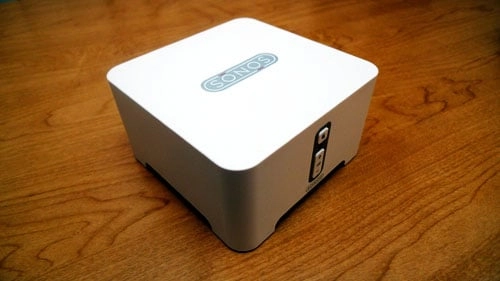
Sonos is a "multi-room music system" that lets you wirelessly stream music to any "zone" in your house either independently or synchronized together using a centralized controller. And, oh yeah, that centralized controller can be an iPhone or iPod Touch.
Chad, with the help of his friend, gave us a first look at using Sonos with the iPhone in lieu of its traditional controller, and raised some great pros (total iPhone control of all music, in every room, of your Sonos-enabled home) and cons (iPhone relegated merely to control, and not leveraged for the media-powerhouse it is in its own right as well) about the experience. So great, in fact, that when Sonos offered TiPb a limited-time demo to test it out, I jumped at the chance.

Since I'm not a Sonos user, not an audiophile, and not particularly interested in struggling anymore with complicated setup procedures, I thought it would be ideal to approach this from a new-user perspective, and one used to the iPhone ecosystem where things (often) "just work".
How did it go? Find out after the break!
Hardware
Delivered in the Sonos box we received were two ZonePlayer 90s and one ZoneBridge. They were kind enough to offer test speakers, but I had that covered.
ZoneBridge
For Sonos to function, at least one of the ZonePlayers needs to be plugged directly into your WiFi router. If you don't happen to have your router conveniently located to one of your sound systems, Sonos provides the ZoneBridge. Just hook that up instead and then put your ZonePlayers wherever else you want them. An elegant enough solution until the ZonePlayers can lose that one-hardwire requirement and go pure WiFi, which given the speeds and range of 802.11N shouldn't be far off. (Right now Sonos prefers to create their own, exclusive Mesh sub-network off the hard-line).
ZonePlayer 90
With the router very close to one of the sound systems I was testing, I could skip the ZoneBridge and plug the ZonePlayer 90 directly into an Airport Extreme. I had to yank out another device to make room for it, but the ZP90 includes a second network jack to give any such de-placed components a new sub-home.
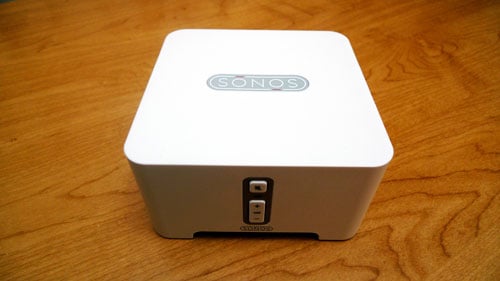
The device itself is nice looking, a white rounded square shape familiar to anyone who likes the Apple aesthetic, and it sits raised on four molded legs. The small size, at 5.4 x 5.5 x 2.9 in, means it doesn't take up a lot of space and can fit in pretty much anywhere (no doubt, however, someone somewhere will complain it's not in rack-mount friendly format -- thank goodness for that!) The front sports a mute button and a volume rocker, and a second Sonos logo (the first being on the top). Design quibble: the buttons, especially the iconography, isn't as beautiful as the device itself, and twice as many logos is half as strong branding. (Especially when the brand was already smartly enough chosen to be readable backwards and forwards, upside and down).
The back holds the ports. From the left is power, RCA stereo in and out, 2 network ports, and digital coax and optical out. This means it should support any home theater, stereo system, self-powered speakers, and other similar sound equipment. The RCA in also means iPods (with the audio out cables), DVD players, TVs, etc. can be plugged in and streamed throughout the system as well.
Unlike many Apple products, the ZP 90 came with some cables! Along with the power cord were RCA connectors and a network cable. No digital cables, unfortunately, so BYO coax or optical if that's how your sound system is set up.

Setup was extremely simple. Just plug the power into the ZP 90, attach a network cable between at least one ZP 90 and your router, and plug in your sound system via any one of the input ports listed above. It took all of a few seconds. If you have more than one ZP 90, the steps are the same as above, minus the hard wire router connection -- WiFi only, baby!
ZonePlayer 120
Though we didn't test one, it should be noted Sonos also has a ZonePlayer 120 available that is similar to the ZP 90 but includes a built in amplifier and direct speaker connections so it can basically serve as its own music system -- no pre-existing home theater, self-powered speakers, or other audio source required.
Software
Setup
The Sonos Controller iPhone app is available, of course, from the iTunes App Store. That means it can be downloaded directly to the iPhone or iPod Touch, or downloaded and synced over via iTunes on the desktop.
Note: Sonos has an installation CD that you can load up on your desktop or laptop to setup the system, but since this is an iPhone blog, I skipped this step and decided to with a full on iPhone-only setup.
Once the Sonos Controller app is installed on the iPhone, tapping it gives you the option to set up your zone. If you've ever used a setup wizard, you'll feel right at home. Hold down the mute and volume up buttons on the ZP 90, the iPhone app detects them, and setup is just a few simple taps and roll-selectors away. If you're setting up more than one zone, which it asks whenever you finish setting up the last on, just repeat the process.
It couldn't be more simple.
Use
Sonos deserves high-marks for the app. It respects iPhone design and user experience paradigms, looks great, and is easy and most importantly -- intuitive to use. Right away they present a very familiar iPhone media browser where you can choose what kind of music you want to listen to, with each choice sliding over narrower sub-options until you ultimately get exactly what you want. This could range from choosing radio to a genre of music to a radio station playing that genre. In addition to internet radio, Sonos (if you install the desktop software) also supports your existing computer-based music collection (though not iTunes DRM-protected content -- record label FAIL again!), as well as services like Audible.com, Napter, and select others.
Don't want to dig through menus? Not a problem. That's why search was invented, and why the iPhone app supports it. Just type in the title or some keywords and, if it's available, it will pop right up.
Once you find something, you can easily add it to "favorites" so you can quickly return to it later.
Select which "zones" the music should play in and, once it starts, volume controls are available to get it to just the right level. Each "zone" can be independent -- for example an MP3 file can be playing in the bedroom and internet radio could be on in the living room, and the iPhone app offers complete control over both.
Alternatively, "zones" can be combined so that the same content, in perfect synchronicity, and be played in multiple or all "zones" simultaneously. Perfect for that party that refuses to stay contained in a single room.
The interface even shows which "zones" are active, so if power is turned off on one system, you can tell it's unavailable. Plug it back in, and it pops back up.
The Sonos Controller app even supports queuing, so you can create a on-the-go playlist for your streaming music/sound content.
Again, as Chad said, it would be nice if the iPhone itself could also be set up as a portable "zone", carrying the same synched content with you around the house, and playing along with the same queue, but if that was an option, we couldn't find it. Maybe version 2.0?
Conclusion
The Sonos system just works, and with the iPhone controller app, it makes Apple's amazing convergence device all the more amazingly convergent. Would that my home were bigger, and I had more friends to party with more often (like in all those spy movies where the target is always throwing a huge bash just conveniently that very night -- that's the scale I'm thinking of!)
What Sonos has accomplished with this app right out of the gate is awesome. If anyone already has Sonos and an iPhone or iPod Touch, and doesn't have this app... what's the matter with you? Go get it now! If anyone has an iPhone and multiple rooms in which they want a highly scalable, superbly controllable audio experience, Sonos is definitely something to look at (or to ask for as a holiday gift! -- perfect timing!)
Pricing and Availability
Sonos is available online via the Sonos Store, or at many fine electronic retailers. MSRP for the ZoneBridge is $99, and the ZonePlayer is $349. Of course, street prices can and often will be lower. Bundles are also available, although I didn't see any without a controller, which iPhone/iPod Touch owners no longer need. A tad pricier than the previous generation, but these are likely premiums for the latest technology, and will no doubt drop over time as all technology prices do.
Rating

[gallery]

