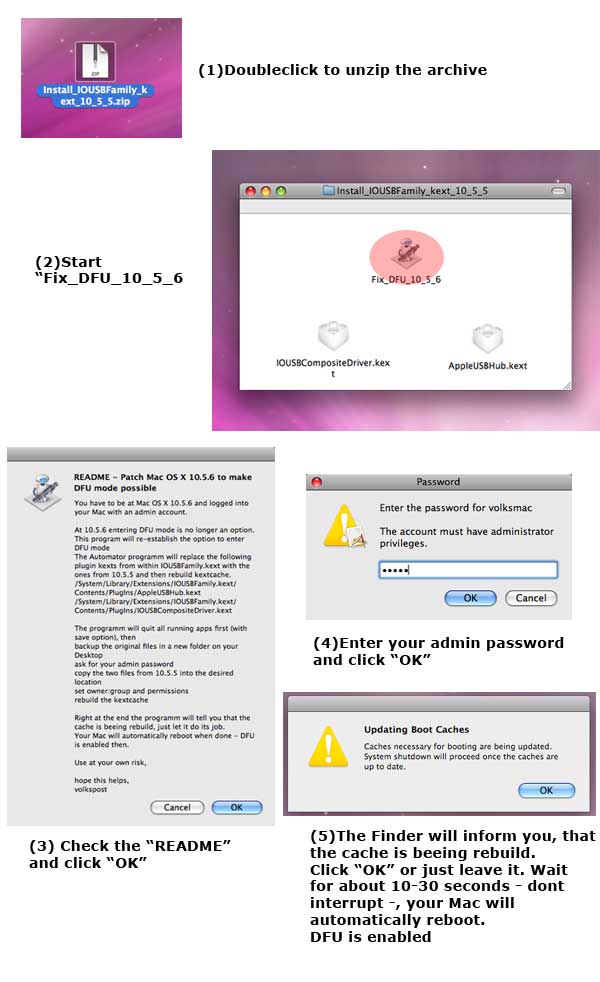
<?xml version="1.0" encoding="UTF-8"?><rss version="2.0"
	xmlns:content="http://purl.org/rss/1.0/modules/content/"
	xmlns:dc="http://purl.org/dc/elements/1.1/"
	xmlns:atom="http://www.w3.org/2005/Atom"
	xmlns:sy="http://purl.org/rss/1.0/modules/syndication/"
		>
<channel>
	<title>Comments on: How To: Re-Enable Jailbreak/Unlock for Mac OS X 10.5.6</title>
	<atom:link href="http://www.imore.com/2008/12/19/reenable-jailbreakunlock-mac-os-1056/feed/" rel="self" type="application/rss+xml" />
	<link>http://www.imore.com/2008/12/19/reenable-jailbreakunlock-mac-os-1056/</link>
	<description>More of everything iPhone and iPad</description>
	<lastBuildDate>Sat, 11 Feb 2012 00:49:12 +0000</lastBuildDate>
	<sy:updatePeriod>hourly</sy:updatePeriod>
	<sy:updateFrequency>1</sy:updateFrequency>
	<generator>http://wordpress.org/?v=3.3.1</generator>
	<item>
		<title>By: fd</title>
		<link>http://www.imore.com/2008/12/19/reenable-jailbreakunlock-mac-os-1056/comment-page-1/#comment-351592</link>
		<dc:creator>fd</dc:creator>
		<pubDate>Fri, 28 Jan 2011 01:37:48 +0000</pubDate>
		<guid isPermaLink="false">http://www.theiphoneblog.com/?p=6131#comment-351592</guid>
		<description>&lt;p&gt;yo&lt;/p&gt;
</description>
		<content:encoded><![CDATA[<p>yo</p>]]></content:encoded>
	</item>
	<item>
		<title>By: imacaccessories</title>
		<link>http://www.imore.com/2008/12/19/reenable-jailbreakunlock-mac-os-1056/comment-page-1/#comment-245719</link>
		<dc:creator>imacaccessories</dc:creator>
		<pubDate>Sat, 16 Oct 2010 12:20:30 +0000</pubDate>
		<guid isPermaLink="false">http://www.theiphoneblog.com/?p=6131#comment-245719</guid>
		<description>&lt;p&gt;Hi, I&#039;m a little off topic aol. I love your blog design, got few very good ideas, thanks for nice article.&lt;/p&gt;
</description>
		<content:encoded><![CDATA[<p>Hi, I&#8217;m a little off topic aol. I love your blog design, got few very good ideas, thanks for nice article.</p>]]></content:encoded>
	</item>
	<item>
		<title>By: Umar</title>
		<link>http://www.imore.com/2008/12/19/reenable-jailbreakunlock-mac-os-1056/comment-page-1/#comment-144523</link>
		<dc:creator>Umar</dc:creator>
		<pubDate>Sun, 25 Apr 2010 12:59:08 +0000</pubDate>
		<guid isPermaLink="false">http://www.theiphoneblog.com/?p=6131#comment-144523</guid>
		<description>&lt;p&gt;@ ALL : Best iphone jailbreaks ( all generations) , downgrades and error fixes With download links of all apps needed on this channel .. all working .
http://www.youtube.com/user/iphonemaster777&lt;/p&gt;
</description>
		<content:encoded><![CDATA[<p>@ ALL : Best iphone jailbreaks ( all generations) , downgrades and error fixes With download links of all apps needed on this channel .. all working .
<a href="http://www.youtube.com/user/iphonemaster777" rel="nofollow">http://www.youtube.com/user/iphonemaster777</a></p>]]></content:encoded>
	</item>
	<item>
		<title>By: UKMac</title>
		<link>http://www.imore.com/2008/12/19/reenable-jailbreakunlock-mac-os-1056/comment-page-1/#comment-138285</link>
		<dc:creator>UKMac</dc:creator>
		<pubDate>Thu, 08 Apr 2010 03:15:02 +0000</pubDate>
		<guid isPermaLink="false">http://www.theiphoneblog.com/?p=6131#comment-138285</guid>
		<description>&lt;p&gt;Made the mistake of using this script, is there anyway i can replace the kext files with the backed up ones? Anyone able to give me a quick runthrough on how i might go about doing this? Thanks&lt;/p&gt;
</description>
		<content:encoded><![CDATA[<p>Made the mistake of using this script, is there anyway i can replace the kext files with the backed up ones? Anyone able to give me a quick runthrough on how i might go about doing this? Thanks</p>]]></content:encoded>
	</item>
	<item>
		<title>By: Murilo</title>
		<link>http://www.imore.com/2008/12/19/reenable-jailbreakunlock-mac-os-1056/comment-page-1/#comment-57740</link>
		<dc:creator>Murilo</dc:creator>
		<pubDate>Wed, 24 Jun 2009 01:20:18 +0000</pubDate>
		<guid isPermaLink="false">http://www.theiphoneblog.com/?p=6131#comment-57740</guid>
		<description>&lt;p&gt;How do I re install the Mac OS X without the trackpad and the keyboard, and is there a way I can do it without losing life ´08?&lt;/p&gt;
</description>
		<content:encoded><![CDATA[<p>How do I re install the Mac OS X without the trackpad and the keyboard, and is there a way I can do it without losing life ´08?</p>]]></content:encoded>
	</item>
	<item>
		<title>By: Sean</title>
		<link>http://www.imore.com/2008/12/19/reenable-jailbreakunlock-mac-os-1056/comment-page-1/#comment-40534</link>
		<dc:creator>Sean</dc:creator>
		<pubDate>Sun, 12 Apr 2009 20:55:24 +0000</pubDate>
		<guid isPermaLink="false">http://www.theiphoneblog.com/?p=6131#comment-40534</guid>
		<description>&lt;p&gt;Same USB freeze on my ppc powermac g5. I lost my Tiger disk years ago. Can anyone point me in the direction of how to install (without keyboard or mouse)? I can boot up in safe mode using a leopard disk for my MacBook pro came with and keyboard mouse work fine - I can even open Disk Utility but don&#039;t know why to do there - should I get some sort of disk image that will fix my USB drive? Like an idiot I didn&#039;t backup so where would I find? Can I steal it from an iMac or PowerBook Pro install disk? Thanks in advance!!!!!!&lt;/p&gt;
</description>
		<content:encoded><![CDATA[<p>Same USB freeze on my ppc powermac g5. I lost my Tiger disk years ago. Can anyone point me in the direction of how to install (without keyboard or mouse)? I can boot up in safe mode using a leopard disk for my MacBook pro came with and keyboard mouse work fine &#8211; I can even open Disk Utility but don&#8217;t know why to do there &#8211; should I get some sort of disk image that will fix my USB drive? Like an idiot I didn&#8217;t backup so where would I find? Can I steal it from an iMac or PowerBook Pro install disk? Thanks in advance!!!!!!</p>]]></content:encoded>
	</item>
	<item>
		<title>By: John E Boy</title>
		<link>http://www.imore.com/2008/12/19/reenable-jailbreakunlock-mac-os-1056/comment-page-1/#comment-40494</link>
		<dc:creator>John E Boy</dc:creator>
		<pubDate>Sun, 12 Apr 2009 10:13:56 +0000</pubDate>
		<guid isPermaLink="false">http://www.theiphoneblog.com/?p=6131#comment-40494</guid>
		<description>&lt;p&gt;Yeah, tried this too, no Updating Cache window appeared, have rebooted without any apparent problems(Fingers crossed) - doesn&#039;t appear to have done a thing, I get the impression no one gives a sh*t either.... just another dodgy script.&lt;/p&gt;
</description>
		<content:encoded><![CDATA[<p>Yeah, tried this too, no Updating Cache window appeared, have rebooted without any apparent problems(Fingers crossed) &#8211; doesn&#8217;t appear to have done a thing, I get the impression no one gives a sh*t either&#8230;. just another dodgy script.</p>]]></content:encoded>
	</item>
	<item>
		<title>By: marvin</title>
		<link>http://www.imore.com/2008/12/19/reenable-jailbreakunlock-mac-os-1056/comment-page-1/#comment-37397</link>
		<dc:creator>marvin</dc:creator>
		<pubDate>Wed, 25 Mar 2009 15:06:49 +0000</pubDate>
		<guid isPermaLink="false">http://www.theiphoneblog.com/?p=6131#comment-37397</guid>
		<description>&lt;p&gt;My ex wife changed the password on my mac how can i bypass or reset? I have a macbook os x&lt;/p&gt;
</description>
		<content:encoded><![CDATA[<p>My ex wife changed the password on my mac how can i bypass or reset? I have a macbook os x</p>]]></content:encoded>
	</item>
	<item>
		<title>By: Willdt</title>
		<link>http://www.imore.com/2008/12/19/reenable-jailbreakunlock-mac-os-1056/comment-page-1/#comment-36802</link>
		<dc:creator>Willdt</dc:creator>
		<pubDate>Mon, 23 Mar 2009 11:05:32 +0000</pubDate>
		<guid isPermaLink="false">http://www.theiphoneblog.com/?p=6131#comment-36802</guid>
		<description>&lt;p&gt;I screwed up my iMac now too. None of the USB ports work. Is the only way to save my mac by reinstalling OSX? And if so how do I do that without using a keyboard or mouse? And will that get rid of all my saved files and programs on the mac? PLEASE HELP!!&lt;/p&gt;
</description>
		<content:encoded><![CDATA[<p>I screwed up my iMac now too. None of the USB ports work. Is the only way to save my mac by reinstalling OSX? And if so how do I do that without using a keyboard or mouse? And will that get rid of all my saved files and programs on the mac? PLEASE HELP!!</p>]]></content:encoded>
	</item>
	<item>
		<title>By: qu.one</title>
		<link>http://www.imore.com/2008/12/19/reenable-jailbreakunlock-mac-os-1056/comment-page-1/#comment-36376</link>
		<dc:creator>qu.one</dc:creator>
		<pubDate>Thu, 19 Mar 2009 18:51:51 +0000</pubDate>
		<guid isPermaLink="false">http://www.theiphoneblog.com/?p=6131#comment-36376</guid>
		<description>&lt;p&gt;can&#039;t you just copy the 10.5.6 kext files, run the automator action to replace kexts, jailbreak your hpone and then replace the kexts with your 10.5.6 ones again?  just thinking out loud...&lt;/p&gt;
</description>
		<content:encoded><![CDATA[<p>can&#8217;t you just copy the 10.5.6 kext files, run the automator action to replace kexts, jailbreak your hpone and then replace the kexts with your 10.5.6 ones again?  just thinking out loud&#8230;</p>]]></content:encoded>
	</item>
	<item>
		<title>By: imi</title>
		<link>http://www.imore.com/2008/12/19/reenable-jailbreakunlock-mac-os-1056/comment-page-1/#comment-35322</link>
		<dc:creator>imi</dc:creator>
		<pubDate>Sat, 14 Mar 2009 18:45:10 +0000</pubDate>
		<guid isPermaLink="false">http://www.theiphoneblog.com/?p=6131#comment-35322</guid>
		<description>&lt;p&gt;Made the mistake of installing this script...how do I go about uninstalling it?&lt;/p&gt;
</description>
		<content:encoded><![CDATA[<p>Made the mistake of installing this script&#8230;how do I go about uninstalling it?</p>]]></content:encoded>
	</item>
	<item>
		<title>By: Rene</title>
		<link>http://www.imore.com/2008/12/19/reenable-jailbreakunlock-mac-os-1056/comment-page-1/#comment-34232</link>
		<dc:creator>Rene</dc:creator>
		<pubDate>Thu, 05 Mar 2009 13:43:36 +0000</pubDate>
		<guid isPermaLink="false">http://www.theiphoneblog.com/?p=6131#comment-34232</guid>
		<description>&lt;p&gt;Please delete this site! The trackpad and keyboard will not work the next time you start, and you have to reinstall Mac OSX. VERY IMPORTANT THAT YOU DO NOT DOWNLOAD THIS !!!!&lt;/p&gt;
</description>
		<content:encoded><![CDATA[<p>Please delete this site! The trackpad and keyboard will not work the next time you start, and you have to reinstall Mac OSX. VERY IMPORTANT THAT YOU DO NOT DOWNLOAD THIS !!!!</p>]]></content:encoded>
	</item>
	<item>
		<title>By: ThePlaypen</title>
		<link>http://www.imore.com/2008/12/19/reenable-jailbreakunlock-mac-os-1056/comment-page-1/#comment-33262</link>
		<dc:creator>ThePlaypen</dc:creator>
		<pubDate>Thu, 26 Feb 2009 01:05:34 +0000</pubDate>
		<guid isPermaLink="false">http://www.theiphoneblog.com/?p=6131#comment-33262</guid>
		<description>&lt;p&gt;Hi. Can i use any usb HUB? I have one from logitech, will it do?
Tks&lt;/p&gt;
</description>
		<content:encoded><![CDATA[<p>Hi. Can i use any usb HUB? I have one from logitech, will it do?
Tks</p>]]></content:encoded>
	</item>
	<item>
		<title>By: Duncan</title>
		<link>http://www.imore.com/2008/12/19/reenable-jailbreakunlock-mac-os-1056/comment-page-1/#comment-31237</link>
		<dc:creator>Duncan</dc:creator>
		<pubDate>Thu, 12 Feb 2009 00:43:49 +0000</pubDate>
		<guid isPermaLink="false">http://www.theiphoneblog.com/?p=6131#comment-31237</guid>
		<description>&lt;p&gt;**********WARNING!!!*****************
DO NOT DO THIS IF YOU ARE RUNNING MAC OS X FROM A POWERMAC G5 (PPC)!!!! IT RENDERS YOUR USB DRIVES USELESS, WHICH WILL KILL YOUR KEYBOARD AND MOUSE! YOU WILL HAVE TO REINSTALL FROM THE DVD. 
**********WARNING!!!*****************&lt;/p&gt;
</description>
		<content:encoded><![CDATA[<p>**********WARNING!!!*****************
DO NOT DO THIS IF YOU ARE RUNNING MAC OS X FROM A POWERMAC G5 (PPC)!!!! IT RENDERS YOUR USB DRIVES USELESS, WHICH WILL KILL YOUR KEYBOARD AND MOUSE! YOU WILL HAVE TO REINSTALL FROM THE DVD. 
**********WARNING!!!*****************</p>]]></content:encoded>
	</item>
	<item>
		<title>By: DAVID</title>
		<link>http://www.imore.com/2008/12/19/reenable-jailbreakunlock-mac-os-1056/comment-page-1/#comment-30795</link>
		<dc:creator>DAVID</dc:creator>
		<pubDate>Sun, 08 Feb 2009 03:50:28 +0000</pubDate>
		<guid isPermaLink="false">http://www.theiphoneblog.com/?p=6131#comment-30795</guid>
		<description>&lt;p&gt;THANKS MARCELLO, I USED AN EXTERNAL USB HUB AFTER TRYING TO FIGURE OUT HOW TO UNLOCK AND JAILBREAK FOR 3 DAYS. IT FINALLY GOT UNLOCKED BECAUSE OF THE USB DRIVES. THANKS&lt;/p&gt;
</description>
		<content:encoded><![CDATA[<p>THANKS MARCELLO, I USED AN EXTERNAL USB HUB AFTER TRYING TO FIGURE OUT HOW TO UNLOCK AND JAILBREAK FOR 3 DAYS. IT FINALLY GOT UNLOCKED BECAUSE OF THE USB DRIVES. THANKS</p>]]></content:encoded>
	</item>
	<item>
		<title>By: anon</title>
		<link>http://www.imore.com/2008/12/19/reenable-jailbreakunlock-mac-os-1056/comment-page-1/#comment-28924</link>
		<dc:creator>anon</dc:creator>
		<pubDate>Wed, 21 Jan 2009 16:38:52 +0000</pubDate>
		<guid isPermaLink="false">http://www.theiphoneblog.com/?p=6131#comment-28924</guid>
		<description>&lt;p&gt;when&#039;s 10.5.7 coming out and will it fix this?&lt;/p&gt;
</description>
		<content:encoded><![CDATA[<p>when&#8217;s 10.5.7 coming out and will it fix this?</p>]]></content:encoded>
	</item>
	<item>
		<title>By: anon</title>
		<link>http://www.imore.com/2008/12/19/reenable-jailbreakunlock-mac-os-1056/comment-page-1/#comment-28812</link>
		<dc:creator>anon</dc:creator>
		<pubDate>Tue, 20 Jan 2009 18:23:12 +0000</pubDate>
		<guid isPermaLink="false">http://www.theiphoneblog.com/?p=6131#comment-28812</guid>
		<description>&lt;p&gt;how do you re-install OSX and does it take long, I&#039;m weighing up the risk of a non-working MacBook against a jailbroken iPhone 3G which will void my warrantee. I have to say, doesn&#039;t sound appealing...&lt;/p&gt;
</description>
		<content:encoded><![CDATA[<p>how do you re-install OSX and does it take long, I&#8217;m weighing up the risk of a non-working MacBook against a jailbroken iPhone 3G which will void my warrantee. I have to say, doesn&#8217;t sound appealing&#8230;</p>]]></content:encoded>
	</item>
	<item>
		<title>By: Marcello</title>
		<link>http://www.imore.com/2008/12/19/reenable-jailbreakunlock-mac-os-1056/comment-page-1/#comment-28086</link>
		<dc:creator>Marcello</dc:creator>
		<pubDate>Thu, 15 Jan 2009 11:05:44 +0000</pubDate>
		<guid isPermaLink="false">http://www.theiphoneblog.com/?p=6131#comment-28086</guid>
		<description>&lt;p&gt;Don&#039;t use this procedure with the new macbook family because it crash!!
I unlocked the iphone 3g 2.2 and jailbroken in 10 minutes!!!!&lt;/p&gt;

&lt;p&gt;using the new Macbook pro aluminium and using an external USB hub (very cheap and it works with anyone!!)&lt;/p&gt;

&lt;p&gt;ITALIAN:
Ho appena fatto il jailbreak e sbloccaggio per tutte le sim del mio iphone 3g 2.2 usando il mio Macbook pro aluminium della nuova famiglia mac.
Precedentemente non funzionava quickpwn su questo modello di laptop ma provando con un hub USB esterno (porta multipla USB) funziona.
Il mio suggerimento e&#039; di non utlizzare la procedura che utilizzando lo script va a sostituire dei file.
Se avete aggiornato il software mac, non vi azzardate a usare questi script perche&#039; potrebbero bloccare la tastiera e trackpad. 
Semplicissimo: usate una porta usb esterna collegate il vostro iphone 3g 2.2 con quickpwn 2.2 e il gioco e&#039; fatto in 10 minuti!!!!!!!!!&lt;/p&gt;

&lt;p&gt;ilMarcello&lt;/p&gt;
</description>
		<content:encoded><![CDATA[<p>Don&#8217;t use this procedure with the new macbook family because it crash!!
I unlocked the iphone 3g 2.2 and jailbroken in 10 minutes!!!!</p>

<p>using the new Macbook pro aluminium and using an external USB hub (very cheap and it works with anyone!!)</p>

<p>ITALIAN:
Ho appena fatto il jailbreak e sbloccaggio per tutte le sim del mio iphone 3g 2.2 usando il mio Macbook pro aluminium della nuova famiglia mac.
Precedentemente non funzionava quickpwn su questo modello di laptop ma provando con un hub USB esterno (porta multipla USB) funziona.
Il mio suggerimento e&#8217; di non utlizzare la procedura che utilizzando lo script va a sostituire dei file.
Se avete aggiornato il software mac, non vi azzardate a usare questi script perche&#8217; potrebbero bloccare la tastiera e trackpad. 
Semplicissimo: usate una porta usb esterna collegate il vostro iphone 3g 2.2 con quickpwn 2.2 e il gioco e&#8217; fatto in 10 minuti!!!!!!!!!</p>

<p>ilMarcello</p>]]></content:encoded>
	</item>
	<item>
		<title>By: Jonathan</title>
		<link>http://www.imore.com/2008/12/19/reenable-jailbreakunlock-mac-os-1056/comment-page-1/#comment-26588</link>
		<dc:creator>Jonathan</dc:creator>
		<pubDate>Wed, 07 Jan 2009 16:05:27 +0000</pubDate>
		<guid isPermaLink="false">http://www.theiphoneblog.com/?p=6131#comment-26588</guid>
		<description>&lt;p&gt;DO NOT TRY THIS SCRIPT. USED ON iMAC OS 10.5.6. All of my USBs are not working including my wireless Keyboard and Mouse.&lt;/p&gt;
</description>
		<content:encoded><![CDATA[<p>DO NOT TRY THIS SCRIPT. USED ON iMAC OS 10.5.6. All of my USBs are not working including my wireless Keyboard and Mouse.</p>]]></content:encoded>
	</item>
	<item>
		<title>By: Sam</title>
		<link>http://www.imore.com/2008/12/19/reenable-jailbreakunlock-mac-os-1056/comment-page-1/#comment-26291</link>
		<dc:creator>Sam</dc:creator>
		<pubDate>Mon, 05 Jan 2009 05:34:36 +0000</pubDate>
		<guid isPermaLink="false">http://www.theiphoneblog.com/?p=6131#comment-26291</guid>
		<description>&lt;p&gt;Hi,&lt;/p&gt;

&lt;p&gt;I followed the above steps. After I accept the terms of use, it asks me for my password and then something runs in the background (I see status updates next to my time machine Icon on the task bar) and then it stops and nothing else happens. I don’t get the “Updating Boot Caches” message.&lt;/p&gt;

&lt;p&gt;I tried to go through the terminal to the path where its supposed to copy the new files, and those files aren’t there.&lt;/p&gt;

&lt;p&gt;Any idea on what could be missing? I really want my iPhone back :(&lt;/p&gt;

&lt;p&gt;Thanks.&lt;/p&gt;
</description>
		<content:encoded><![CDATA[<p>Hi,</p>

<p>I followed the above steps. After I accept the terms of use, it asks me for my password and then something runs in the background (I see status updates next to my time machine Icon on the task bar) and then it stops and nothing else happens. I don’t get the “Updating Boot Caches” message.</p>

<p>I tried to go through the terminal to the path where its supposed to copy the new files, and those files aren’t there.</p>

<p>Any idea on what could be missing? I really want my iPhone back <img src='http://www.imore.com/wp-includes/images/smilies/icon_sad.gif' alt=':(' class='wp-smiley' /> </p>

<p>Thanks.</p>]]></content:encoded>
	</item>
	<item>
		<title>By: Chris</title>
		<link>http://www.imore.com/2008/12/19/reenable-jailbreakunlock-mac-os-1056/comment-page-1/#comment-25979</link>
		<dc:creator>Chris</dc:creator>
		<pubDate>Fri, 02 Jan 2009 18:31:02 +0000</pubDate>
		<guid isPermaLink="false">http://www.theiphoneblog.com/?p=6131#comment-25979</guid>
		<description>&lt;p&gt;I just did this and now my keyboard and trackpad dont work at all, dont tell me I&#039;ve got to re install OSX because of this shit...&lt;/p&gt;
</description>
		<content:encoded><![CDATA[<p>I just did this and now my keyboard and trackpad dont work at all, dont tell me I&#8217;ve got to re install OSX because of this shit&#8230;</p>]]></content:encoded>
	</item>
	<item>
		<title>By: jeversion1</title>
		<link>http://www.imore.com/2008/12/19/reenable-jailbreakunlock-mac-os-1056/comment-page-1/#comment-25825</link>
		<dc:creator>jeversion1</dc:creator>
		<pubDate>Thu, 01 Jan 2009 03:53:06 +0000</pubDate>
		<guid isPermaLink="false">http://www.theiphoneblog.com/?p=6131#comment-25825</guid>
		<description>&lt;p&gt;i dont have the new aluminum macbook pro with the black border. I have the one before that. still killed my usb , keyboard and mouse lol until i re installed the os&lt;/p&gt;
</description>
		<content:encoded><![CDATA[<p>i dont have the new aluminum macbook pro with the black border. I have the one before that. still killed my usb , keyboard and mouse lol until i re installed the os</p>]]></content:encoded>
	</item>
	<item>
		<title>By: Will Shao</title>
		<link>http://www.imore.com/2008/12/19/reenable-jailbreakunlock-mac-os-1056/comment-page-1/#comment-24931</link>
		<dc:creator>Will Shao</dc:creator>
		<pubDate>Thu, 25 Dec 2008 23:59:07 +0000</pubDate>
		<guid isPermaLink="false">http://www.theiphoneblog.com/?p=6131#comment-24931</guid>
		<description>&lt;p&gt;Yeah, same happened to me.&lt;/p&gt;

&lt;p&gt;I opened it and it asked for password, then it like crashed. I restarted my computer and the DFU mode still doesn&#039;t work. I tried doing it multiple times but still didn&#039;t work. What really confused me is there is a backup folder thing on my desktop like there is supposed to be, but overall it doesn&#039;t work.&lt;/p&gt;

&lt;p&gt;WHEN IS THE DEV TEAM GOING TO COME UP WITH A SOLUTION TO THIS?&lt;/p&gt;
</description>
		<content:encoded><![CDATA[<p>Yeah, same happened to me.</p>

<p>I opened it and it asked for password, then it like crashed. I restarted my computer and the DFU mode still doesn&#8217;t work. I tried doing it multiple times but still didn&#8217;t work. What really confused me is there is a backup folder thing on my desktop like there is supposed to be, but overall it doesn&#8217;t work.</p>

<p>WHEN IS THE DEV TEAM GOING TO COME UP WITH A SOLUTION TO THIS?</p>]]></content:encoded>
	</item>
	<item>
		<title>By: joe</title>
		<link>http://www.imore.com/2008/12/19/reenable-jailbreakunlock-mac-os-1056/comment-page-1/#comment-24866</link>
		<dc:creator>joe</dc:creator>
		<pubDate>Wed, 24 Dec 2008 23:25:35 +0000</pubDate>
		<guid isPermaLink="false">http://www.theiphoneblog.com/?p=6131#comment-24866</guid>
		<description>&lt;p&gt;I tried running this on my macbook pro, and it asked for my password twice as expected, but then the activity bar on the top disappeared and it seemed like it just stopped doing anything... waited for a few minutes and nothing happened at all... afterwords i tried to reopen the software and try again but after i push the ok button at the readme screen it crashes.  help?&lt;/p&gt;
</description>
		<content:encoded><![CDATA[<p>I tried running this on my macbook pro, and it asked for my password twice as expected, but then the activity bar on the top disappeared and it seemed like it just stopped doing anything&#8230; waited for a few minutes and nothing happened at all&#8230; afterwords i tried to reopen the software and try again but after i push the ok button at the readme screen it crashes.  help?</p>]]></content:encoded>
	</item>
	<item>
		<title>By: Ric</title>
		<link>http://www.imore.com/2008/12/19/reenable-jailbreakunlock-mac-os-1056/comment-page-1/#comment-24699</link>
		<dc:creator>Ric</dc:creator>
		<pubDate>Tue, 23 Dec 2008 18:50:27 +0000</pubDate>
		<guid isPermaLink="false">http://www.theiphoneblog.com/?p=6131#comment-24699</guid>
		<description>&lt;p&gt;DO NOT ATTEMPT THIS on a new aluminium macbook.&lt;/p&gt;

&lt;p&gt;It will break your USB drivers causing the keyboard and trackpad not to work when you restart, forcing you to reinstall OS X&lt;/p&gt;
</description>
		<content:encoded><![CDATA[<p>DO NOT ATTEMPT THIS on a new aluminium macbook.</p>

<p>It will break your USB drivers causing the keyboard and trackpad not to work when you restart, forcing you to reinstall OS X</p>]]></content:encoded>
	</item>
	<item>
		<title>By: jake</title>
		<link>http://www.imore.com/2008/12/19/reenable-jailbreakunlock-mac-os-1056/comment-page-1/#comment-24697</link>
		<dc:creator>jake</dc:creator>
		<pubDate>Tue, 23 Dec 2008 18:48:01 +0000</pubDate>
		<guid isPermaLink="false">http://www.theiphoneblog.com/?p=6131#comment-24697</guid>
		<description>&lt;p&gt;After fretting about not being able to jailbreak my phone, this article was exactly what i needed to read.  Thank you!&lt;/p&gt;
</description>
		<content:encoded><![CDATA[<p>After fretting about not being able to jailbreak my phone, this article was exactly what i needed to read.  Thank you!</p>]]></content:encoded>
	</item>
	<item>
		<title>By: Cheebahawk</title>
		<link>http://www.imore.com/2008/12/19/reenable-jailbreakunlock-mac-os-1056/comment-page-1/#comment-24609</link>
		<dc:creator>Cheebahawk</dc:creator>
		<pubDate>Tue, 23 Dec 2008 02:58:30 +0000</pubDate>
		<guid isPermaLink="false">http://www.theiphoneblog.com/?p=6131#comment-24609</guid>
		<description>&lt;p&gt;Just updated using the file. Have a 1st gen macbook and have not had any issues. &lt;/p&gt;

&lt;p&gt;Rebooted quickly and everything is working!&lt;/p&gt;
</description>
		<content:encoded><![CDATA[<p>Just updated using the file. Have a 1st gen macbook and have not had any issues. </p>

<p>Rebooted quickly and everything is working!</p>]]></content:encoded>
	</item>
	<item>
		<title>By: Seth Rubenstein</title>
		<link>http://www.imore.com/2008/12/19/reenable-jailbreakunlock-mac-os-1056/comment-page-1/#comment-24511</link>
		<dc:creator>Seth Rubenstein</dc:creator>
		<pubDate>Mon, 22 Dec 2008 18:37:08 +0000</pubDate>
		<guid isPermaLink="false">http://www.theiphoneblog.com/?p=6131#comment-24511</guid>
		<description>&lt;p&gt;Is this intended for the new Macbooks? I have a new MacBook and really want to jailbreak my iPhone but have shyed away from it because of the DFU problems people have been having. But if this fixes it awesome.&lt;/p&gt;
</description>
		<content:encoded><![CDATA[<p>Is this intended for the new Macbooks? I have a new MacBook and really want to jailbreak my iPhone but have shyed away from it because of the DFU problems people have been having. But if this fixes it awesome.</p>]]></content:encoded>
	</item>
	<item>
		<title>By: jeversion1</title>
		<link>http://www.imore.com/2008/12/19/reenable-jailbreakunlock-mac-os-1056/comment-page-1/#comment-24345</link>
		<dc:creator>jeversion1</dc:creator>
		<pubDate>Sat, 20 Dec 2008 22:22:09 +0000</pubDate>
		<guid isPermaLink="false">http://www.theiphoneblog.com/?p=6131#comment-24345</guid>
		<description>&lt;p&gt;i tried it and it worked then when i restarted my macbook pro and then the keyboard and mouse did not work, nor the cd drive. had to reinstall at the mac store with an ext. drive. But that might have just been a special case. For clarification it was a previous gen macbook pro not the new one that everyone claims doesnt do the jailbreaking.&lt;/p&gt;
</description>
		<content:encoded><![CDATA[<p>i tried it and it worked then when i restarted my macbook pro and then the keyboard and mouse did not work, nor the cd drive. had to reinstall at the mac store with an ext. drive. But that might have just been a special case. For clarification it was a previous gen macbook pro not the new one that everyone claims doesnt do the jailbreaking.</p>]]></content:encoded>
	</item>
	<item>
		<title>By: iDutch</title>
		<link>http://www.imore.com/2008/12/19/reenable-jailbreakunlock-mac-os-1056/comment-page-1/#comment-24285</link>
		<dc:creator>iDutch</dc:creator>
		<pubDate>Sat, 20 Dec 2008 01:26:07 +0000</pubDate>
		<guid isPermaLink="false">http://www.theiphoneblog.com/?p=6131#comment-24285</guid>
		<description>&lt;p&gt;Was a matter of time for those brilliant people of th Dev Team
I will try this out when i get home.&lt;/p&gt;
</description>
		<content:encoded><![CDATA[<p>Was a matter of time for those brilliant people of th Dev Team
I will try this out when i get home.</p>]]></content:encoded>
	</item>
</channel>
</rss>

<!-- Performance optimized by W3 Total Cache. Learn more: http://www.w3-edge.com/wordpress-plugins/

Page Caching using memcached

Served from: imore.com @ 2012-02-10 19:51:22 -->