
Join our iPhone, iPod touch, iPad and Apple TV community today! Register Here | Login

iPhone 101: How to Reset Your Home Screen Icons to Default

By , Monday, Jun 1, 2009
33

photo-2

Welcome to iPhone 101, where TiPb helps new iPhone users use their new iPhones — or just gives you a handy link to send to your new iPhone using friends.

This time we’re tackling something near and dear to every child-caring adult’s heart: how to resent your iPhone Home Screen to default. Because as we all know, you let your child at your iPhone, and they can switch around your icons — even blank your Home Screen — in no time flat (and yes, the above is a real screenshot of an iPhone after a 3 year old spent about 5 minutes on it…)

Luckily, there must be a lot of parents at Apple, because they’ve made it lickity-split simple to restore.

From the home screen, tap Settings (yeah, if you can find it — but at least they can’t delete that or any built-in application).

From Settings, hit General, then choose Reset.
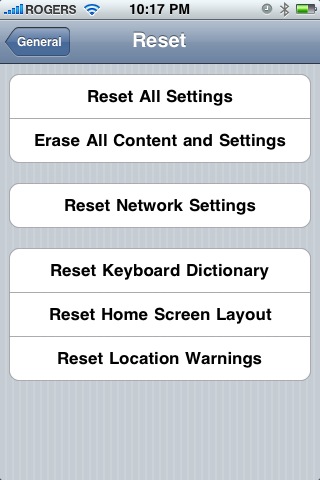
photo-31

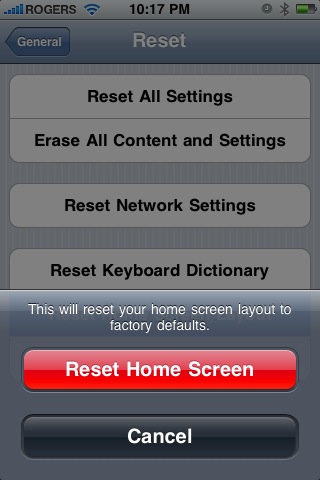
From the Reset menu, choose Reset Home Screen Layout. When it asks you to confirm, tap the big red Reset Home Screen button.
photo

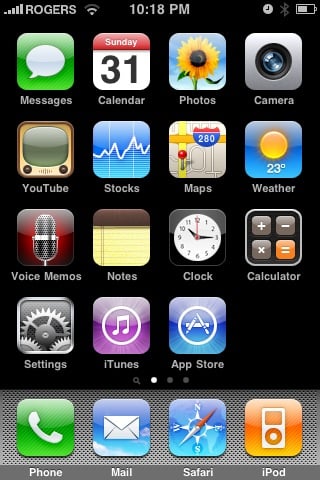
And you’re done. Your iPhone’s icons will be back to the way Apple ships them… until your child gets a hold of them again! photo-4
← Previously

iPhone 3G Supply Running Low at Best Buy

Next up →

Apple Releases iTunes 8.2, QuickTime 7.6.2
  1. Matt Hall says:

    Isn’t this a feature of 3.0? Maybe I’m wrong but I don’t remember it on 2.2.1

  2. Chris says:

    @Matt Hall

    I noticed that the screenshot they used must be 3.0, because it’s got that magnifying glass searcher icon to the left of the first homescreen page, so I’m wondering if you’re right.

  3. icebike says:

    Matt, Its on 2.2.1, its been on every version since at least 2.0 when I last used it.

    Back then, I had no apps other than the default, so I don’t remember if this restored apps deleted by pressing the wiggling X. Anybody know?

  4. Matt Hall says:

    Ah cool. I don’t remember ever going into reset while using 2.0. But as far as with 3.0 I have explored it throughly.

  5. Joe McG says:

    Oh my gosh! My son did this the other day. What a mess!

    What happens to your non-default programs?

  6. Danny says:

    Yes it is 3.0 probably beta or the crack one but the same except crack is way better u could customize ur iPhone with it

  7. Microcosmos says:

    @Joe McG: looks like you have to sync up to get those back! Yeah, keep an eye on those kids when they’re messing with your phone my goodness!

  8. Marc says:

    Careful: the home screen is restored indeed.

    And all the other apps and icons are alphabetically re-sorted.

  9. Roger says:

    What about the other apps you may have? Are they deleted after reset?

  10. OmariJames says:

    Hmm. They should work on enhancing how we organize our apps.

  11. Al says:

    @ Roger – Look directly above your own post sir and you will find your answer.

  12. Al says:

    Agreed Omari, they need to have a tool built into iTunes that allows you to reorganize icons which are they moved on the phone during sync. If you ever restore your phone and reload all of your apps again they become alphabetized as Roger said. Even if you have screenshots of your iPhone taken before you restore it is a huge pain moving them all back to your desired locations.

  13. Ben says:

    How do you end up with a blank homescreen? Now I feel dumb that a 3 year old can do it in 5 minutes yet I can’t figure it out. :(

  14. Drake says:

    Apple should build in a home screen locker that locks them in with a pass code. Just saying. this could avoid the blank home screens. and people messing with it.

  15. BBYM says:

    I have 2.2.1 and have that on reset menu..

  16. Tyler says:

    Is there a way to reset your calendar? Btw don’t make a all day date from 1933 to 2069

  17. pleask55 says:

    yep the reset for home screen works well BUT indeed does reset ALL other icons on ALL other pages alphabeticly … Al ur spot on man!

  18. lynsey says:

    i have just updated the new software and all my apps have disappeared, can anybody tell me where they have gone please? thanks

  19. Joe says:

    guys.. i don’t even have that settings option..what do i do to get it back ive got everything else except settings

  20. fizzi says:

    none of the apps are showing up on the homescreen of my iphone. i just got it from a friend so he resetted it and now the homescreen in completely blank. is there anything i can do??

  21. csicso says:

    My factory icons disappeared, just the custom installed programs visible. Settings, Contacts, Calendar, Calculator, all disappeared. The re-jailbreak doesn’t helped, restore doesn’t helped… Any suggestions?

  22. Bob says:

    But will all my apps go?

    • Km4221 says:

      all your apps will stay…i took the risk to just try it and all my apps are still here-just in alphabetical order

  23. sonam says:

    all my icons hav disappeared leavn my home screen blank…i restored da home layout screen but it diddnt help….plz tell me wot 2 do??

  24. Ruckus says:

    My phone zoomed in on accident and I didn’t know how to zoom back out so I reset the home screen and I have a lot o apps so when it alphabetized them I lost all my icons after m. I still have the apps but I have to search for them to use them. How do I get the icons back?

    • Guest says:

      When that happened to me I tried to put all visible apps in folders (12 per folder), then restart, and the rest will show up. I put those in folders too and do that until you get to the end. Now my home screen only contains of the built-in apps on the first page and from the second page it’s all folders. My layout is now completely gone but there’s no other way to fix this.

  25. Masonhagan says:

    Very good directions, if I hadn’t asked someone else about reseting the homescreen layout earlier, I would have learned this even faster. Tons of people must know how to reset homescreen layout to default because of this helpful website. I love it!

  26. mgs4a says:

    i cannot find the settings

  27. Home says:

    Thank you thankyou, this did exactly what you said it would do, I just had th calendar icon missing and did the home page reset and all my icons/apps are still there plus the previously missing calendar one. Thank you again. Oliver

  28. Home says:

    Thank you thankyou, this did exactly what you said it would do, I just had th calendar icon missing and did the home page reset and all my icons/apps are still there plus the previously missing calendar one. Thank you again. Oliver

  29. Home says:

    Thank you thankyou, this did exactly what you said it would do, I just had th calendar icon missing and did the home page reset and all my icons/apps are still there plus the previously missing calendar one. Thank you again. Oliver

  30. Tartangown says:

    thank you, thank you, thank you

  31. Tartangown says:

    thank you, thank you, thank you

Leave a Reply

Note: Comments must be civil, respectful, and on-topic. If a comment does not add to the conversation, if it contains spam advertising, or inappropriate language or content, it will be removed. Comments containing links may be held for moderation. Relax, enjoy, and share in the discussion.

