<?xml version="1.0" encoding="UTF-8"?><rss version="2.0"
	xmlns:content="http://purl.org/rss/1.0/modules/content/"
	xmlns:dc="http://purl.org/dc/elements/1.1/"
	xmlns:atom="http://www.w3.org/2005/Atom"
	xmlns:sy="http://purl.org/rss/1.0/modules/syndication/"
		>
<channel>
	<title>Comments on: iPhone 101: How to Reset Your Home Screen Icons to Default</title>
	<atom:link href="http://www.imore.com/2009/06/01/iphone-101-reset-home-screen-icons-default/feed/" rel="self" type="application/rss+xml" />
	<link>http://www.imore.com/2009/06/01/iphone-101-reset-home-screen-icons-default/</link>
	<description>More of everything iPhone and iPad</description>
	<lastBuildDate>Sun, 27 May 2012 01:37:56 +0000</lastBuildDate>
	<sy:updatePeriod>hourly</sy:updatePeriod>
	<sy:updateFrequency>1</sy:updateFrequency>
	<generator>http://wordpress.org/?v=3.3.1</generator>
	<item>
		<title>By: Kailee</title>
		<link>http://www.imore.com/2009/06/01/iphone-101-reset-home-screen-icons-default/comment-page-1/#comment-672014</link>
		<dc:creator>Kailee</dc:creator>
		<pubDate>Thu, 19 Apr 2012 02:28:46 +0000</pubDate>
		<guid isPermaLink="false">http://www.theiphoneblog.com/?p=8845#comment-672014</guid>
		<description>&lt;p&gt;It puts the icons back they way first were, so it might delete apps, but I&#039;m not sure&lt;/p&gt;
</description>
		<content:encoded><![CDATA[<p>It puts the icons back they way first were, so it might delete apps, but I'm not sure</p>]]></content:encoded>
	</item>
	<item>
		<title>By: Kailee</title>
		<link>http://www.imore.com/2009/06/01/iphone-101-reset-home-screen-icons-default/comment-page-1/#comment-672012</link>
		<dc:creator>Kailee</dc:creator>
		<pubDate>Thu, 19 Apr 2012 02:26:54 +0000</pubDate>
		<guid isPermaLink="false">http://www.theiphoneblog.com/?p=8845#comment-672012</guid>
		<description>&lt;p&gt;Thanks:)&lt;/p&gt;
</description>
		<content:encoded><![CDATA[<p>Thanks:)</p>]]></content:encoded>
	</item>
	<item>
		<title>By: Kelsey</title>
		<link>http://www.imore.com/2009/06/01/iphone-101-reset-home-screen-icons-default/comment-page-1/#comment-668939</link>
		<dc:creator>Kelsey</dc:creator>
		<pubDate>Fri, 13 Apr 2012 22:57:05 +0000</pubDate>
		<guid isPermaLink="false">http://www.theiphoneblog.com/?p=8845#comment-668939</guid>
		<description>&lt;p&gt;Does it also delete all of your downloaded apps? Or just push them back? How does it work?&lt;/p&gt;
</description>
		<content:encoded><![CDATA[<p>Does it also delete all of your downloaded apps? Or just push them back? How does it work?</p>]]></content:encoded>
	</item>
	<item>
		<title>By: Ascom</title>
		<link>http://www.imore.com/2009/06/01/iphone-101-reset-home-screen-icons-default/comment-page-1/#comment-645357</link>
		<dc:creator>Ascom</dc:creator>
		<pubDate>Mon, 12 Mar 2012 02:36:53 +0000</pubDate>
		<guid isPermaLink="false">http://www.theiphoneblog.com/?p=8845#comment-645357</guid>
		<description>&lt;p&gt;Ah, that&#039;s better. Now I&#039;m happy. :-)
Thanks for showing me how to un-mess up my homescreen after playing with it.&lt;/p&gt;
</description>
		<content:encoded><![CDATA[<p>Ah, that's better. Now I'm happy. <img src='http://www.imore.com/wp-includes/images/smilies/icon_smile.gif' alt=':-)' class='wp-smiley' /> 
Thanks for showing me how to un-mess up my homescreen after playing with it.</p>]]></content:encoded>
	</item>
	<item>
		<title>By: ak</title>
		<link>http://www.imore.com/2009/06/01/iphone-101-reset-home-screen-icons-default/comment-page-1/#comment-639501</link>
		<dc:creator>ak</dc:creator>
		<pubDate>Mon, 05 Mar 2012 06:54:29 +0000</pubDate>
		<guid isPermaLink="false">http://www.theiphoneblog.com/?p=8845#comment-639501</guid>
		<description>&lt;p&gt;I did this and it worked ! 4 of my apps were in a box labeled utilities and all I had to do was get each one out. Thank you so much&lt;/p&gt;
</description>
		<content:encoded><![CDATA[<p>I did this and it worked ! 4 of my apps were in a box labeled utilities and all I had to do was get each one out. Thank you so much</p>]]></content:encoded>
	</item>
	<item>
		<title>By: Rena</title>
		<link>http://www.imore.com/2009/06/01/iphone-101-reset-home-screen-icons-default/comment-page-1/#comment-625810</link>
		<dc:creator>Rena</dc:creator>
		<pubDate>Thu, 16 Feb 2012 00:52:49 +0000</pubDate>
		<guid isPermaLink="false">http://www.theiphoneblog.com/?p=8845#comment-625810</guid>
		<description>&lt;p&gt;So if I reset my home screen, all the apps, including the ones I downloaded, will just be organized alphabetically and not disappear?&lt;/p&gt;
</description>
		<content:encoded><![CDATA[<p>So if I reset my home screen, all the apps, including the ones I downloaded, will just be organized alphabetically and not disappear?</p>]]></content:encoded>
	</item>
	<item>
		<title>By: Tartangown</title>
		<link>http://www.imore.com/2009/06/01/iphone-101-reset-home-screen-icons-default/comment-page-1/#comment-527750</link>
		<dc:creator>Tartangown</dc:creator>
		<pubDate>Wed, 09 Nov 2011 00:00:00 +0000</pubDate>
		<guid isPermaLink="false">http://www.theiphoneblog.com/?p=8845#comment-527750</guid>
		<description>&lt;p&gt;thank you, thank you, thank you&lt;/p&gt;
</description>
		<content:encoded><![CDATA[<p>thank you, thank you, thank you</p>]]></content:encoded>
	</item>
	<item>
		<title>By: Tartangown</title>
		<link>http://www.imore.com/2009/06/01/iphone-101-reset-home-screen-icons-default/comment-page-1/#comment-527751</link>
		<dc:creator>Tartangown</dc:creator>
		<pubDate>Wed, 09 Nov 2011 00:00:00 +0000</pubDate>
		<guid isPermaLink="false">http://www.theiphoneblog.com/?p=8845#comment-527751</guid>
		<description>&lt;p&gt;thank you, thank you, thank you&lt;/p&gt;
</description>
		<content:encoded><![CDATA[<p>thank you, thank you, thank you</p>]]></content:encoded>
	</item>
	<item>
		<title>By: Home</title>
		<link>http://www.imore.com/2009/06/01/iphone-101-reset-home-screen-icons-default/comment-page-1/#comment-527272</link>
		<dc:creator>Home</dc:creator>
		<pubDate>Sun, 06 Nov 2011 21:09:00 +0000</pubDate>
		<guid isPermaLink="false">http://www.theiphoneblog.com/?p=8845#comment-527272</guid>
		<description>&lt;p&gt;Thank you thankyou, this did exactly what you said it would do, I just had th calendar icon missing and did the home page reset and all my icons/apps are still there plus the previously missing calendar one. Thank you again. Oliver &lt;/p&gt;
</description>
		<content:encoded><![CDATA[<p>Thank you thankyou, this did exactly what you said it would do, I just had th calendar icon missing and did the home page reset and all my icons/apps are still there plus the previously missing calendar one. Thank you again. Oliver </p>]]></content:encoded>
	</item>
	<item>
		<title>By: Home</title>
		<link>http://www.imore.com/2009/06/01/iphone-101-reset-home-screen-icons-default/comment-page-1/#comment-527273</link>
		<dc:creator>Home</dc:creator>
		<pubDate>Sun, 06 Nov 2011 21:09:00 +0000</pubDate>
		<guid isPermaLink="false">http://www.theiphoneblog.com/?p=8845#comment-527273</guid>
		<description>&lt;p&gt;Thank you thankyou, this did exactly what you said it would do, I just had th calendar icon missing and did the home page reset and all my icons/apps are still there plus the previously missing calendar one. Thank you again. Oliver &lt;/p&gt;
</description>
		<content:encoded><![CDATA[<p>Thank you thankyou, this did exactly what you said it would do, I just had th calendar icon missing and did the home page reset and all my icons/apps are still there plus the previously missing calendar one. Thank you again. Oliver </p>]]></content:encoded>
	</item>
	<item>
		<title>By: Home</title>
		<link>http://www.imore.com/2009/06/01/iphone-101-reset-home-screen-icons-default/comment-page-1/#comment-527274</link>
		<dc:creator>Home</dc:creator>
		<pubDate>Sun, 06 Nov 2011 21:09:00 +0000</pubDate>
		<guid isPermaLink="false">http://www.theiphoneblog.com/?p=8845#comment-527274</guid>
		<description>&lt;p&gt;Thank you thankyou, this did exactly what you said it would do, I just had th calendar icon missing and did the home page reset and all my icons/apps are still there plus the previously missing calendar one. Thank you again. Oliver &lt;/p&gt;
</description>
		<content:encoded><![CDATA[<p>Thank you thankyou, this did exactly what you said it would do, I just had th calendar icon missing and did the home page reset and all my icons/apps are still there plus the previously missing calendar one. Thank you again. Oliver </p>]]></content:encoded>
	</item>
	<item>
		<title>By: mgs4a</title>
		<link>http://www.imore.com/2009/06/01/iphone-101-reset-home-screen-icons-default/comment-page-1/#comment-501415</link>
		<dc:creator>mgs4a</dc:creator>
		<pubDate>Sun, 04 Sep 2011 11:54:00 +0000</pubDate>
		<guid isPermaLink="false">http://www.theiphoneblog.com/?p=8845#comment-501415</guid>
		<description>&lt;p&gt;i cannot find the settings&lt;/p&gt;
</description>
		<content:encoded><![CDATA[<p>i cannot find the settings</p>]]></content:encoded>
	</item>
	<item>
		<title>By: Guest</title>
		<link>http://www.imore.com/2009/06/01/iphone-101-reset-home-screen-icons-default/comment-page-1/#comment-498145</link>
		<dc:creator>Guest</dc:creator>
		<pubDate>Fri, 19 Aug 2011 19:59:00 +0000</pubDate>
		<guid isPermaLink="false">http://www.theiphoneblog.com/?p=8845#comment-498145</guid>
		<description>&lt;p&gt;When that happened to me I tried to put all visible apps in folders (12 per folder), then restart, and the rest will show up. I put those in folders too and do that until you get to the end. Now my home screen only contains of the built-in apps on the first page and from the second page it&#039;s all folders. My layout is now completely gone but there&#039;s no other way to fix this.&lt;/p&gt;
</description>
		<content:encoded><![CDATA[<p>When that happened to me I tried to put all visible apps in folders (12 per folder), then restart, and the rest will show up. I put those in folders too and do that until you get to the end. Now my home screen only contains of the built-in apps on the first page and from the second page it's all folders. My layout is now completely gone but there's no other way to fix this.</p>]]></content:encoded>
	</item>
	<item>
		<title>By: Masonhagan</title>
		<link>http://www.imore.com/2009/06/01/iphone-101-reset-home-screen-icons-default/comment-page-1/#comment-496946</link>
		<dc:creator>Masonhagan</dc:creator>
		<pubDate>Sun, 14 Aug 2011 06:04:00 +0000</pubDate>
		<guid isPermaLink="false">http://www.theiphoneblog.com/?p=8845#comment-496946</guid>
		<description>&lt;p&gt;Very good directions, if I hadn&#039;t asked someone else about reseting the homescreen layout earlier, I would have learned this  even faster. Tons of people must know how to reset homescreen layout to default because of this helpful website. I love it!&lt;/p&gt;
</description>
		<content:encoded><![CDATA[<p>Very good directions, if I hadn't asked someone else about reseting the homescreen layout earlier, I would have learned this  even faster. Tons of people must know how to reset homescreen layout to default because of this helpful website. I love it!</p>]]></content:encoded>
	</item>
	<item>
		<title>By: Ruckus</title>
		<link>http://www.imore.com/2009/06/01/iphone-101-reset-home-screen-icons-default/comment-page-1/#comment-494399</link>
		<dc:creator>Ruckus</dc:creator>
		<pubDate>Fri, 29 Jul 2011 21:29:00 +0000</pubDate>
		<guid isPermaLink="false">http://www.theiphoneblog.com/?p=8845#comment-494399</guid>
		<description>&lt;p&gt;My phone zoomed in on accident and I didn&#039;t know how to zoom back out so I reset the home screen and I have a lot o apps so when it alphabetized them I lost all my icons after m. I still have the apps but I have to search for them to use them. How do I get the icons back?&lt;/p&gt;
</description>
		<content:encoded><![CDATA[<p>My phone zoomed in on accident and I didn't know how to zoom back out so I reset the home screen and I have a lot o apps so when it alphabetized them I lost all my icons after m. I still have the apps but I have to search for them to use them. How do I get the icons back?</p>]]></content:encoded>
	</item>
	<item>
		<title>By: Km4221</title>
		<link>http://www.imore.com/2009/06/01/iphone-101-reset-home-screen-icons-default/comment-page-1/#comment-493898</link>
		<dc:creator>Km4221</dc:creator>
		<pubDate>Tue, 26 Jul 2011 12:14:00 +0000</pubDate>
		<guid isPermaLink="false">http://www.theiphoneblog.com/?p=8845#comment-493898</guid>
		<description>&lt;p&gt;all your apps will stay...i took the risk to just try it and all my apps are still here-just in alphabetical order&lt;/p&gt;
</description>
		<content:encoded><![CDATA[<p>all your apps will stay...i took the risk to just try it and all my apps are still here-just in alphabetical order</p>]]></content:encoded>
	</item>
	<item>
		<title>By: sonam</title>
		<link>http://www.imore.com/2009/06/01/iphone-101-reset-home-screen-icons-default/comment-page-1/#comment-421642</link>
		<dc:creator>sonam</dc:creator>
		<pubDate>Mon, 28 Mar 2011 08:56:26 +0000</pubDate>
		<guid isPermaLink="false">http://www.theiphoneblog.com/?p=8845#comment-421642</guid>
		<description>&lt;p&gt;all my icons hav disappeared leavn my home screen blank...i restored da home layout screen but it diddnt help....plz tell me wot 2 do??&lt;/p&gt;
</description>
		<content:encoded><![CDATA[<p>all my icons hav disappeared leavn my home screen blank...i restored da home layout screen but it diddnt help....plz tell me wot 2 do??</p>]]></content:encoded>
	</item>
	<item>
		<title>By: Bob</title>
		<link>http://www.imore.com/2009/06/01/iphone-101-reset-home-screen-icons-default/comment-page-1/#comment-289773</link>
		<dc:creator>Bob</dc:creator>
		<pubDate>Sun, 05 Dec 2010 01:01:29 +0000</pubDate>
		<guid isPermaLink="false">http://www.theiphoneblog.com/?p=8845#comment-289773</guid>
		<description>&lt;p&gt;But will all my apps go?&lt;/p&gt;
</description>
		<content:encoded><![CDATA[<p>But will all my apps go?</p>]]></content:encoded>
	</item>
	<item>
		<title>By: csicso</title>
		<link>http://www.imore.com/2009/06/01/iphone-101-reset-home-screen-icons-default/comment-page-1/#comment-95689</link>
		<dc:creator>csicso</dc:creator>
		<pubDate>Sun, 22 Nov 2009 08:55:56 +0000</pubDate>
		<guid isPermaLink="false">http://www.theiphoneblog.com/?p=8845#comment-95689</guid>
		<description>&lt;p&gt;My factory icons disappeared, just the custom installed programs visible. Settings, Contacts, Calendar, Calculator, all disappeared.
The re-jailbreak doesn&#039;t helped, restore doesn&#039;t helped... Any suggestions?&lt;/p&gt;
</description>
		<content:encoded><![CDATA[<p>My factory icons disappeared, just the custom installed programs visible. Settings, Contacts, Calendar, Calculator, all disappeared.
The re-jailbreak doesn't helped, restore doesn't helped... Any suggestions?</p>]]></content:encoded>
	</item>
	<item>
		<title>By: fizzi</title>
		<link>http://www.imore.com/2009/06/01/iphone-101-reset-home-screen-icons-default/comment-page-1/#comment-67632</link>
		<dc:creator>fizzi</dc:creator>
		<pubDate>Mon, 10 Aug 2009 09:13:56 +0000</pubDate>
		<guid isPermaLink="false">http://www.theiphoneblog.com/?p=8845#comment-67632</guid>
		<description>&lt;p&gt;none of the apps are showing up on the homescreen of my iphone. i just got it from a friend so he resetted it and now the homescreen in completely blank. is there anything i can do??&lt;/p&gt;
</description>
		<content:encoded><![CDATA[<p>none of the apps are showing up on the homescreen of my iphone. i just got it from a friend so he resetted it and now the homescreen in completely blank. is there anything i can do??</p>]]></content:encoded>
	</item>
	<item>
		<title>By: Joe</title>
		<link>http://www.imore.com/2009/06/01/iphone-101-reset-home-screen-icons-default/comment-page-1/#comment-63973</link>
		<dc:creator>Joe</dc:creator>
		<pubDate>Wed, 22 Jul 2009 13:21:17 +0000</pubDate>
		<guid isPermaLink="false">http://www.theiphoneblog.com/?p=8845#comment-63973</guid>
		<description>&lt;p&gt;guys.. i don&#039;t even have that settings option..what do i do to get it back ive got everything else except settings&lt;/p&gt;
</description>
		<content:encoded><![CDATA[<p>guys.. i don't even have that settings option..what do i do to get it back ive got everything else except settings</p>]]></content:encoded>
	</item>
	<item>
		<title>By: lynsey</title>
		<link>http://www.imore.com/2009/06/01/iphone-101-reset-home-screen-icons-default/comment-page-1/#comment-58937</link>
		<dc:creator>lynsey</dc:creator>
		<pubDate>Sun, 28 Jun 2009 12:26:09 +0000</pubDate>
		<guid isPermaLink="false">http://www.theiphoneblog.com/?p=8845#comment-58937</guid>
		<description>&lt;p&gt;i have just updated the new software and all my apps have disappeared, can anybody tell me where they have gone please?  thanks&lt;/p&gt;
</description>
		<content:encoded><![CDATA[<p>i have just updated the new software and all my apps have disappeared, can anybody tell me where they have gone please?  thanks</p>]]></content:encoded>
	</item>
	<item>
		<title>By: pleask55</title>
		<link>http://www.imore.com/2009/06/01/iphone-101-reset-home-screen-icons-default/comment-page-1/#comment-55571</link>
		<dc:creator>pleask55</dc:creator>
		<pubDate>Thu, 18 Jun 2009 03:35:19 +0000</pubDate>
		<guid isPermaLink="false">http://www.theiphoneblog.com/?p=8845#comment-55571</guid>
		<description>&lt;p&gt;yep the reset for home screen works well BUT indeed does reset ALL other icons on ALL other pages alphabeticly ... Al ur spot on man!&lt;/p&gt;
</description>
		<content:encoded><![CDATA[<p>yep the reset for home screen works well BUT indeed does reset ALL other icons on ALL other pages alphabeticly ... Al ur spot on man!</p>]]></content:encoded>
	</item>
	<item>
		<title>By: Tyler</title>
		<link>http://www.imore.com/2009/06/01/iphone-101-reset-home-screen-icons-default/comment-page-1/#comment-51266</link>
		<dc:creator>Tyler</dc:creator>
		<pubDate>Fri, 12 Jun 2009 04:43:08 +0000</pubDate>
		<guid isPermaLink="false">http://www.theiphoneblog.com/?p=8845#comment-51266</guid>
		<description>&lt;p&gt;Is there a way to reset your calendar? Btw don&#039;t make a all day date from 1933 to 2069&lt;/p&gt;
</description>
		<content:encoded><![CDATA[<p>Is there a way to reset your calendar? Btw don't make a all day date from 1933 to 2069</p>]]></content:encoded>
	</item>
	<item>
		<title>By: BBYM</title>
		<link>http://www.imore.com/2009/06/01/iphone-101-reset-home-screen-icons-default/comment-page-1/#comment-48286</link>
		<dc:creator>BBYM</dc:creator>
		<pubDate>Mon, 01 Jun 2009 23:54:56 +0000</pubDate>
		<guid isPermaLink="false">http://www.theiphoneblog.com/?p=8845#comment-48286</guid>
		<description>&lt;p&gt;I have 2.2.1 and have that on reset menu..&lt;/p&gt;
</description>
		<content:encoded><![CDATA[<p>I have 2.2.1 and have that on reset menu..</p>]]></content:encoded>
	</item>
	<item>
		<title>By: Drake</title>
		<link>http://www.imore.com/2009/06/01/iphone-101-reset-home-screen-icons-default/comment-page-1/#comment-48276</link>
		<dc:creator>Drake</dc:creator>
		<pubDate>Mon, 01 Jun 2009 23:40:22 +0000</pubDate>
		<guid isPermaLink="false">http://www.theiphoneblog.com/?p=8845#comment-48276</guid>
		<description>&lt;p&gt;Apple should build in a home screen locker that locks them in with a pass code. Just saying. this could avoid the blank home screens. and people messing with it.&lt;/p&gt;
</description>
		<content:encoded><![CDATA[<p>Apple should build in a home screen locker that locks them in with a pass code. Just saying. this could avoid the blank home screens. and people messing with it.</p>]]></content:encoded>
	</item>
	<item>
		<title>By: Ben</title>
		<link>http://www.imore.com/2009/06/01/iphone-101-reset-home-screen-icons-default/comment-page-1/#comment-48260</link>
		<dc:creator>Ben</dc:creator>
		<pubDate>Mon, 01 Jun 2009 22:35:48 +0000</pubDate>
		<guid isPermaLink="false">http://www.theiphoneblog.com/?p=8845#comment-48260</guid>
		<description>&lt;p&gt;How do you end up with a blank homescreen? Now I feel dumb that a 3 year old can do it in 5 minutes yet I can&#039;t figure it out. :(&lt;/p&gt;
</description>
		<content:encoded><![CDATA[<p>How do you end up with a blank homescreen? Now I feel dumb that a 3 year old can do it in 5 minutes yet I can't figure it out. <img src='http://www.imore.com/wp-includes/images/smilies/icon_sad.gif' alt=':(' class='wp-smiley' /> </p>]]></content:encoded>
	</item>
	<item>
		<title>By: Al</title>
		<link>http://www.imore.com/2009/06/01/iphone-101-reset-home-screen-icons-default/comment-page-1/#comment-48246</link>
		<dc:creator>Al</dc:creator>
		<pubDate>Mon, 01 Jun 2009 21:53:27 +0000</pubDate>
		<guid isPermaLink="false">http://www.theiphoneblog.com/?p=8845#comment-48246</guid>
		<description>&lt;p&gt;Agreed Omari, they need to have a tool built into iTunes that allows you to reorganize icons which are they moved on the phone during sync.  If you ever restore your phone and reload all of your apps again they become alphabetized as Roger said.  Even if you have screenshots of your iPhone taken before you restore it is a huge pain moving them all back to your desired locations.&lt;/p&gt;
</description>
		<content:encoded><![CDATA[<p>Agreed Omari, they need to have a tool built into iTunes that allows you to reorganize icons which are they moved on the phone during sync.  If you ever restore your phone and reload all of your apps again they become alphabetized as Roger said.  Even if you have screenshots of your iPhone taken before you restore it is a huge pain moving them all back to your desired locations.</p>]]></content:encoded>
	</item>
	<item>
		<title>By: Al</title>
		<link>http://www.imore.com/2009/06/01/iphone-101-reset-home-screen-icons-default/comment-page-1/#comment-48245</link>
		<dc:creator>Al</dc:creator>
		<pubDate>Mon, 01 Jun 2009 21:51:27 +0000</pubDate>
		<guid isPermaLink="false">http://www.theiphoneblog.com/?p=8845#comment-48245</guid>
		<description>&lt;p&gt;@ Roger - Look directly above your own post sir and you will find your answer.&lt;/p&gt;
</description>
		<content:encoded><![CDATA[<p>@ Roger - Look directly above your own post sir and you will find your answer.</p>]]></content:encoded>
	</item>
	<item>
		<title>By: OmariJames</title>
		<link>http://www.imore.com/2009/06/01/iphone-101-reset-home-screen-icons-default/comment-page-1/#comment-48244</link>
		<dc:creator>OmariJames</dc:creator>
		<pubDate>Mon, 01 Jun 2009 21:49:19 +0000</pubDate>
		<guid isPermaLink="false">http://www.theiphoneblog.com/?p=8845#comment-48244</guid>
		<description>&lt;p&gt;Hmm. They should work on enhancing how we organize our apps.&lt;/p&gt;
</description>
		<content:encoded><![CDATA[<p>Hmm. They should work on enhancing how we organize our apps.</p>]]></content:encoded>
	</item>
	<item>
		<title>By: Roger</title>
		<link>http://www.imore.com/2009/06/01/iphone-101-reset-home-screen-icons-default/comment-page-1/#comment-48239</link>
		<dc:creator>Roger</dc:creator>
		<pubDate>Mon, 01 Jun 2009 21:30:48 +0000</pubDate>
		<guid isPermaLink="false">http://www.theiphoneblog.com/?p=8845#comment-48239</guid>
		<description>&lt;p&gt;What about the other apps you may have? Are they deleted after reset?&lt;/p&gt;
</description>
		<content:encoded><![CDATA[<p>What about the other apps you may have? Are they deleted after reset?</p>]]></content:encoded>
	</item>
	<item>
		<title>By: Marc</title>
		<link>http://www.imore.com/2009/06/01/iphone-101-reset-home-screen-icons-default/comment-page-1/#comment-48237</link>
		<dc:creator>Marc</dc:creator>
		<pubDate>Mon, 01 Jun 2009 21:24:03 +0000</pubDate>
		<guid isPermaLink="false">http://www.theiphoneblog.com/?p=8845#comment-48237</guid>
		<description>&lt;p&gt;Careful: the home screen is restored indeed. &lt;/p&gt;

&lt;p&gt;And all the other apps and icons are alphabetically re-sorted.&lt;/p&gt;
</description>
		<content:encoded><![CDATA[<p>Careful: the home screen is restored indeed. </p>

<p>And all the other apps and icons are alphabetically re-sorted.</p>]]></content:encoded>
	</item>
	<item>
		<title>By: Microcosmos</title>
		<link>http://www.imore.com/2009/06/01/iphone-101-reset-home-screen-icons-default/comment-page-1/#comment-48232</link>
		<dc:creator>Microcosmos</dc:creator>
		<pubDate>Mon, 01 Jun 2009 21:16:08 +0000</pubDate>
		<guid isPermaLink="false">http://www.theiphoneblog.com/?p=8845#comment-48232</guid>
		<description>&lt;p&gt;@Joe McG: looks like you have to sync up to get those back! Yeah, keep an eye on those kids when they&#039;re messing with your phone my goodness!&lt;/p&gt;
</description>
		<content:encoded><![CDATA[<p>@Joe McG: looks like you have to sync up to get those back! Yeah, keep an eye on those kids when they're messing with your phone my goodness!</p>]]></content:encoded>
	</item>
	<item>
		<title>By: Danny</title>
		<link>http://www.imore.com/2009/06/01/iphone-101-reset-home-screen-icons-default/comment-page-1/#comment-48229</link>
		<dc:creator>Danny</dc:creator>
		<pubDate>Mon, 01 Jun 2009 20:38:17 +0000</pubDate>
		<guid isPermaLink="false">http://www.theiphoneblog.com/?p=8845#comment-48229</guid>
		<description>&lt;p&gt;Yes it is 3.0 probably beta or the crack one but the same except crack is way better u could customize ur iPhone with it&lt;/p&gt;
</description>
		<content:encoded><![CDATA[<p>Yes it is 3.0 probably beta or the crack one but the same except crack is way better u could customize ur iPhone with it</p>]]></content:encoded>
	</item>
	<item>
		<title>By: Joe McG</title>
		<link>http://www.imore.com/2009/06/01/iphone-101-reset-home-screen-icons-default/comment-page-1/#comment-48222</link>
		<dc:creator>Joe McG</dc:creator>
		<pubDate>Mon, 01 Jun 2009 19:58:44 +0000</pubDate>
		<guid isPermaLink="false">http://www.theiphoneblog.com/?p=8845#comment-48222</guid>
		<description>&lt;p&gt;Oh my gosh!  My son did this the other day.  What a mess!&lt;/p&gt;

&lt;p&gt;What happens to your non-default programs?&lt;/p&gt;
</description>
		<content:encoded><![CDATA[<p>Oh my gosh!  My son did this the other day.  What a mess!</p>

<p>What happens to your non-default programs?</p>]]></content:encoded>
	</item>
	<item>
		<title>By: Matt Hall</title>
		<link>http://www.imore.com/2009/06/01/iphone-101-reset-home-screen-icons-default/comment-page-1/#comment-48218</link>
		<dc:creator>Matt Hall</dc:creator>
		<pubDate>Mon, 01 Jun 2009 19:40:54 +0000</pubDate>
		<guid isPermaLink="false">http://www.theiphoneblog.com/?p=8845#comment-48218</guid>
		<description>&lt;p&gt;Ah cool. I don&#039;t remember ever going into reset while using 2.0. But as far as with 3.0 I have explored it throughly.&lt;/p&gt;
</description>
		<content:encoded><![CDATA[<p>Ah cool. I don't remember ever going into reset while using 2.0. But as far as with 3.0 I have explored it throughly.</p>]]></content:encoded>
	</item>
	<item>
		<title>By: Chris</title>
		<link>http://www.imore.com/2009/06/01/iphone-101-reset-home-screen-icons-default/comment-page-1/#comment-48216</link>
		<dc:creator>Chris</dc:creator>
		<pubDate>Mon, 01 Jun 2009 19:34:26 +0000</pubDate>
		<guid isPermaLink="false">http://www.theiphoneblog.com/?p=8845#comment-48216</guid>
		<description>&lt;p&gt;@Matt Hall&lt;/p&gt;

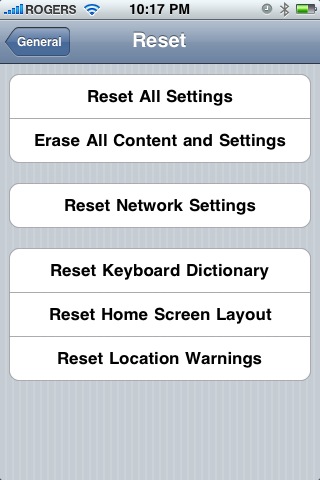
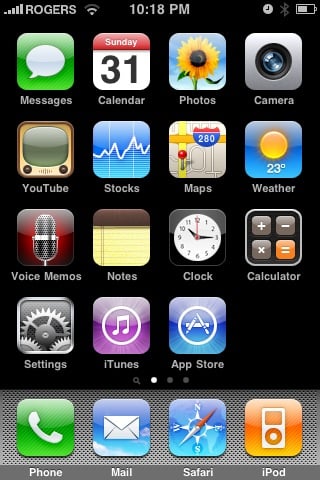
&lt;p&gt;I noticed that the screenshot they used must be 3.0, because it&#039;s got that magnifying glass searcher icon to the left of the first homescreen page, so I&#039;m wondering if you&#039;re right.&lt;/p&gt;
</description>
		<content:encoded><![CDATA[<p>@Matt Hall</p>

<p>I noticed that the screenshot they used must be 3.0, because it's got that magnifying glass searcher icon to the left of the first homescreen page, so I'm wondering if you're right.</p>]]></content:encoded>
	</item>
	<item>
		<title>By: icebike</title>
		<link>http://www.imore.com/2009/06/01/iphone-101-reset-home-screen-icons-default/comment-page-1/#comment-48217</link>
		<dc:creator>icebike</dc:creator>
		<pubDate>Mon, 01 Jun 2009 19:34:26 +0000</pubDate>
		<guid isPermaLink="false">http://www.theiphoneblog.com/?p=8845#comment-48217</guid>
		<description>&lt;p&gt;Matt, Its on 2.2.1, its been on every version since at least 2.0 when I last used it.&lt;/p&gt;

&lt;p&gt;Back then, I had no apps other than the default, so I don&#039;t remember if this restored apps deleted by pressing the wiggling X.  Anybody know?&lt;/p&gt;
</description>
		<content:encoded><![CDATA[<p>Matt, Its on 2.2.1, its been on every version since at least 2.0 when I last used it.</p>

<p>Back then, I had no apps other than the default, so I don't remember if this restored apps deleted by pressing the wiggling X.  Anybody know?</p>]]></content:encoded>
	</item>
	<item>
		<title>By: Matt Hall</title>
		<link>http://www.imore.com/2009/06/01/iphone-101-reset-home-screen-icons-default/comment-page-1/#comment-48213</link>
		<dc:creator>Matt Hall</dc:creator>
		<pubDate>Mon, 01 Jun 2009 19:14:36 +0000</pubDate>
		<guid isPermaLink="false">http://www.theiphoneblog.com/?p=8845#comment-48213</guid>
		<description>&lt;p&gt;Isn&#039;t this a feature of 3.0? Maybe I&#039;m wrong but I don&#039;t remember it on 2.2.1&lt;/p&gt;
</description>
		<content:encoded><![CDATA[<p>Isn't this a feature of 3.0? Maybe I'm wrong but I don't remember it on 2.2.1</p>]]></content:encoded>
	</item>
</channel>
</rss>