Daily Tip: How to find out what iOS software and baseband version you're running
Interested in Jailbreaking and Unlocking your iPhone, iPod touch, or iPad but can't determine which version of iOS you're running, or what your iPhone baseband (i.e. modem firmware) is? Just get a new device and not sure if it's been updated yet? Some Jailbreak methods only work with certain software versions and some Unlocks only work on certain modem firmware, so they're important to know before you start. Luckily they're easy to find. We'll show you where to look, after the break.

To find your iPhone, iPod touch, or iPad software version, and your iPhone modem firmware:
- Tap Settings
- Tap General
- Tap About
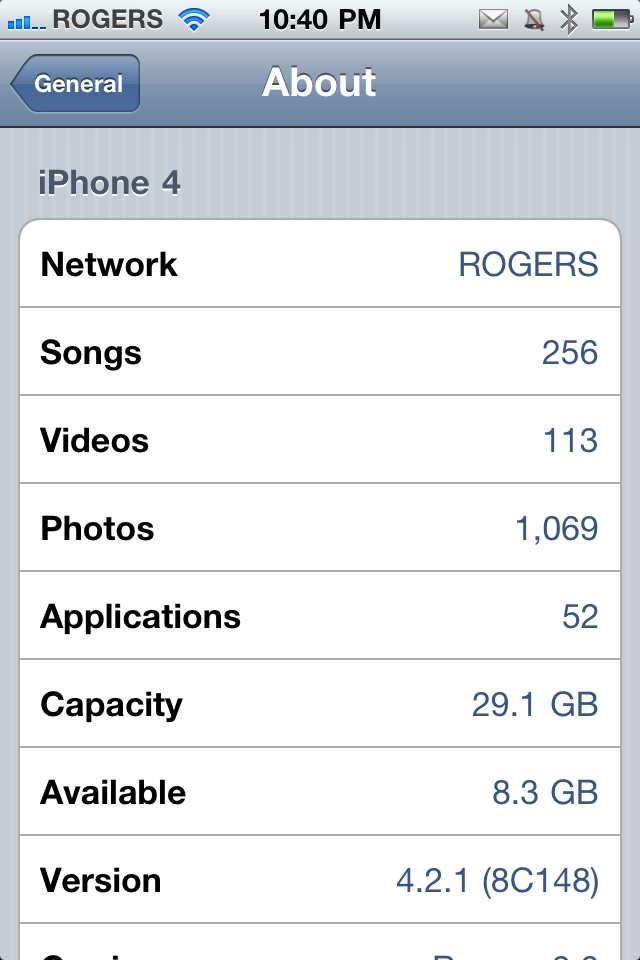
iOS software version
At the bottom you'll see Version in bold on the left, and a number series on the right. The current version of iOS as of this writing is 4.2.1. If you have older software you might see 4.1 or something similar. Note the number down somewhere convenient. (You can ignore any numbers or letters in parenthesis, that's the actual build identifier and you won't typically need it.)
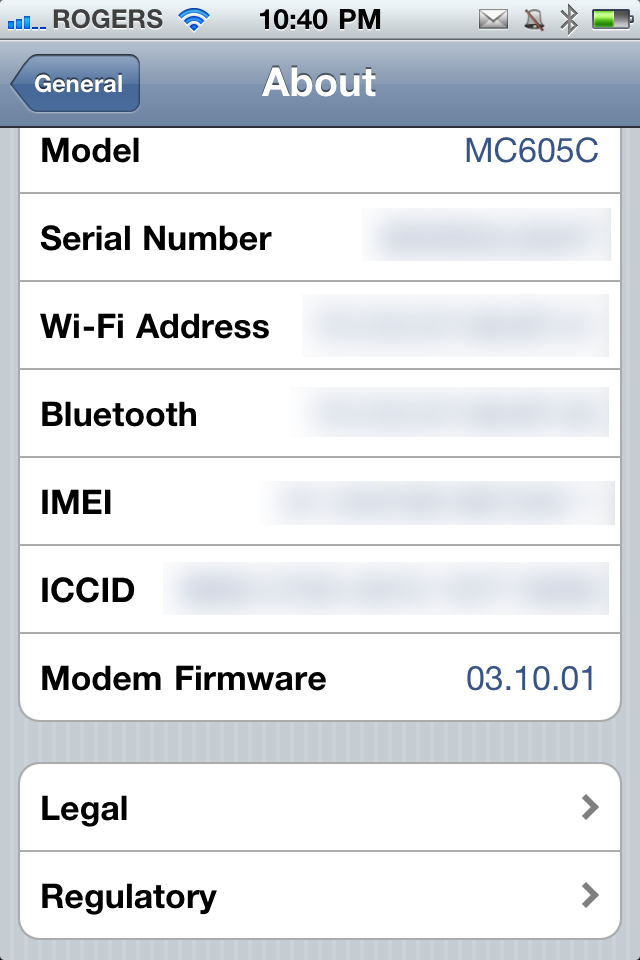
Modem Firmware (baseband)
Next scroll down to the very end of the About page and near the bottom you'll see Modem Firmware (what's called the Baseband). The current Modem Firmware for iPhone 4 is 03.10.01. Again, note the number down somewhere convenient.
Now that you know your software version and baseband, you're ready to Jailbreak. Check out our Jailbreak Starter Guide to get started, and our Jailbreak Forum if you need extra help!
Tips of the day will range from beginner-level 101 to advanced-level ninjary. If you already know this tip, keep the link handy as a quick way to help a friend. If you have a tip of your own you'd like to suggest, add them to the comments or send them in to dailytips@tipb.com. (If it's especially awesome and previously unknown to us, we'll even give ya a reward...)
| Tweet |
|
|
← Previously
What tech gifts did you get? What did you give?Leave a Reply
Note: Comments must be civil, respectful, and on-topic. If a comment does not add to the conversation, if it contains spam advertising, or inappropriate language or content, it will be removed. Insulting the topic, author, staff, site, network, or other commenters will result in the comment being marked as spam and potential prevent future comments from appearing on the site. Do not post as a business or your comment will likely be confused with spam. Comments containing links may be held for moderation. Relax, enjoy, and share in the discussion.


Not sure for which device you are showing the Modem Firmware. I have a 3g and it is 05.15.04
3 gs
I was thinking the same thing as Elayne. I have a 3GS and it's 05.15.04 as well.
iPhone 4
So is it Iphone 4? however I have a question about how to jailbreak my iphone 3gs 4.2.1 and firmware 05.15.04. Because, I had followed all the instructions from Jailbreak website, but I am still strunggling to unlock it. In fact ,doesn´t open the files in the folder request like firmware ipsw. Moreover, I´ve paid $29,00 dollar for nothing.. Gosh!!So if anyone know how to fix it, please let me know.
tks
Ehhh you can go to http://www.everythingapplepro.net for your jailbreak. If you have already jailbroken your iphone, but it still doesn't work, go to http://www.everythingapplepro.net. There search for the jailbreak compatible with your iPhone's Ios then they will give you a file you need to download and save, then go to redsnow inside that file, run it wait awhile and you'll see options on what you want to do to your iPhone such as, Jailbreak or anything other, like tether boot or get out of recovery mode.
Hi.Very nice advice. Could you help me ? by telling me how can i check what version of IOS i am running? Because my Iphone 4 is stuck on the activate screen and doesn't recognize the sim card as being original. So is there a software out there to tell me what IOS I have?
A quick reply would be much appreciated! p.s. I managed to find out the baseband : 02.10.04 with f0recast. is this baseband unlockable? best regards, Lovesome
hi - did you ever find out how to do this? i have a new iphone 4s (legal), keep getting the NO SIM installed message and unable to activate....heard that 5.0.1 may fix it, but no idea if this is what the phone has, and unable to check the version!
really helpful, thanks
Basic, but necessary. Thanks
SVVEEEEEEEEEEEEEEEETTNESS.........ScOrEd!!!!!!!!!!!!!!!!!!!!!!!!!!!!!!!
ok im having some trouble here i need to know what my firmware is and what version phone i have next to version it says 4.2.1and modem firmware says 05.15.04 im trying to figure out how to jailbreak my iphone and need this information thanks
i cant seem to find it in my itouch 4g...
And how do I find out the iOS Version from a user-agent?
i own a 3g8gb unlocked when i switched on its not showing the menu all its showing is the usb icon and an itune icon and its directing me to slide to an emergence calls only, please help me
Excellent post. I used to be checking constantly this blog and I am impressed! Extremely useful information specifically the closing section
I deal with such info much. I used to be seeking this certain info for a long time. Thanks and best of luck.
