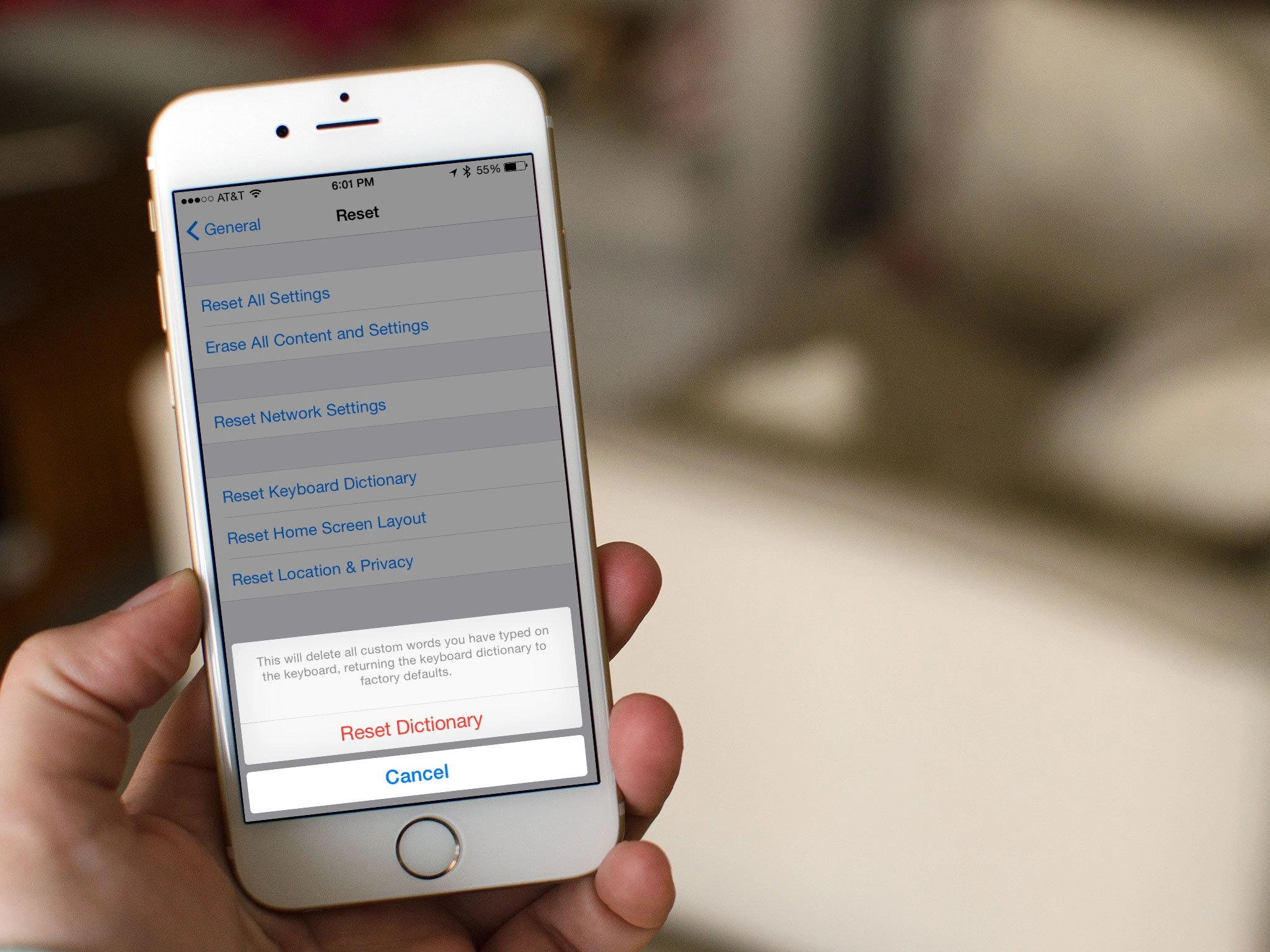
Daily tip: How to reset Your iPhone keyboard dictionary
Frustrated that your iPhone auto-correct dictionary has "learned" an incorrect word and curious how to reset it? Worried you might have a damnyouautocorrect moment when SMS'ing that important contact? Apple doesn't give you very many options when it comes to editing dictionary entries but if your iPhone has learned to incessantly auto-correct something that isn't right, there's an easy way to fix it. We'll show you how after the break.
Until Apple gives us the option to individually edit entries into the keyboard dictionary, the only option we have is to reset it. Not ideal, but it does fix any incorrect entries the phone may have learned. As a side note, you can also do this on the iPad and iPod Touch as well.
- 1 Go to Settings: General: Reset
- 2 Tap Reset Keyboard Settings.
- 3 Your keyboard dictionary will reset back to factory default.
I've had a few times where my iPhone or iPad has learned an annoying word combination from me either entering a word wrong and dismissing the auto-correct on accident, or from me using an abbreviation. I abbreviated Olive Garden to OG only one time and my iPhone decided every time I typed the word "of", it would auto-correct it to OG. Very annoying, but this simple trick fixed it.
So if you guys have had issues, give this a try and let us know how it works for you!
Tips of the day will range from beginner-level 101 to advanced-level ninjary. If you already know this tip, keep the link handy as a quick way to help a friend. If you have a tip of your own you'd like to suggest, add them to the comments or send them in to news@tipb.com. (If it's especially awesome and previously unknown to us, we'll even give ya a reward...)


There are 21 comments. Add yours.
Nice :)
Wow...how long has that been there??!?!? I've been needing this for so long... lol
a while back i had an issue when i was spelling "as" autocorrect was suggesting "A's" what the hell??
A great service guys!
Much needed by the masses.
Many thanks.
Pete.
If it's only one word you're concerned about then you can also open notepad and type that one word a few times (all the while hitting the "X" on the incorrect entry) until auto-correct learns it the correct way...tedious I know, but sometimes a necessary evil if you have auto-correct trained just the way you want on everything else.
i love the iphone , really do.
however the autocorrect feature / dictionary on these phones are the most god awful pieces of crap to ever grace the phone.
really needs to be fixed.
Quick tip on autocorrect:
If you have a word that is being incorrectly corrected, do the following.
Open Notes
Type the word in question.
If it is trying to correct it after the word is completely typed, click the autocorrect box to cancel it.
Press space bar and type again. If it is still trying to correct, click the autocorrect box to cancel and press space.
Keep doing this until it learns not to correct.
Yesssss, I can type "we'll" again without it wanting to say "Welll". Great tip that I completely forgot about. And I agree with @Dan. They should make text prediction like Android. I much prefer the prediction on my N1 to my iPhone...more than just one option when typing words!
I wish there was an easy way like this to remove the typed email addresses that are "remembered". I can't stand the old and incorrect email addresses that are shown as options when I start typing one.
YES YES, the incorrect email addresses, biggest pain in my Ipad
how did you change the sms theme?
anyone else notice the jailbroken iphone uses lol awesome
@Danny - I'm jailbroken
@people saying to use notes - this has never worked for me permanently. it will still eventually correct back to the other word. it's kind of a cr@pshoot when you use notes. it may work, it may not. in my experience, it's not a very good way of fixing the dictionary, and it's a pain
Thanks! Sometimes when I try to type 'ME' it will auto-correct to 'MR'.
@Kie - if you touch the "e" key on the right side it'll want to autocorrect the word to mr. However, if you hit the "e" key on the left side it won't autocorrect.
It resets all those good things also that it has learnt correct
@Medicmaestro - what do you mean the e on the right or left?
@Copeling - The right side or left side of the key, since you don't always hit it directly in the center.
Hi, this will not work on my iPhone 3GS o/s 5.0.1
Thank you so much! My iPhone had accidentally started replacing the with tge... It was super annoying!!!
If using the reset option doesn't seem to work for you, try pressing reset keyboard dictionary then without touching anything else, backup and restore your iPhone. That was the only way I could get around it not working perminatly
