
1. iOS 18 — what's next for iPhone?
2. iPadOS 18 — will Apple finally unleash the power of iPad?
3. macOS 15 — what's new for Mac?
4. Apple Intelligence — what will it be able to do?
tvOS 18 was announced at WWDC 2024 on June 10, with Apple revealing some exciting changes to your home entertainment box, such as InSight.
If you're a developer, you know it's time to get tvOS 18 onto your test devices so you can bring your apps up to speed with Apple's latest Apple TV software. We advise general members of the public against installing the beta until Apple releases a public beta in a few weeks time.
With this in mind, here's how to download and install tvOS 18 beta 1.
How to download and install tvOS 18 beta
How to download and install tvOS 18 developer beta
Beta software, also referred to as a preview, seed, or release candidate, is a version of software that’s still under development and not yet released to the public. This software is intended only for installation on development devices registered under your Apple Developer Program membership. Registered development devices can be upgraded to future beta releases and the public version of the software. Attempting to install beta software in an unauthorized manner violates Apple policy and could render your device unusable and necessitate an out-of-warranty repair. Make sure to back up your devices before installing beta software and install only on devices and systems that you’re prepared to erase if necessary.
- Open Settings on your Apple TV
- Select System then Software Updates
- Choose Beta Updates then tvOS 18 developer beta
It's that simple. You no longer need to use Xcode or any other external software to update your Apple TV to the newest tvOS developer beta, and you don't need to be a developer either.
How to download and install tvOS 18 public beta
The tvOS 18 public beta is not currently available but we expect to see the first iteration in July. The process is identical to the developer beta installation:
- Open Settings on your Apple TV
- Select System then Software Updates
- Choose Beta Updates then tvOS 18 public beta
The next step in tvOS
Although there aren't many new features this year for tvOS, you'll likely be using what's been announced for tvOS 18 in due course.
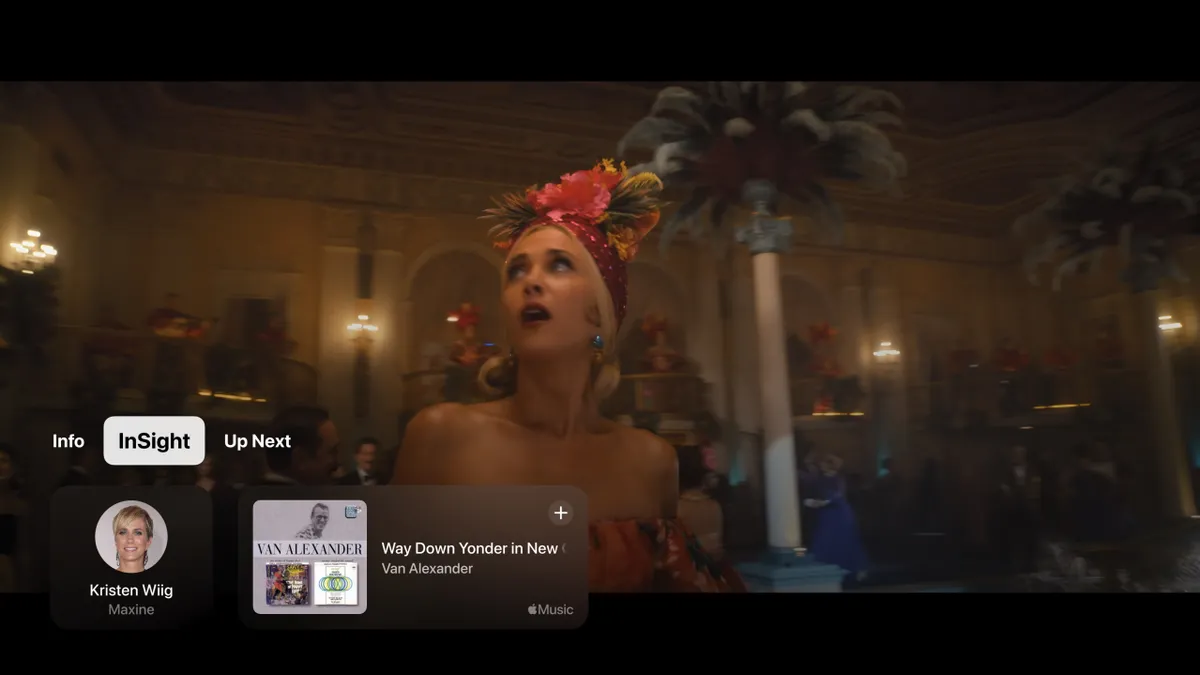
For instance, InSight lets you find out more information about the actors and music in the show you're watching. This is very familiar to Amazon Prime Video's 'X-Ray' feature, so if you've used that before, you'll feel right at home.
tvOS 18 now supports 21:9 projectors, which can be great for watching certain movies in their intended aspect ratio. Enhanced dialog improves the way you hear actor's voices in certain scenes that may be harder to hear. There's also a new dynamic subtitles feature that only shows captions when you need them. Finally, Screensavers have been redesigned in how you can choose them, as well as a new portraits category.
Follow WWDC 2024 as it happened. Check out our roundups for all the latest on the newly announced iOS 18, iPadOS 18, macOS 15, watchOS 11, visionOS 2, and Apple Intelligence.

