Complete review of Apple's iOS 4 software for iPhone and iPod touch
iOS 4 (previously iPhone OS 4.0) continues Apple's relentless yearly mobile OS update cycle. If 2007 was the mainstreaming of the multitouch user interface, 2008 all about the App Store, and 2009 was filling in the feature list, then iOS 4 promises to be... well, that's why we're here.
(And yes, iOS. That's the new name Apple has licensed from trademark-holders Cisco to represent the iPhone, iPad, and iPod touch -- and maybe soon the Apple TV and who knows what else -- family.)
Back on April 8 at the sneak preview event, Apple promised 7 "tent-pole" features and 100+ general user features overall, along with 1500 major new API for developers. We're going to walk you through the ones that matter most.
Note: iOS 4.1 is now available. See our complete iOS 4.1 walkthrough for the latest on Game Center, HDR photography, Ping social music network, and the other new features.
See also our iPhone 4 review for more on hardware specific features.
iOS 4 in 10 minutes: video quick-start guide
If you don't have time (yet) to read this massive iOS 4 walkthrough and are eager to get the basics down now, here's a quick 10 minute video guide to get your started.
We're showing it off on an iPhone 3GS, which should be similar to how it will work on an iPod touch G3. If you're using the iPhone 3G or iPod touch 2G you won't get the multitasking and wallpapers. You'll blame Apple. Apple will blame the hardware. The hardware will try to frustrate you into upgrading to an iPhone 4. You've been warned.
Note: If you haven't updated yet, save yourself some time and potential hassles and go read our getting ready for iOS 4 post first first. Then once you're good to go, sit back, relax, and hit play on the video below.
What Hasn't Changed
As always, we'll start off by telling you what hasn't change so we can clear the deck for what has. For more information on any functionality that's pretty much identical to past versions, check out our previous walkthroughs:
And here's a quick list of the unchanged apps in iOS 4:
- Stocks: Similarly, Stocks got landscape and a slew of swipe-able data last time, so the update love gets skipped this time.
- Weather: Almost comedically at this point, it's still unchanged from iPhone 1.0. Still no HTC TouchFlo 3D style animations, no landscape mode with more/different information. Not even a Calendar-style icon update to show current local weather. Nada.
- Voice Memo: Introduced in iPhone 3.0, it looks pretty much the same in iOS 4.
- Clock: With nothing but a lap feature added last time, we lose the "but" and keep the "nothing" for iOS 4.
- Calculator: Upgraded back in 2.0 for landscape scientific mode, all Calculator gets this time is a slight icon tweak towards the red.
(We're not counting getting a resolution bump for iPhone 4 Retina Display as a functional change.)
System-wide enhancements
Spell check

Spell check, which debuted in iOS 3.2 for iPad, is a system-wide addition to iOS 4 now as well. Words the OS thinks you've misspelled will be underlined in red (familiar to any Microsoft Office or Mac OS X user). Tapping on them will give you a popup containing a recommended replacement. Tapping the popup replaces the misspelled word with the (hopefully!) correctly spelled one.


Combined with the iPhone's existing -- and industry leading -- predictive auto-correct, it's a powerful combination.
Text Replace

Cut, copy, and paste also gets an iPad-debuting feature with "replace" now added to the popup options.

Additionally, if iOS 4 autocorrects a word and you immediately backspace, a popup will appear offering to replace the correction with the originally typed word.
VoiceControl

We haven't found any specific documentation on this yet, and it doesn't seem to be listed as one of the options flying by on the on-screen suggestions, but per the comments below asking "what time is it" will now have VoiceControl speak the current time to you. It's possible other commands have been added as well. If you come across any, let us know.
Wi-Fi

iPod touch (and I believe iPhone) can now stay connected to Wi-Fi even when in sleep mode. This means background VoIP calls, push notifications, and other apps that require an active Wi-Fi connection can just keep working.
Virtual Keyboard
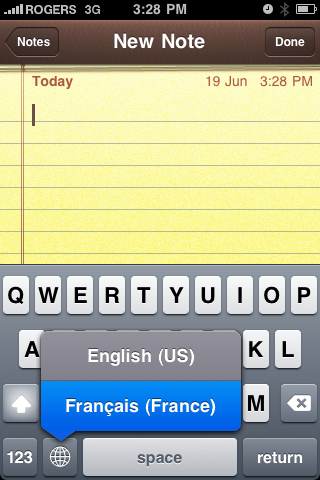
Instead of just hitting the globe key to cycle through languages on the virtual keyboard, you can now hold it down to get a popup showing all currently enabled international keyboards.
Bluetooth Keyboard Support

You're going to get tired of us saying "like the iPad" but remember when we told you spring's influx of iPad news would be important come summer's new iPhone news? You were warned for a reason. iPhone is getting iPad's Bluetooth keyboard support. Thank goodness for that.
Over-the-air Carrier Setting Updates
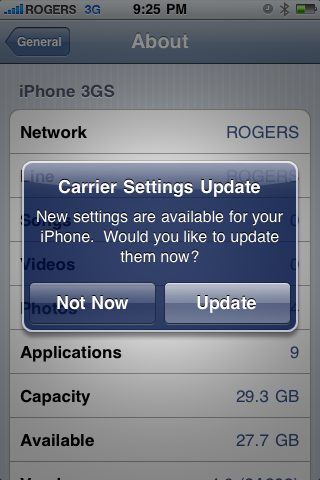
Based on reports from Rogers/Fido users in Canada, iOS 4 adds the ability for Carrier Setting Updates to be pushed out over-the-air (OTA) to iPhones and installed on-device. (In previous versions iTunes would handle the update and sync it over).
Home Screen

SpringBoard, the app behind the Home Screen gets an iOS 3.2 for iPad-style update to support custom wallpaper. Yes, the default background in iOS 4 is water drops on gray, which is not default but included in the iPad's wallpaper gallery. Also like iPad, the Mac OS X reflective Dock (buh-bye grid) and translucent top bar have been brought over.
(If you get a new iPhone 4, or do a clean install of iOS 4, you'll also note Clock, Compass, Calculator, and Voice Memos have been moved to a Utilities folder by default -- more on Folders later).

In addition to the iPad wallpapers, Apple has also introduced a few new ones, all seemingly focused on livening up the home screen without being too visually distracting. Natural textures and muted patterns get an obvious focus here with stones, rocks, and textiles front and center.
(See all of them in our iOS 4 wallpaper gallery)

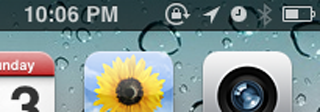
In addition to previous status icons, the top bar will now show a north-east pointing arrow to alert you that location-based services (GPS) are being used. (So you'll see this in Maps and when using navigation, location-based social networks or games, etc.) An orientation lock icon will also show if you've enabled the widget to lock your screen in portrait mode (see below).
The color bands indicators across the top of the screen that highlight running voice or data connections (green for Phone, red for Voice Memo, blue for tethering) get expanded. Red now serves double-duty to indicate a VoIP app (like Skype) is active in the background.

How the SpringBoard has been once again extended to visualize new, core-level OS changes is where things get more interesting...
Spotlight

First, and strangely least, the Spotlight Home Screen introduced in iPhone 3.0 now gets to look beyond on-device data and reach for the clouds. Literally. Well, insomuch as the cloud here is Google and Wikipedia, which are very welcome additions. (Hopefully Twitter will be added in as well at some point). Tapping either will launch you into Mobile Safari and the appropriate search result page.

Multitasking

While Apple's built-in apps (like iPod, Mail, etc.) have had background multitasking since 1.0. four years, many gripes, and stiffer Google Android competition than later, background multitasking comes to App Store apps. (At least for iPhone 4 and last year's iPhone 3GS).
Why no iPhone 3G? Apple abjectly refuses to put their name on an implementation where hardware constrains software -- see video recording last year -- and that means iPhone 3G isn't up to their multitasking standards.
As to how it works, instead of a traditional "leave full apps running in the background" approach, Apple instead chose to implement a more restricted but, they felt, better performing and power friendly solution involving 7 specific background API (application programming interfaces.)
Local notifications
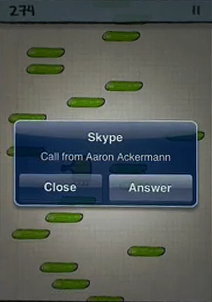
In addition to the existing push notification service from Apple's servers, which provide sound, badges, and alert popups for everything from IM to game challenges, iOS 4 adds local notifications so something like an alarm-clock app could register an alert that would sit in the iPhone in the background until the proper time, then activate. That takes the online server out of the equation which is good for tasks that don't need additional information from the cloud, and so don't have to activate the radios.
Task completion
There's another API for task completion so that, for example, if you're uploading a picture to Twitter and leave the app, it can register a thread to keep uploading the picture in the background while you do something else. That means the entire app doesn't have to keep running, freeing up memory and lightening battery load, and even the thread will terminate when the upload is done.
Fast task switching and saved state
Fast task switching deals with the perceptive speed that multitasking offers. With previous versions of iOS, if you left an App Store app it would shut down completely. If you went back -- regardless if it was a second or a week or later -- it would usually restart not from where you left off but from the beginning. A few developers tried to add persistence on their own, saving your place when you came back as best as previous OS versions allowed, but most didn't -- especially games which was aggravating when phone calls pulled you unexpectedly out of them. Also, if you closed one app and went to another, you could theoretically be stuck swiping back or forth between 11 home screen pages.
Saved state is now built into iOS 4. If you switch out, Apps have their currents state saved to memory and if/when you go back, the app checks the memory save and resumes from that state. [Thanks Aaron]
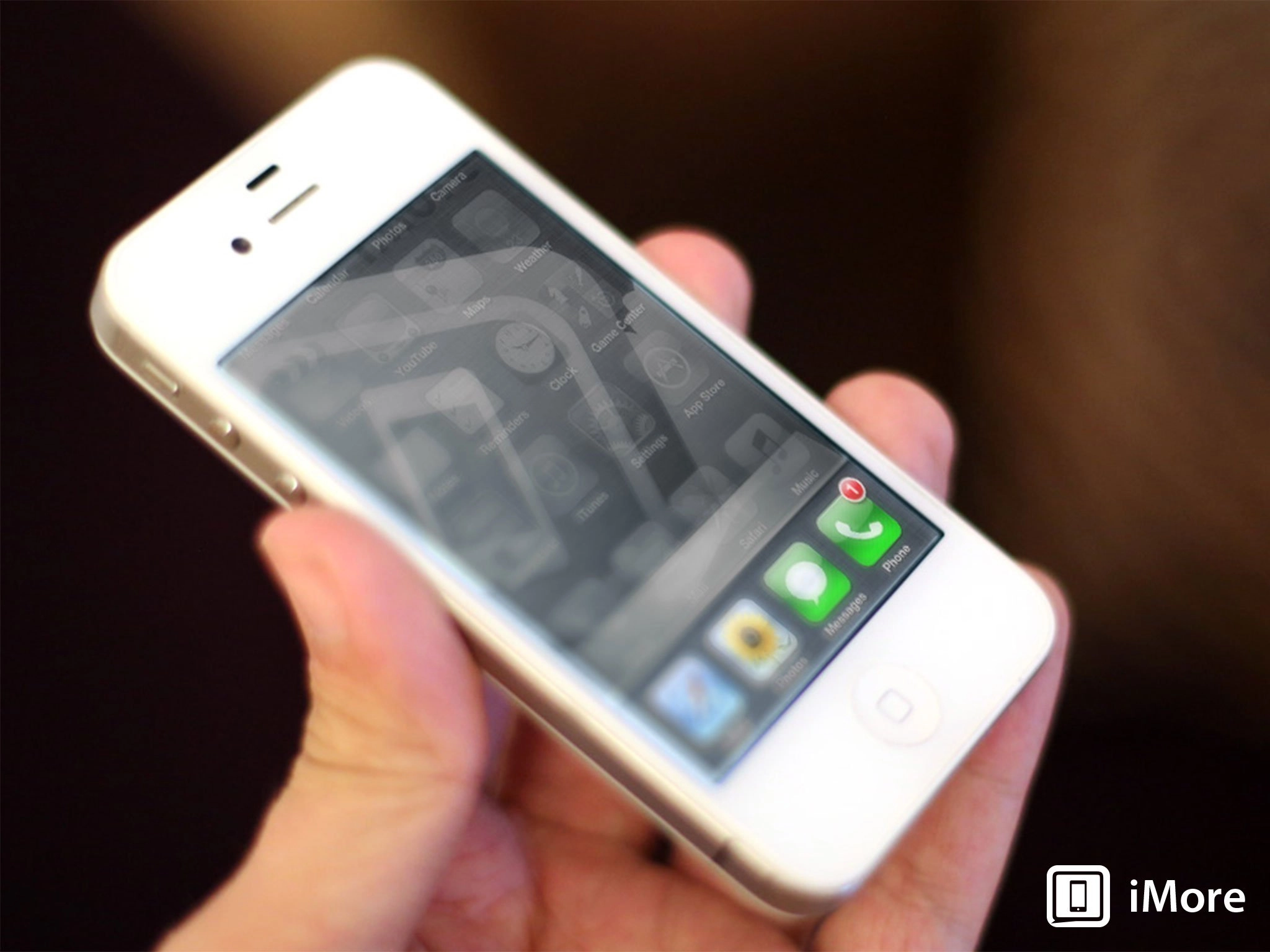
To enable fast app switching, Apple's created a new UI mechanic. Now, when you double tap the home button, the screen turns translucent and slides up, allowing you to peek at the apps running "under the hood". (Technically frozen with state saved and threads registered with the background API).
Apps in the fast switcher UI are sorted in order of last usage. That means, if you're moving between a set of commonly used apps, they're most likely right next to each other and not screens and screens away. These two elements combine together to make launching apps perceptively much faster, even though the apps don't have to be running in the background consuming resources just for that convenience.
Positionally the fast task switcher apps take up the space traditionally reserved for the Dock, so while it's a tad confusing the concept of apps at the bottom of the screen being more permanent and easily accessible remains. Behaviorally, while they look like a secret dock, they function like the Home Screen itself in that you can swipe from right to left to scroll through a several 4-icon sets of multitasking apps.
Given even the iPhone 3GS has only 256MB of RAM, we assume Apple will discretely kill off the least-used app in the stack when things get tight. Whether or not that means the icon disappears from the multitasking UI we don't know, but worst case you just have to go to the home screen, re-launch it (hopefully from saved state) and all you notice is a slightly longer start up time. iPhone 4 is supposed to have 512MB of RAM which should allow for significantly more threads to run in background without slowdown or other problems.
iOS 4 helps users visualize what's going on when switching tasks by introducing a new, carousel-like animation. The new animation occurs when you switch between two apps either via the new, double-click-Home to trigger to launch the multitasking UI, or when one app calls another app (i.e. when you're in Contacts and you tap to send a contact an SMS).
Launching or leaving an app retains the same, zoom-based effect as always (though the wallpaper in iOS zooms slightly as well, like on the iPad).
Interlude: Task Killing
At the iOS 4 event, Steve Jobs likened task managers (in the multitasking, not to-do sense) to styluses -- if you need them there's something wrong. Initially this created confusion in iOS 4 when it was noted, if you hold your finger down on multitasking apps, they'd jiggle and bring up a delete icon that, if tapped, removed them.
It appears like there's a couple things going on. First, with built-in Apple apps, like Mail, if you "delete" it from the fast task switcher, you will still receive Mail (it doesn't kill the background thread that checks, sounds/vibrates, and updates the badge) but the app seems to do some sort of data cache refresh at times.
For App Store apps, if you "delete" them it does appear to force a reset when next you launch them, i.e. they won't resume from the previously saved state and their threads seem to be restarted. [Thanks Justin!]
Widgets
Just like to the left of the main home screen is a special Spotlight screen, to the left of the fast app switcher is a special widget dock containing an software version of the iPad's hardware orientation lock control (though it currently only locks in portrait mode). More over, there are three circular controls to skip back, play/pause, or skip forward any music (including streaming music) -- and rewind or fast forward if you hold them down. Lastly, whichever app is currently playing the music, be it iPod, iTunes (streaming podcasts, for example), or an App Store app (like Pandora or Slacker) is shown at the right so you can jump back to it and access further controls.
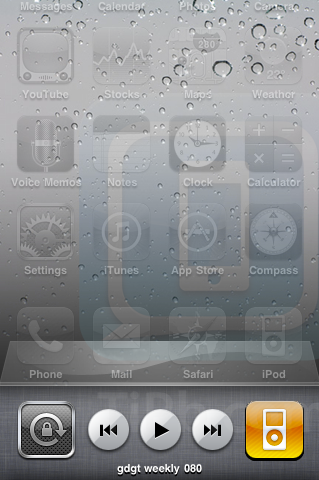

The presentation may not be as visually slick as Palm webOS' Card view (which looks like iPhone Safari's Page view) or Mac OS X Expose mode, but it keeps tens of millions of existing iPhone and iPod touch users grounded in the interface they're familiar with and that's what Apple is prioritizing.
Note: Previously you could assign the double-click home button action to trigger Phone Favorites, Camera, or Spotlight. On iPhone 3G under iOS those options remain. On iPhone 3GS under iOS, in early betas you could double-click-and-hold the home button to trigger Phone Favorites, but this function doesn't appear to have survive to the final release. Hopefully something will replace it and soon.
Background music, location, and VoIP
Speaking of streaming music, perhaps most famously, Apple is allowing apps to register three specific types of the threads for persistent backgrounding (they can just keep running until you close them). Again, this isn't the whole app running, just one thread from the app, so the idea is it won't slow down performance, use up memory, or drain battery to the same degree. These API are for streaming music, location, and VoIP (voice over IP).
This means you can listen to Pandora, Slacker, etc. while surfing the web. Navigon, TeleNav,TomTom, etc. can keep using the GPS and alert you to directions while you're on the phone, and to further save resources, non-critical location apps like FourSquare, Gowalla, Loopt, etc. can be alerted when you change cell towers. Fring, Skype, Line2, etc. can answer calls and receive messages when you're not in the app, making them more equal telephony citizens.
What's still missing are background API for timeline updates, so that IM, Twitter, RSS, etc. could update like Mail does and have new messages ready and waiting when you return to the app. Also, there's no API to let internet sessions like SSH, RDP/VNC remain active when you exit an app making it more onerous for network administrators and others to manage remote machines. Hopefully these can be added in future revisions.
Folders

There are over 200,000 apps in the App Store and likely a ton more by the time I finish writing the sentence. Literally. iPhone 1.0 had one Home Screen but with only the built-in apps available back then, it wasn't even a limitation. With WebApps, it grew to 9 pages for a 148 app limit. With iPhone 3.0 we were given 11 pages, for 180 apps viewable, but you could eventually install many more and use Spotlight as a way of finding and launching them. Organizing them still wasn't a real option.
Enter Folders. A Folder is simply a grouped icon that holds up to 12 other icons inside it. (And for those keeping count at home, the new math means a whopping 2160 apps can be kept available at once. Shudder).
The way it works is you tap a Folder icon and once again the Home Screen fades and splits open, this time below the Folder. Inside the split are all the apps contained in the group.
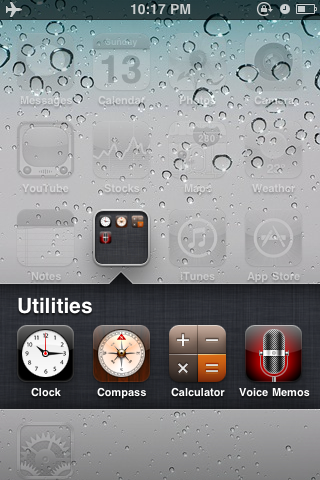
To create a Folder, you begin by tapping and holding an icon to put it in jiggly mode, just like you did before to delete or move it. Then, drag it over and drop it on top of another icon to create a Folder. (This works better when icons aren't at the right edge of the screen, as the move behavior seems to supersede the Folder behavior, causing the icon to wrap to the next line before you can drop on top of it.) Once created, iOS reads the apps' category data and tries to name the folder for you, but you can easily edit it and change it to anything you want.
To remove apps from a Folder, put them in jiggly mode inside the Folder and drag them out (or just delete them if you don't want the app anymore at all). You can also move them around within the Folder to customize their order.
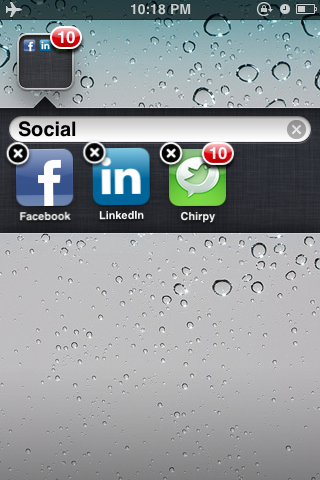
Folders can be put in jiggly mode and moved as well, but not deleted (they can only be deleted by removing all the apps from within them, and which point they self-destruct for you). You can even move them to the Dock, which means you could have 48 apps readily available at any time for quick launching.
And while you still can't delete Apple's built-in apps, you can take the ones you're not using and hide them away inside a folder so they waste as little Home Screen space as possible (as Apple now does by default with the Utilities folder mentioned previously).
Again, not as visually exciting perhaps as Mac OS X's Stacks, but it keeps current iPhone users in a familiar interface while adding much-needed functionality.
The ability to manage Folders has also been added to iTunes 9.2, mirroring the creation, editing, and removal features found on-device.
Messages

Messages in iOS 4 gets the same built-in Spotlight search that Mail and other apps got with iPhone 3.0. It appears at the top of the main messages screen. (There's no search within an individual Messages thread). [@justin_horn]

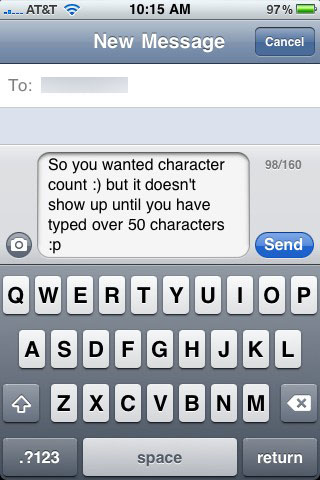
Messages (finally) gets a character counter so you'll know when you're getting close to, or going past, the SMS limit (which would cause a second message to be sent). It kicks in after you've typed 50 characters or so. [@iMuggle]
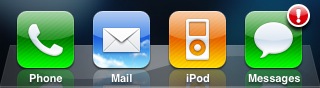
iOS 4 will now put an exclamation badge on the Messages app as a way to inform you when an SMS text or MMS multimedia message fails to send.
There's also a new API to allow in-app SMS for developers who want to include the functionality in their own apps. While this might be similar to the iPhone 3.0 embedded email option, and whether or not it will let users reply to SMS without leaving an app, it doesn't seem as elegant a solution as a global background messaging system.
Calendar

Calendar removes two long-standing gripes and adds something pretty much invisible from the interface but awesome in terms of functionality.
First, you can now show all or hide all calendars or individually check/uncheck just the calendars you want to see.

Birthday calendars have also been added to the option, something that was previously only possible to see under certain setup conditions.

Lastly (and most excitingly), Apple has finally added Calendar access for developers. What this means is you may soon see apps where you can buy tickets for a local movie and have the show time automatically added to your Calendar.
Photos

Photos, at least for Mac users, gets the same iPhoto '09-based organizational features introduced with the iPad: Events, Faces, and Places.
If you have a Mac with iPhoto '09 and you've let it automatically file your photos by time stamp (Events), through facial-recognition algorithms (Faces), and via geo-location (Places). All these join the previous Albums view to form the bottom tab bar.


Landscape mode is also now supported in album and gallery views [@antonioj].


Previous betas included a Rotate function under the action button that would turn a photo 90 degrees, but this doesn't seem to have made it into the final. Hopefully it will return.
If you Email Photo, you now get the option of sending a small, medium, or large version (shrunken pixel dimensions and hence file size), or at actual size.

Lastly, developers have been given access to the photo and video library (not just the image picker as in previous OS versions).
Camera

Tap to focus, introduced in iPhone 3.0 for still photography, now gets expanded to video recording for the iPhone 3GS and iPhone 4.

Still photography maintains its leg up, however, via a new 5x digital zoom. When you tap the screen, a slider pops up allowing you to swipe to the right to increase magnification and swipe left to decrease.


With iPhone 4, there's an additional control to swap between the beefed up 5mp back-facing camera, and the all new front-facing VGA camera (if you want to take a self-portrait/profile picture). There's also an icon to show the new rear-mounted LED flash. This feature sounds like it's automatic for still but can be turned on and left on for night-time video shooting, but we'll have to wait and see when iPhone 4 ships.

Developers also get full access to and control of video playback and recording.
YouTube

You can now watch YouTube videos in portrait mode if you really want to. They'll still default in landscape, so you may have to rock the accelerometer back and forth to get them to switch.
Maps

A minor tweak, but the current location/current direction button changes from the previous crosshairs to a north-east pointer to match the new location services icon used in the title bar. (No iOS 3.2 for iPad-style terrain mode, at least not yet).

For developers, overlays can now be added to embedded maps to show extra data like routes or annotations.
Notes

When you first enter notes it looks unchanged from previous versions of the iPhone OS. However, there is now an Accounts button at the top left of the list page and tapping it takes you to a new screen where you can choose to view All Notes, just the notes on your iPhone, or just the notes that are synced via IMAP to your email account(s). Yes, that means over the air (OTA) notes sync is finally here -- with the caveat that Exchange doesn't seem supported yet.
(UI-wise this is similar to how you back out/left in Calendar or Contacts to toggle data sources.)

The way these show up in Mac OS X is via the built-in Mail.app client in the Notes tab.
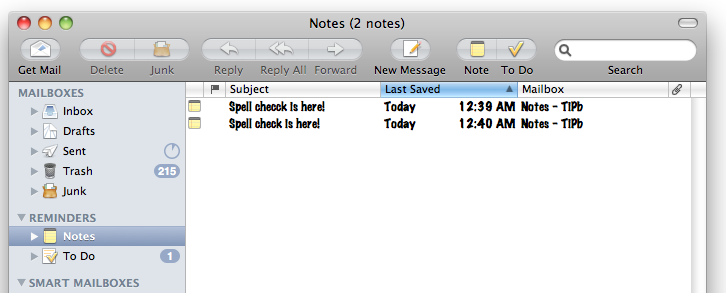
On Gmail they show up as a generic label. In other IMAP clients, regardless of OS, they'll show up as generic IMAP folders.

iTunes Store

The iTunes store itself is the same, however, audio streaming from the app has taken a huge leap forward. Since iPhone OS 2.2 you've been able to tap the title of a podcast to begin streaming (rather than downloading) the audio, even in the background while using other apps, but it was sometimes hit or miss. It would drop out, it would time out, you couldn't really scrub through it, and if you left it for a while it would lose its place and start over.
In iOS 4 it's rock solid. You can scrub and it re-buffers and keeps playing flawlessly. You can stop it and come back hours or even days later -- even after using the iTunes app to search for other things or the iPod app to play different audio -- and it still knows where you left off and starts playing again instantly without missing a beat.
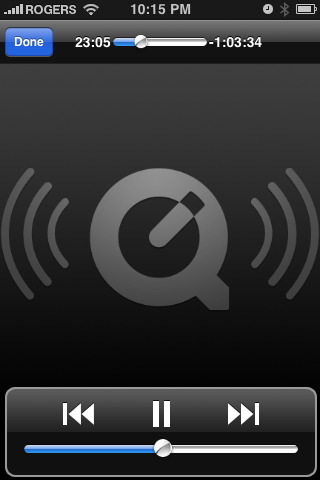
As mentioned previously in the multitasking section, when iTunes is using the background music streaming API (I'm assuming thats' what it's using) it gets the widget position in the fast task switcher interface, complete with widget controls.
Settings

This year, like every year, some of the more numerous and interesting changes Apple delivers in their new OS are tucked neatly away in the Settings app.
General: Network
You can now choose to not only turn off 3G data or roaming data, but all cellular data.

General: Location Services
At the iOS event, Apple made a big deal about user privacy when it came to location (like a shot at Google). That manifests here with far more granular controls over which apps are allowed to access your location data (GPS, Wi-Fi mapping, and cell tower triangulation) and the aforementioned north-east pointing arrow that shows up when any app has used your location in the last 24 hours.

General: Spotlight Search
Since double clicking the home button is now a hard-wired to launch the fast-task switcher for iPhone 3GS and iPhone 4, the Home Button setting is gone and replaced by direct access to Spotlight Search preferences.
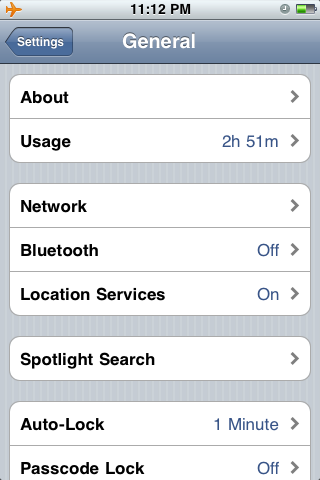
Since iPhone 3G won't be getting multitasking those options remain under iOS 4 for that device.
General: Passcode Lock
Previously available only through an Enterprise profile, iOS 4 brings stronger, alphanumeric passcodes to all iPhone users. That means you're no longer stuck with only a 4 digit pin, but can now create longer passcodes with far greater variation. Of course, longer, more varied passcodes are more of a hassle to remember and enter, but that's the cost of good security.


Mail, Contacts, Calendars
As previously mentioned, Notes will now sync over IMAP and the settings for that appear here. First, all the way at the bottom, you can choose which account to use as the default for note sync.

Inside MobileMe, Gmail, or other IMAP accounts, you can choose whether or not to enable sync. Again, there's no support for Exchange ActiveSync accounts yet (including Gmail via GoogleSync).


Safari
When you tap into the Safari's URL bar in iOS 4 and start typing, Safari starts to do a "keyword search", i.e. display predictive results based on your bookmarks and history. Anything that contains the text you're inputing either in the URL or history is listed below the URL field so the moment you see what you want you can just tap it and go.
This makes it easier to find something if you don't remember the exact web page address or if you know you recently saw a site, and know what it was about, but don't remember where exactly it was. Just start typing a few words you do remember and let Safari do the heavy lifting. Highly convenient and certainly "awesome". [To misappropriate the term from Mozilla]
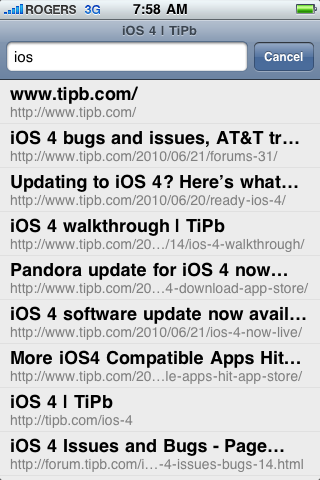
Also, welcome to iOS search options, Microsoft Bing.

Messages
Here's where you can turn on that new character count option.

iPod
The iPod app now has an overlay that shows you information about songs and podcasts. While functional it's not terribly attractive so it's nice to be able to toggle it off right here.

App Store

iPhone 2.0 brought us the iTunes App Store, iPhone 3.0 added in-app purchases, and now iOS raises the mercantile stakes once again with...
iAd

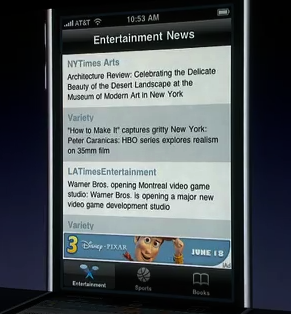
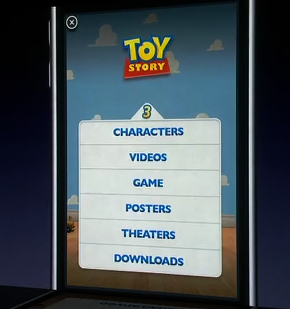
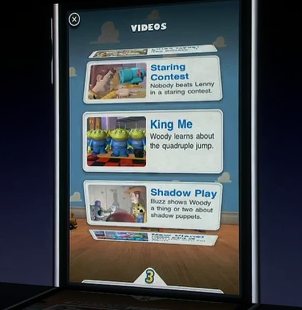
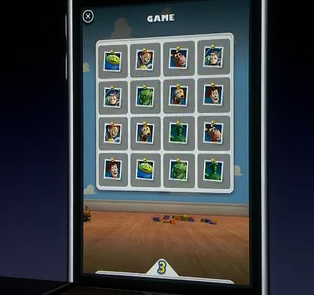
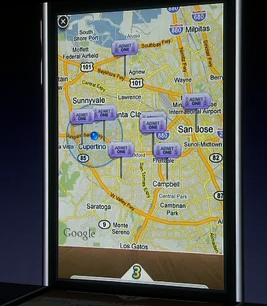
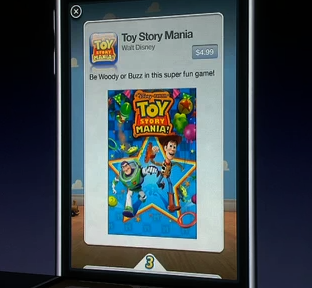
iAd will provide developers with an easy-as-Xcode way to place advertising in their apps, both paid and free. Apple is setting a high bar for their ads, however. No simple Google-style text, annoying punch-the-monkey, or jarring transition out of the app and into the browser, they claim to want great looking, highly interactive, emotionally compelling content that will connect with rather than alienate users. Served every 3 minutes. Yeah...
Functionally these are built in HTML5 (no Flash need apply) and seem to work as apps-within-apps. Tapping on a banner brings up a full-screen ad-as-webapp and examples shown included plenty of animated UI effects and content that ranged from videos to freebies like wallpaper, to free and paid apps you could download from within the ad (no trip to the App Store needed). An exit button is persistent at the top left so users can quit the add at any time.
Apple will be selling and serving the ads, so all we can do is hope they're unobtrusive and actually reach the quality levels presented. For paid apps that also try to include in-app iAds, that bar will rightly be very, very high.
Quick Look

Just like Mail can preview documents, Quick Look will allow developers to present the same functionality in their apps.
Accelerate
2000 hardware accelerated math APIs probably won't be seen by users, but there's not doubt we'll feel them in the games. Zoom. Zoom.
File Sharing
Again it looks like the iPhone is finally getting in iOS what the iPad got in 3.2 with the file/document transfer feature now exposed in iTunes sync.
Now all we need is an elegant way to share and wirelessly sync those documents across multiple devices and users. MobileMe 2.0, souped up iWork.com 2.0, where are you?
Phone
The biggest addition to the iOS 4 Phone app is iPhone 4 exclusive -- FaceTime. When connected to Wi-Fi and making a call to another iPhone 4 user, the Hold button gets replaced with a FaceTime video icon. (Where the hold option goes under these circumstances is as yet unknown.)
Tapping that initiates a FaceTime video call. During the FaceTime video call, the person you're calling fill the screen, your own camera input is boxed in the lower left corner (you can touch and drag it to move it around), and mute, hang up, and switch camera buttons line the bottom of the screen. (Switch camera toggles between the rear-facing and front-facing cameras on the iPhone 4).


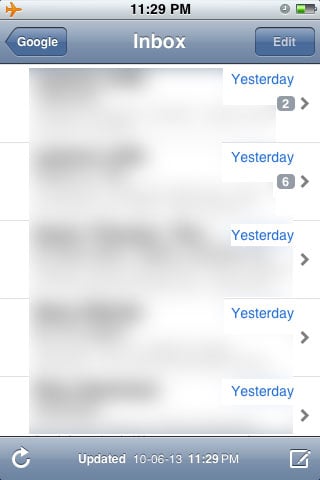
Mail gets a unified inbox. Let's write that again -- Mail gets a unified inbox. For those with multiple email accounts whose previous iPhone experience involved tapping into and out of those boxes many, many times a day this is a hugely welcome addition.
As with Calendars, Notes, etc. you can tap a button on the top left, in this case Mailboxes, to back into a selection screen where you can then go into All Inboxes, a specific account's inbox (which is considered fast inbox switching), or into the complete folder and sub-folder system of a given account (how Mail has worked from iPhone 1.0 to iPhone 3.0).

Once inside, All Inboxes is visually indistinguishable from an account-specific inbox, it simply contains all of their messages.
What is distinguishable are the small carets (technically greater-than symbols) to the right of replies that indicate a message is part of a thread. A number, typically 2 or 3, accompanies the caret to indicate how many replies are in the thread.
Tapping on a message that's part of a thread doesn't take you to the message but rather to a second list-view, similar to the inbox itself, but containing only the messages from the thread. Tapping on one of them then takes you to the message. A thread view contains a small vertical bar at the top with the subject of the thread and time of the most recent reply. A button to the top left of the message that's part of the thread also contains the subject of the thread and lets you back out and see the thread again. The button then switches to contain the name of the inbox so you can back out again, leave the thread completely, and see all your messages.
So yes, the tap, tap, tap of inbox navigation persists, albeit shifted from moving into and out of inboxes to moving into and out of threaded messages.

Like iOS 3.2 for iPad, you'll be able to open email attachments in apps. Now there's no iWork (Numbers, Pages, Keynote) for iPhone yet, but plenty of apps should support it as they push out the iOS 4 compatible versions.
Great news for heavy ActiveSync users, iOS 4 supports multiple accounts. So, for example, you can now have your work Exchange server and home Google account both set up to push through ActiveSync (which is what Google Sync users behind the scenes) at the same time. Win. Win.
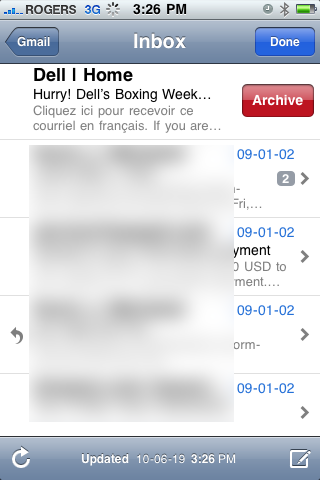
Also for Gmail users, the Delete button has no been properly renamed as Archive (since Google really doesn't want you deleting anything if they can possibly help it).
Lastly, in previous versions of the iPhone OS, when you wanted to abandon an email, you would hit Cancel and get options to Save (store the email in Drafts), Don't Save (trash the email), and Cancel (go back to writing the email). The naming of these options was likely too confusing so in iPhone OS they've been replaced with a big red Delete button (to trash the email), Save as Draft, and Cancel. And yes, you can still cancel a cancel. (iPad, by contrast, still has Save and Don't Save, but no Cancel since it's in a popover rather than full-screen menu and you can just tap away to cancel).

Safari

More iPad to iPhone cross-polination means we get search auto-complete in iOS. As you type, suggestions appear in a list view below. And as with the iPad, while Google and Yahoo! branding remain in the search boxes (along with Bing now as well), they no longer get brand advertising on the keyboard -- it simply remains labeled Search now regardless of which engine is set and default.


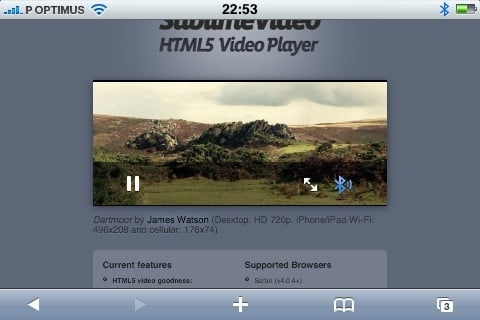
While HTML5 video would work under iPhone 3.1.3, it would launch the full screen QuickTime player to do so. Under iOS, it seems to play in-line as well [MobileGeekdom], like it does on the iPad.
If history is any indicator, Apple will likely also integrate whatever advancements WebKit and the Nitro JavaScript engine make between now and release this summer. However, there's no sign of Safari 5 desktop's key new features -- reader (think built-in Instapaper) and extensions.
iPod

When you have a song playing in the iPod app and you tap the album art, in addition to all the previous controls that popped up, you now get a dark overlay with white text giving you the info metadata of the song or podcast. This is another iPad bring-over, though not the most attractive one by a long shot. (Remember, it can be turned off in Settings).

Album art has been added to album views, jazzing up the track lists.

And in yet another iPad-like update, on-the-go playlists are dead, long live... just regular old playlists. You can add them via an item in the playlists list, at which point you get a popup that asks you for a name. Next, you tap on any songs you want to add, and when you're done, you have a new playlist. If you're not happy with it, or any playlist, just swipe to bring up the usual red Delete button and annihilate it.


Contacts

When you sync contacts from more than one source (i.e. Exchange and MobileMe, on-device and Google Sync, etc.), and there are duplicates, rather than showing the same contact twice iOS 4 will instead create a single, linked contact. This works on any iOS 4 device, including iPhone 4, iPhone 3GS, recent iPod touch, etc.
If you look at a linked contact, the header will show Unified Info at the top so you know it's linked. At the very bottom of the contact it will show you the source of the links (i.e MobileMe, Google). Tapping on the source lets you see the original, non-unfied info from just that source.

If you don't like the idea of your contacts being linked, you can tap edit and hit Unlink. If iOS 4 missed linking a contact that ought be linked, tap edit, scroll down to the bottom, tap Link Contact and choose the contact you want linked.

Game Center (Preview)
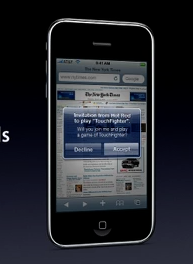
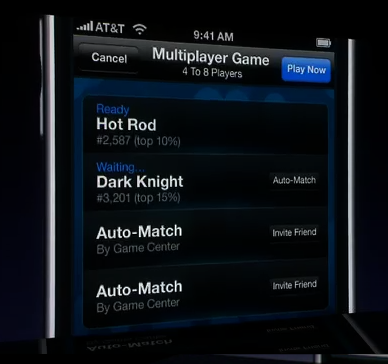
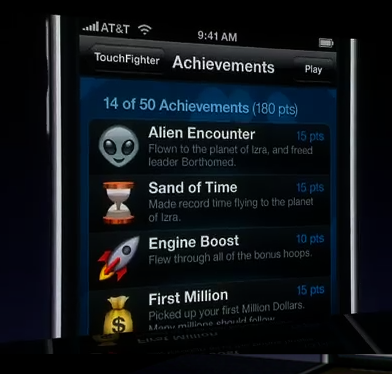
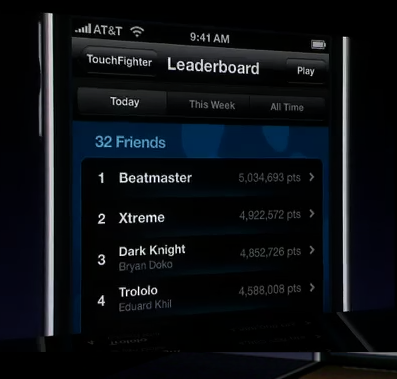
Game Center is Apple's entry into the social gaming network space (think Xbox Live or Playstation Network for iOS devices). With Game Center you'll be able to invite friends to play, use matchmaking to challenge other players, gain achievements, and have your scores displayed on a leader board.
Game Center won't launch with iOS this summer, but is scheduled for release "later" this year.
iBooks

Though not a built-in app (you'll need to go get it from the App Store when it becomes available), as part of iOS Apple announced they were bringing iBooks to the iPhone.
Apple has announced new features, including notes and bookmarks, and that those along with highlights will automatically be synced across all the iOS devices logged into your iTunes accounts. (So you can have the same book, at the same place, with the same annotations on your iPhone, iPod touch, and iPad).
Also, iBooks will be able to add PDFs to a second book shelf and open them in the same iBooks interface.
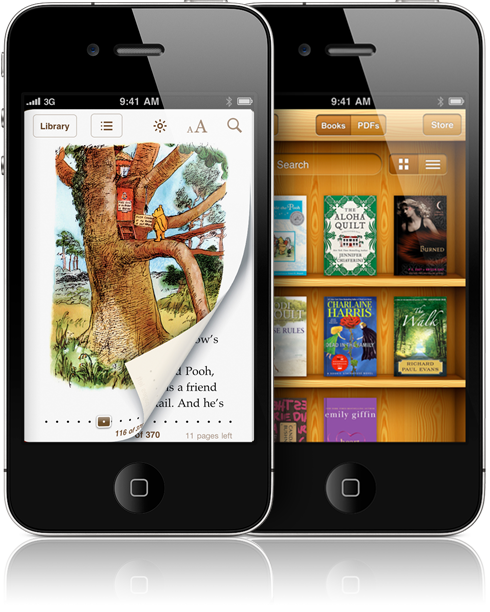
Due to the fracture and regionalism in books, it's going to take Apple a while to get deals in place with all publishers in all areas which means most countries won't have paid content at first, only public domain books from the Project Gutenberg library.
Accessibility

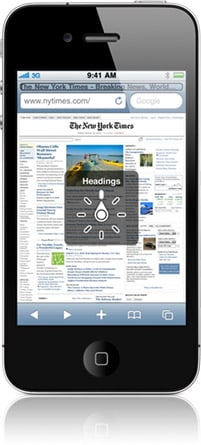
Apple really doesn't get enough credit for the outstanding accessibility features they build into their OS, both desktop and mobile. iOS 4 continues to lead the industry. VoiceOver supports 21 languages to read out loud whatever your finger touches on the screen, and a "rotor" gesture lets you temporarily change languages now on the fly.
Bluetooth support has been extended to more than 30 braille devices with tables for more than 25 languages.
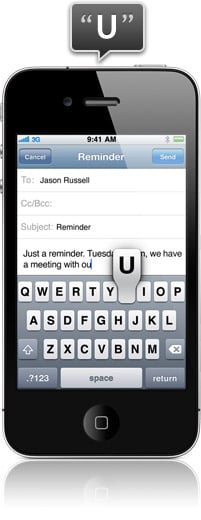
Touch Typing lets you run your finger across the keyboard, hear the letter you're currently over, and release your finger to type it.
The basic rotor has been made visible so sighted users can see it in action, and you can now add custom settings to move through content.
iOS 4 pricing and availability
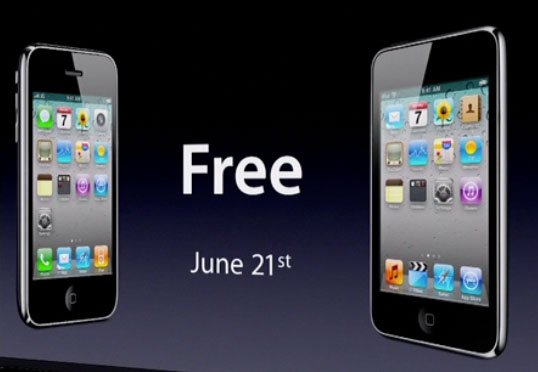
Apple has announced that iOS 4 will be coming to iPhone and iPod touch on June 21, and iPad later this fall. In a huge departure from previous years, Apple is also making it a free update to all users, iPhone and iPod touch alike. (If you have a compatible device, see directly below).
iOS 4 device compatibility
Before we begin it's important to note that not all iOS 4 features will be available for all iOS devices.
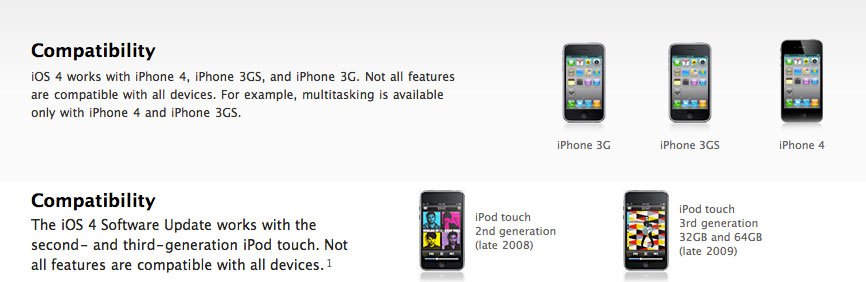
- iPhone 4 (2010): All features
- iPad (2010): Coming this fall
- iPhone 3GS and iPod touch G3 (2009): No features requiring iPhone 4-type hardware (i.e. FaceTime)
- iPhone 3G and iPod touch G2 (2008): No multitasking, custom wallpaper, and Bluetooth keyboard support.
- iPhone 2G and iPod touch G1 (2007): not compatible/no update
Yes, the original iPhone 2G and iPod touch G1 don't look to be getting iOS 4 at all -- Apple considers them outdated. Second generation iPhone 3G and iPod touch G2 are getting the update but no multitasking -- Apple doesn't consider them powerful enough (similar to video recording last year). And it should go without saying only iPhone 4 (and perhaps a forth generation iPod touch when it ships this fall) will be able to use hardware specific features like the Retina Display resolution or the front-facing camera.
Additionally, Apple's own iMovie for iPhone will only run on iPhone 4 -- apparently it needs the A4 chipset -- so there might be other apps that go 2010-only. Legacy, right?
Conclusion
Apple is again rounding out their offering with iOS 4, which is the sign of the maturity of the platform. Since they've stated several times now that they're using the iPhone to "educate" users about multitouch interfaces, they're going to continue keeping changes evolutionary for now, and the UI broadly consistent across devices. There won't be any huge, revolutionary changes again until they have to, and they don't have to yet. Restraint can be a virtue.
Some functionality is still not present, like non-interuptive notifications, widgets beyond the limited fast task switcher UI, wireless sync/sharing, less painful file round-tripping, etc. but Apple is no doubt working on this the way they worked on copy and paste and multitasking. The question is how and when, not if. After all, it's only 9 or 10 months until the iOS 5 sneak preview in spring 2011, right?
But this is not a review — our full rundown of the pros and cons will come after the official launch, when we've had a chance to spend some quality time with the final version on the new iPhone 4 hardware.
Congratulations to the iOS team at Apple, phenomenal work. Again.
[Thanks to everyone who contributed screenshots and descriptions for this walkthrough. If you noticed we missed anything, drop us a note in the comments and we'll update as needed.]

