
So you've just picked up your new Apple TV. Whether you've got the older Apple TV HD or the new Apple TV 4K (2022), it has many features and capabilities, including Siri and tvOS 16, third-party app and accessory support, Apple Music, and the TV app. Here's everything you need to know to get started.
If you want a quick guide on getting your Apple TV up and running, we've got walkthroughs for setting up your Apple TV with either your iOS device or manually.
Meet Apple TV

The Apple TV as we know it today debuted in 2015 as the fourth-generation Apple TV, now known as the Apple TV HD. It's a fairly simple streaming box, but it was the first to support tvOS, which allows you to download apps from third-party developers for use with your big-screen TV. Thicker than its predecessor, the Apple TV HD is still a comparatively small, sleek black set-top box that takes up very little space in your home theater setup.
The new Apple TV 4K (2022) retains the physical form of the Apple TV HD but adds a lot more on the inside. Chief among them is the Apple A15 bionic chip, which boosts graphics performance, video decoding, and audio processing. In addition to 4K HDR content, the Apple TV 4K now also supports High Frame Rate HDR10+ and Dolby Vision video. This means you get an insanely smooth 60 frames-per-second video. Apple works with brands like FOX Sports, NBCUniversal, Paramount+, Red Bull TV, and Canal+, which all support high frame rate HDR streaming content. (Need more info? We've got everything you need to know about the Apple TV 4K 2022 here.)
Setting up your Apple TV

Whether an Apple TV HD or Apple TV 4K, getting your new Apple TV set up can be fairly simple. tvOS provides a couple of methods to set up your new box, one that's fairly slick and painless and one that requires you to type a lot using the Siri Remote.
You can set up your Apple TV with your iPhone, which automatically drags over things like your home Wi-Fi network, iTunes, and iCloud accounts, and other essential settings. You'll still have to enter some things manually, but the most important parts of your Apple TV's setup process will be taken care of without a lot of hassle.
If you choose to manually set up your new Apple TV, you'll need to enter everything, from your iTunes account credentials to your Wi-Fi password one by one.
Siri remote
The newest Apple TV 4K comes with a completely revamped Siri Remote. This updated remote comes with an innovative clickpad control with five-way navigation, offering improved accuracy compared to the previous version. However, those who like the touch gestures don't need to worry, as they are still there too. A new circular gesture on the outer ring of the clickpad becomes a jog control, letting users have a faster and easier way to scrub through whatever they're watching.
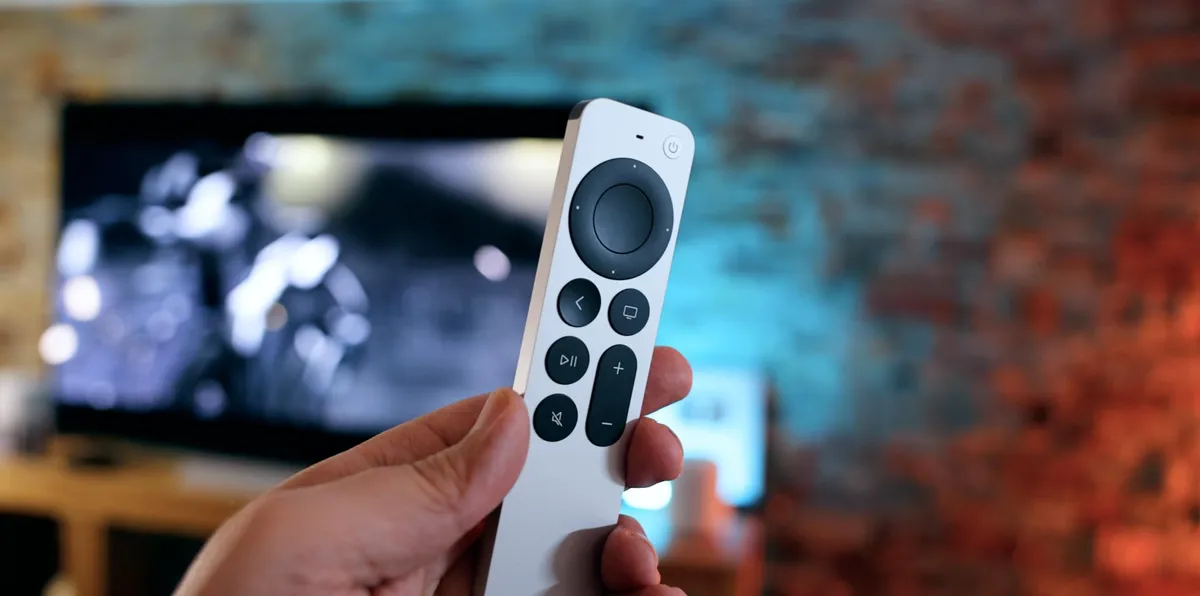
With the new Siri Remote comes a brand new design, too. It is now a one-piece aluminum design with high-contrast buttons — no more not knowing what the heck you're pressing or swiping! There is also a new power button that lets you control your entire TV set with the Siri Remote and enable mute system-wide. And don't forget that you can control all of your favorite HomeKit devices, check sports scores or the weather, and more, just by accessing Siri from the side button on the remote.
The Apple TV HD and previous-generation Apple TV 4K also come with a Siri Remote, though it's the older all-black version. The long, slim remote features Menu, TV, Play/Pause, and Volume buttons, as well as a Siri button.
The previous Siri Remote is also designed to navigate through the Apple TV's interface, keyboard, and apps. The Home button, which features an icon of a TV, can take you either directly to the TV app or to the Apple TV's app-laden Home screen. The glass trackpad at the top of the remote allows you to swipe through the Apple TV's interface and can be clicked like the trackpad on a Mac to make a selection.
Third-party controllers and accessories

If the Siri Remote isn't quite cutting it, you can augment your experience with the best Apple TV accessories.
Universal remotes, like those from Logitech or Caavo, work with the new Apple TV, as do third-party Made For iPhone (MFi) game controllers; you can also connect your favorite Bluetooth headphones, including Apple's own AirPods, to your Apple TV for a more personal listening experience — plus, Bluetooth keyboards for greater typing control.
You can simultaneously connect a maximum of two Bluetooth devices to your Apple TV at one time: This means you can either have two third-party game controllers connected or a game controller and Bluetooth headphones. These are the Apple Arcade games with controller support.
If specific apps support them, you can also connect your best iPhone, best iPad, or iPod touch to your Apple TV to use as an auxiliary controller. Outside of apps, however, there's currently no great way to control your Apple TV with your iPhone besides limited support in the company's own Remote app.
The interface

Apple TV is powered by tvOS 16, Apple's set-top version of iOS. The top row of the tvOS Home screen is called your Top Shelf: Like with your Dock on iOS, you can choose up to six apps to reside there. When selected, Top Shelf apps are also allowed to display additional preview content along the top of the screen; for example, Hulu displays a list of currently popular shows on its streaming network.
All your other apps live below the Top Shelf, arranged in rows of six. You can move an app by selecting it with the touchpad and clicking and holding; release the click and swipe to move the app up, down, or side-to-side on your Home screen. You can also collect apps into easy-to-find folders.
Meet your new Apple TV apps

By default, your Apple TV ships with the following apps:
- App Store: The Apple TV's store for third-party TV apps.
- Arcade: If you have an Apple Arcade subscription, here's where you'll find all of the Apple TV games you can play at no extra cost.
- Computers: Any iTunes music and video libraries you've added to Home Sharing will show up here.
- Fitness: Those subscribed to Apple Fitness+ will use the Fitness app on Apple TV for on-demand workout videos and on-screen stats.
- iTunes Movies: Movies from the iTunes Store, including your previously purchased or rented content.
- iTunes TV Shows: TV shows from the iTunes Store, including your previously purchased or rented content.
- Music: An app for your personal music collection and access to the entire Apple Music library, including music videos.
- Photos: An app for viewing your current iCloud Photo Library, Photo Stream, and Shared Photo Streams.
- Podcasts: Use the Podcasts app to browse episodes you haven't heard or watched, or resume episodes you haven't finished yet.
- Search: Apple TV's universal search bar.
- Settings: The place to change your Apple TV's settings.
- TV: Apple's unified TV app brings together everything you want to watch in one convenient place to watch it. Make sure to check our guide on how to use the TV app for Apple TV if you have trouble.
In addition to these stock apps, Apple TV's App Store is chock-full of third-party apps and games for your television. Though tvOS apps and iOS apps have different underlying codes, Apple is allowing developers to sell their apps in "Universal" bundles: This means that you may get the tvOS version of an app for free if you already have its iOS counterpart.
You can check to see if you have any tvOS apps available for download by going to App Store > Purchased. The App Store can definitely be overwhelming with all of the available choices, so make sure to check our list of the best Apple TV apps to help get you going!
If you want to move apps around to get your Apple TV set up to your liking, we've got a guide on how to rearrange or delete Apple TV apps that will help you out.
An Apple a day
Now that you're all set up with your new Apple TV, you can start streaming your favorite content, playing some games, working out with Apple Fitness Plus, and more.
Looking to upgrade your Apple TV? Check out the best Apple TV deals. If you want to add multiple people to your Apple TV, you can. Take a look at our how to set up multiple accounts on your Apple TV guide.
Updated November 2022: Updated for the new Apple TV 4K (2022).

